Jira Portfolio Management: The Complete Guide to Scaling Strategy and Execution
 Mykhailo Kulakov
.
Updated
.
Project Portfolio Management
.
27 mins READ
Mykhailo Kulakov
.
Updated
.
Project Portfolio Management
.
27 mins READ

Jira’s basic features perform well in managing projects, but once an organization hits certain growth goals, these functions become insufficient to accomplish strategic objectives. Projects need to be viewed and managed in the context of the program they belong to or the portfolio as a whole.
In this article, we’ll explore how Jira can be used for portfolio management, what are some options to enhance native Jira capabilities in this regard, and share several tips on implementing PPM with Jira.
Key takeaways:
- The basic Jira plan is mostly useful for project management and doesn’t provide many PPM features.
- The premium plan and its Advanced Roadmaps feature provides plenty of PPM features, but lacks resource management capabilities.
- Jira Agile has the potential to improve PPM, but may be only accessible for large organizations.
- Purpose-built PPM tools like Epicflow provide the best set of features for managing a portfolio of Jira projects.
Why Jira Portfolio Management Matters for PMOs in 2026
Let’s first take a quick detour of why Jira project portfolio management is relevant in 2026 and why PMOs might want to pursue it.
PPM is especially important in the current times of global economic downturn because most organizations cannot afford to waste efforts and funds. Through analyzing real resource constraints with PPM software and prioritizing projects by the business value they bring to the company, management can effectively do more with less.
PMOs need a reliable source of project-level data and analytical tools for processing it. Let’s take a quick look at how Jira plays a role in that.
Jira is one of the leading project management tools. It offers simple workflows fit for a wide variety of companies, even though the IT sector is among the primary users of its software. Atlassian claims Jira has over 300,000 customers worldwide, ranging from small teams to large corporations.
It’s a useful tool that’s already integrated in hundreds of thousands of workflows and that is expected to stay and evolve into a better version of itself in 2026 and beyond. This alone is a decent benefit of using Jira for PPM as due to its popularity in project management, if a company already uses it, Jira can provide the majority of data points necessary for PPM analytics.
Even if you’re starting with a clean slate and didn’t use a project management solution before, Jira is a great choice for companies that want to progress to project portfolio management because:
- Jira has team capacity metrics necessary for resource management.
- Jira’s premium plan provides a feature called Advanced Roadmaps that offers some portfolio management capabilities.
- Jira Align can present even more PPM features suited for large enterprises.
- Due to its popularity, Jira can be natively integrated with multiple add-ons and PPM tools.
However, Jira does have some constraints when it comes to PPM. We’ll look into them in the section below.
Jira Portfolio Management: Capabilities, Limits, and Reality Check
Jira is not a portfolio management tool primarily. Its main capabilities lie in time-tested project management workflows, useful for distributing team load for tasks, projects, and epics. But when it comes to a high-level view of the portfolio of projects, it can’t compare with purpose-built PPM software.
Jira has multiple features across many plans, though. Let’s take a quick look at Jira capabilities and limitations across different parts of the app.
Jira Software
The classic version of Jira most project managers have worked with provides plenty of features for managing projects day-to-day: issue and bug tracking, Kanban and Scrum boards, as well as collaboration features.
However, the native Jira app lacks most of the features essential for portfolio management. It doesn’t let you categorize projects or track company-wide resources. If you want to check project progress, you’ll have to do so individually.
It is, however, possible to get some PPM capabilities by creating custom gadgets on the Jira dashboard. These can let you track progress of multiple projects, but can be difficult to set up right, and still lack some of the key features of PPM software.
Integrating Jira with portfolio management software allows you to achieve seamless cross-project visibility.
Jira Software with add-ons
The standard Jira app can be improved with various add-ons you can get from the Atlassian Marketplace. There are around a dozen add-ons focused specifically around portfolio management.
These apps improve on the PPM features available in Jira and typically work by providing a dashboard that can:
- Show all projects and project information in one place.
- Track time spent on performing projects.
- Track Jira issues to report on project risks.
It’s a big step up from native Jira features, but still often lacks resource management features crucial for proper portfolio management. With the pricing comparable to that of entry-level PPM tools, it’s not the optimal solution.
Portfolio management software like Epicflow provides advanced analytical tools and AI-based portfolio optimization capabilities.
Jira Advanced Roadmaps
This Jira feature is available in Jira’s Premium and Jira Enterprise plans. It allows the management to create top-level planning for all or select projects and compare project progress.
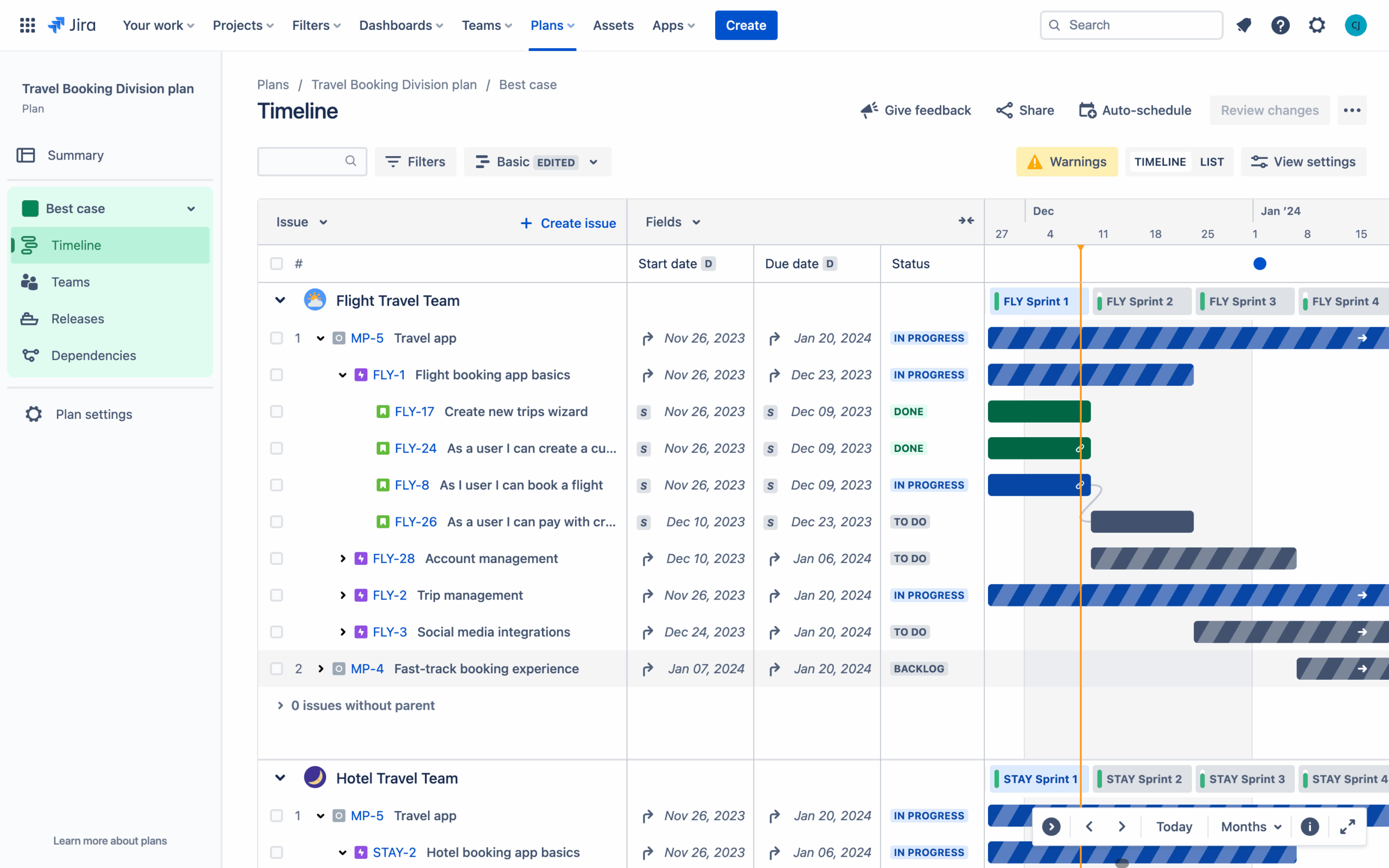
This is enough to cover basic PPM needs. This feature allows for:
- Consolidating the view of all projects in the portfolio.
- Finding and managing cross-project dependencies.
- Tracking resources through time or story points.
- Planning project portfolio scenarios.
- Sharing plans with stakeholders.
It can be a great start for PPM activities, but may lack some advanced resource capacity analytics present in purpose-built tools. The cost increase is double that of the standard Jira plan, so if you’re not already using Premium, it can be quite a large addition to monthly expenses.
Jira Align
Jira Align is a part of Atlassian’s Strategy Collection that greatly expands portfolio management capabilities and adds other strategic features.
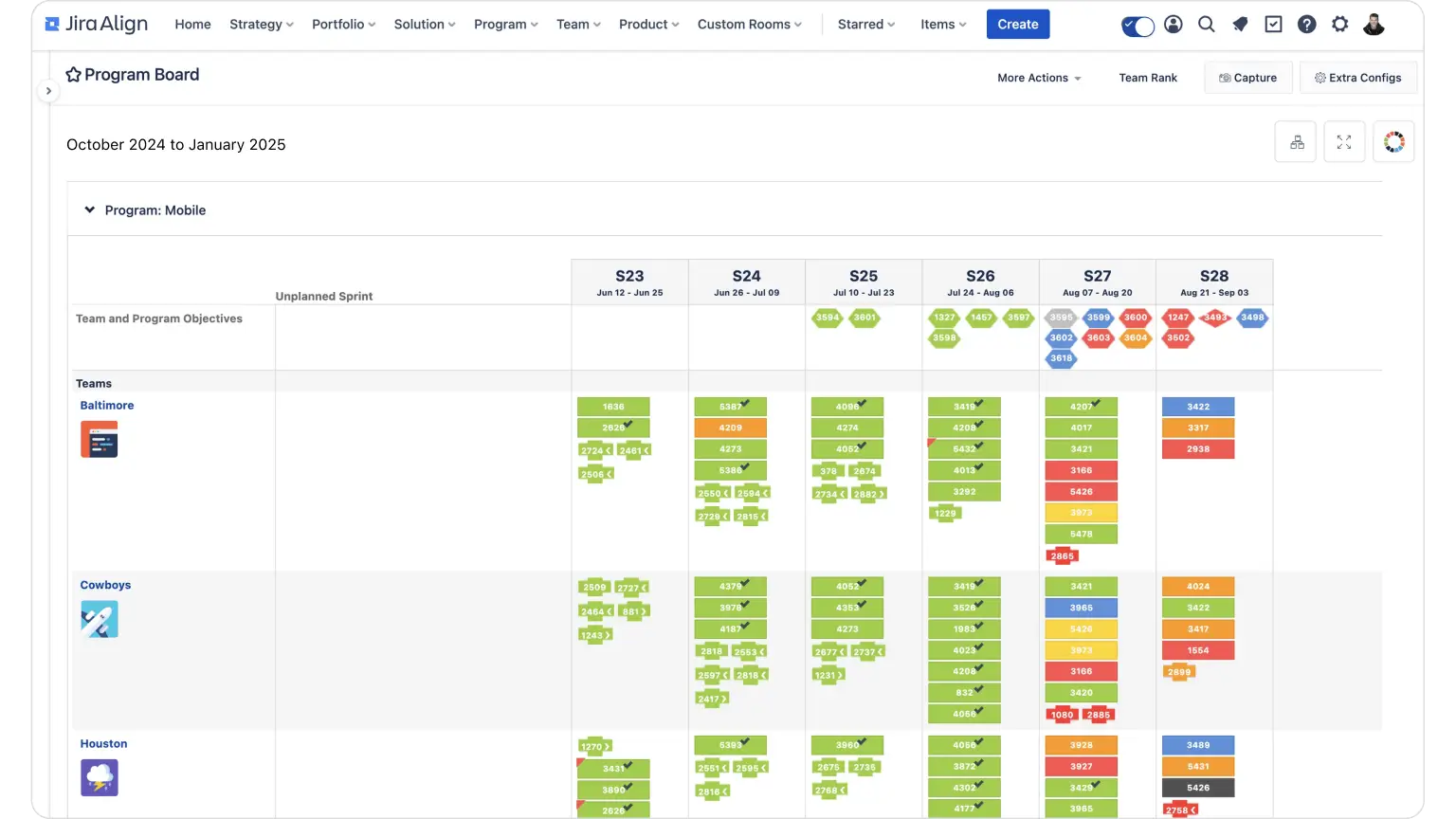
Jira Align can:
- Visualize the portfolio.
- Show the difference between investments and spending.
- Visualize project dependencies.
- Use a range of program management tools.
- Track and forecast team capacity.
The main drawback of this feature is that it is only useful for enterprise portfolio management. The Strategy Collection is marketed towards teams with over 250 members and costs $77,400 annually. That’s a sum that most medium businesses can’t handle.
Overall, it’s quite difficult to balance the PPM features you might need with Jira alone because the reasonably priced options don’t have the analytical depth and the ones that do are only suitable for large corporations.
Dedicated portfolio management tools provide scalable solutions that can be taken up as a pilot without heavy investment, and help your company grow from small through medium to large without straining financials.
How to Set Up Portfolio Management in Jira (Step-by-Step)
Now let’s take a look at how you can do portfolio management with Jira. We’ll mainly focus on basic Jira features, including those present in the Premium plan and possible with add-ons, but will also include some points on using Jira Align.
Read more: A Guide to Project Portfolio Management Process: Steps and Flows
Remove data silos
Your first step towards building a project portfolio management solution with Jira is removing data silos and centralizing data storage within the organization. If you’ve been using different tools to store additional information about your projects or resources, you need to consolidate that data in Jira to reflect the broadest view possible on your projects.
Create a Jira portfolio view
The next step is creating a unified portfolio view. It can help you judge the portfolio composition, the planned deadlines, and progress on each project at a glance.
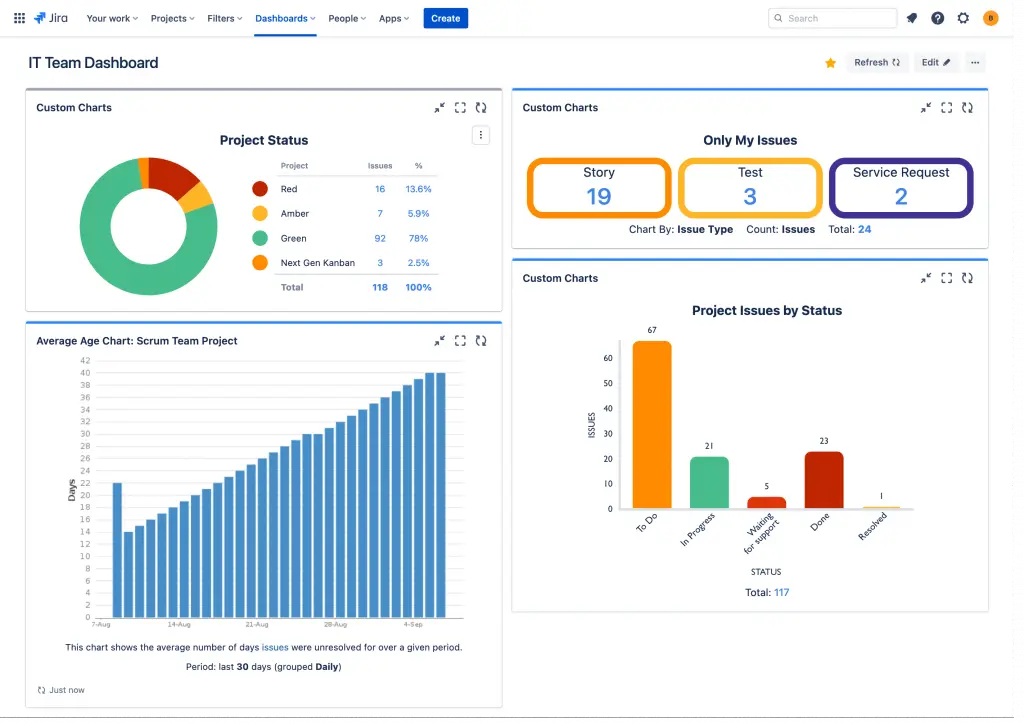
In Jira Software, you can do that via creating custom gadgets in the dashboard. You can display:
- Sprint health chart.
- Number of unresolved issues per project/epic.
- Average number of story points per sprint.
- Status of different issue types.
However, it can be difficult to place all the necessary gadgets in one place.
With Jira Advanced Roadmaps available in the Premium plan, you can do a bit more. You can create a portfolio view with a top-level planning template that can reflect project timelines, portions of team resources allocated to the project, and manage project dependencies in a Gantt chart.
Similar results can be achieved with add-ons from the Atlassian Marketplace. Apps like Structure or BigPicture can centralize the view of all of your projects in one place and present it as a Gantt chart or a timeline view. Most come with workflow automation features and options to add custom calculations.
In Jira Align, it’s possible to break down your projects into programs and present them in a program board that shows tasks broken down into sprints.
Create success metrics
The next step is adding realistic success metrics to judge your portfolio’s performance. These can include:
- Deliverables.
- Quality of deliverables.
- Budget limitations.
- Time of delivery.
Dashboards created with Advanced Roadmaps, some of Jira add-ons, and OKRs in Jira Align can be used to track the progress towards said goals.
Analyze performance
Analyzing performance of the portfolio allows you to spot potential issues, understand what’s causing them, and resolve them. Here are a few analytical solutions you can find in Jira:
- Jira Software provides Agile reports on issue velocity and Issue analysis reports on team progress among other things.
- Jira add-ons often provide an aggregated view of progress of groups of issues.
- Advanced Roadmaps shows issue progress, key dependencies, and team capacity.
- Jira Align provides a more detailed dependency breakdown, and program-level progress metrics.
You can do some resource load analysis in Jira Align by comparing planned story points against project velocity or team capacity.
Use this data to find bottlenecks and resolve them through rescheduling or resource reallocation.
Add stakeholder access
Once you have fixed the issues, share access to the dashboard with portfolio stakeholders. Jira makes that as simple as sharing a guest link if a stakeholder is someone from outside of the organization or sharing viewing rights with a person within.
Key Components of Portfolio Management in Jira
Let’s briefly discuss some key elements of portfolio management and how they can be implemented in Jira.
Categorizing Jira projects for portfolio management
Since Jira doesn’t support parent-child relationships in projects, categorization can be a good way to group similar projects together for purposes of management and reporting. To do that, you can navigate to the project settings and create or assign an existing category.
A project can only belong to one category, so it’s impossible to create high-level hierarchies with this method. Use initiatives and epics instead.
You can later use the categories in reporting by setting up custom JQL filters to display data only on the set of projects you need.
Portfolio governance and prioritization for PMOs in Jira
Prioritization is an important part of portfolio management because it lets you understand which of the projects can be postponed without hurting overall business value creation. Jira lets users assign priority to projects on a five-step scale from highest to lowest.
To assess project priority, you can either simply use the projected cash flow and margin rates or use a voting system to rank each project across multiple criteria.
Read more: How to Prioritize Projects: Methods, Criteria & Matrix (A Complete Guide)
Visualizing progress with Jira portfolio management dashboards
This is one of the easiest portfolio management tasks that can be done in Jira if you have a premium account. Add the projects you need to monitor to the Advanced Roadmap, and the dashboard will show what is the project’s due date, how much work has been done, and whether the project is at risk.
With a basic plan, you’ll need to use gadgets to visualize that. The easiest way to do that is to create a table that shows how many child issues were completed in each project or epic in percentages.
With Jira Align, you can divide your portfolio into programs and view progress of projects that belong to the same program.
Jira portfolio resource management and team capacity planning
Planning team capacity before starting a project allows you to only take on the projects that your team is capable of doing. You can access some statistics on your team’s capacity in Advanced Roadmaps and Jira Align. Jira doesn’t allow for advanced capacity planning analytics, but does provide a handy template for team capacity planning.
Grab their template, fill in the hourly resource allocation for the project you’re planning, and assess its feasibility.
Read more: Resource Management Best Practices: 7 Tips to Consider
Measuring portfolio success in Jira: metrics and PMO reporting
You can track success of your PPM efforts with metrics already present in Jira. Generally, you want to see improvements in project performance across the organization. Look at the burnup and issue progress insights to confirm that.
You should also use financials to see whether your margin rates and revenue are growing as expected.
Read more: 10 PMO KPIs: Essential Metrics to Drive Project Portfolio Performance
When Jira Alone Is Not Enough for Portfolio Management
As you have seen, Jira is not an ideal solution for portfolio management on its own. If the features provided by the standard and premium Jira plans are not enough for your purposes, you have two major choices: using a PMO add-on or investing in a purpose-built PPM tool.
Let’s briefly go through the benefits of using either of these approaches.
Jira PMO Atlassian Marketplace products
There are plenty of portfolio management tools on the Atlassian Marketplace. The most notable names include:
- Structure.
- BigPicture.
- ProScheduler.
- Projectrack.
These tools introduce some program and portfolio management capabilities in Jira. For instance, the one below provides an overview of all projects in a portfolio and highlights their level of risk of not being delivered on time.
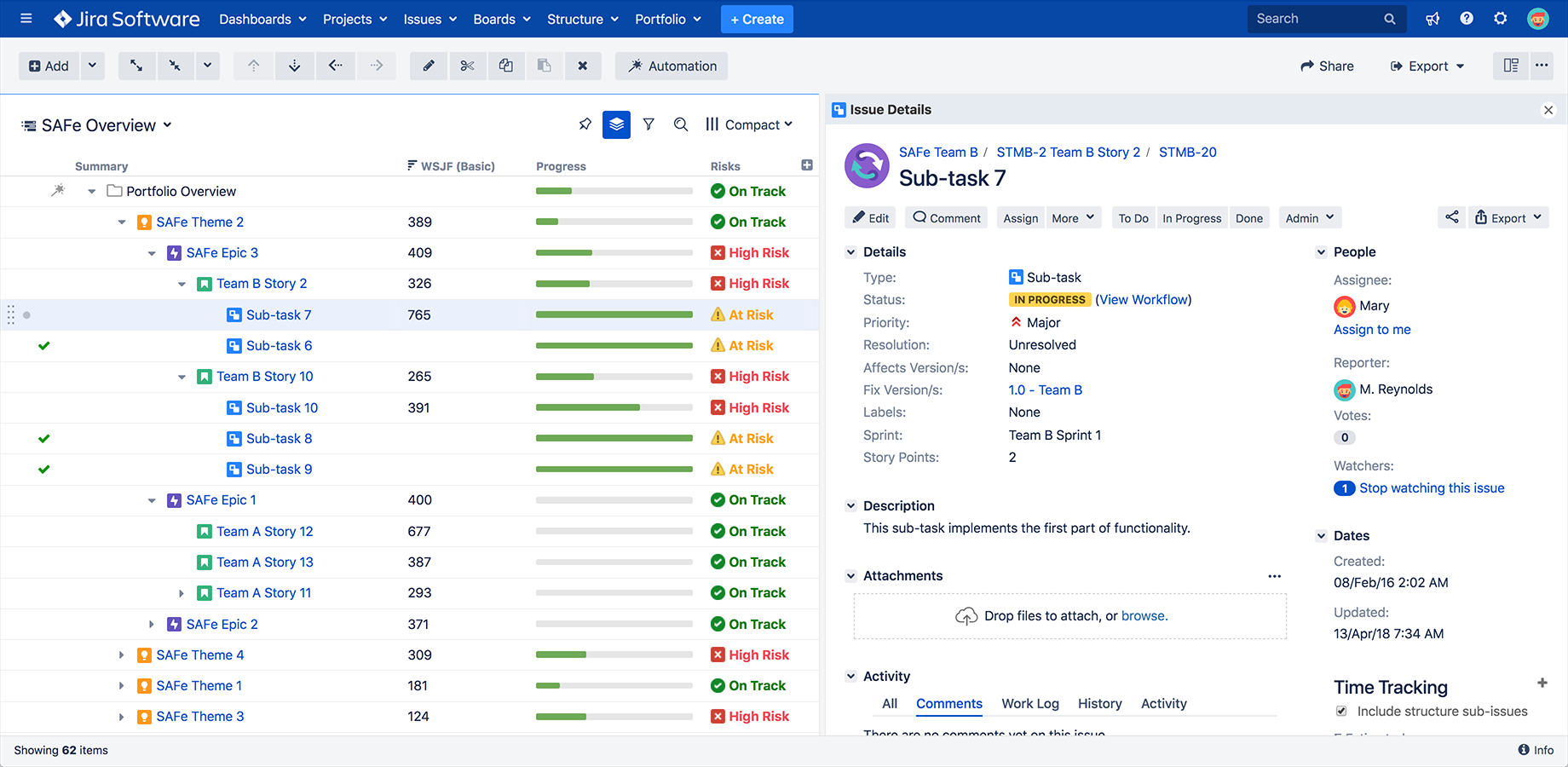
The major drawback of using tools like these is that in most cases, they lack advanced resource load analytics. Analyzing resource capacity and load is one of the core tasks of the PPM methodology and one that can produce the most benefits to the company using it. So if you want to maximize the benefits of implementing PPM, you might want to look into taking up a specialized PMO tool.
Integration with PMO tools
A PMO tool like Epicflow can help your company’s leadership team create a bird’s eye view of the portfolio and analyze it to improve overall company productivity. It can do all the things Jira Premium and add-ons can:
- Visualize the portfolio in a timeline view or a Gantt chart.
- Display the tasks within the project.
- Display project priority.
- Display budget allocated to the project.
- Display project progress and highlight projects that are a risk of not meeting their targets.
- Provide scenario planning tools.
On top of those features, it also has powerful resource management capabilities:
- Displaying the resources your company has.
- Showing the skill levels of the resources and comparing them to skill requirements of the project.
- Analyzing organizational, team, and individual resource capacity.
- Predicting resource load based on the project roadmap.
- Finding resource overloads and bottlenecks caused by them.
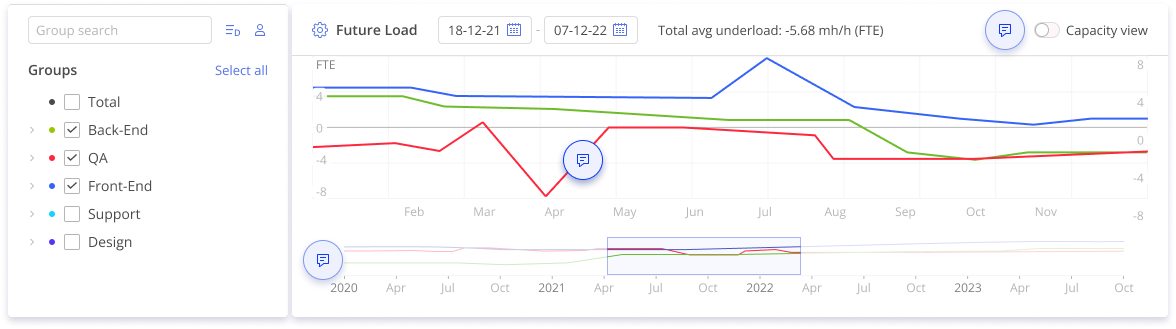
The two key analytical features that make Epicflow stand out are the future load graph and Epicflow Portfolio Optimizer.
The Future Load Graph compares organizational, team, or individual resource capacity with the existing load of work assigned to them. If you see that their monthly capacity is at 160 hours but they’re assigned tasks that amount to 200 hours, that’s an overload. It causes gaps in productivity and delays in project delivery. If they’re assigned 120 hours, this means you can assign them more work.
This feature allows your organization to view how resource interactions and allocation decisions affect future resource load, how they create bottlenecks, and disrupt productivity. Using it to the full of its potential lets managers normalize resource load, eliminate bottlenecks, and increase company productivity.
Portfolio Optimizer is an AI-driven tool that can analyze your company’s portfolio and weigh real resource capacity against the business value assessment of projects. The result of the analysis is an optimal portfolio composition that maximizes business value production at the current resource capacity and helps businesses avoid human error in portfolio management.
By providing in-depth analytical capabilities and metrics like drag cost and DIPP, Epicflow helps organizations shift their portfolio management approach from simple workload management to analyzing and maximizing value per constrained hour.
Epicflow integrates with Jira natively. You can automatically import all relevant Jira projects and information about them. Jira-specific values like story points will be converted into Epicflow metrics.
The project managers and team members at your organization can continue using Jira without having to adopt anything new in their workflows, while the higher management can use Epicflow as an analytical portfolio management solution.
Book a call with the Epicflow team representative to learn more about how this tool can improve your portfolio management in Jira.
Conclusion
Jira is a great project management tool, but when it comes to managing a portfolio, its features are far from ideal. The basic app makes monitoring multiple projects rather difficult as it requires setting up custom gadgets. The premium version allows much more flexibility when it comes to PPM, but may lack advanced resource planning tools. Jira Agile can be inaccessible to most organizations.
The best choice for companies that want to implement portfolio management is adopting a purpose-built PPM tool like Epicflow that can natively integrate with Jira.
Frequently Asked Questions
Why should organizations use Jira Portfolio for managing multiple projects?
Managing multiple projects can be difficult because of interdependencies between them, both in terms of one project requiring another being finished for its success and in terms of having to share company resources to ensure timely execution of all projects. Software like Jira Portfolio, now integrated in Jira Advanced Roadmaps, can help visualize the portfolio as a whole, highlight the dependencies, and help resolve them.
How do Jira Advanced Roadmaps support portfolio management for PMOs?
Jira Advanced Roadmaps helps portfolio management by providing portfolio visualisation, highlighting projects that are at risk of not meeting their goals, and doing scenario planning.
What are the key benefits of implementing project portfolio management (PPM) in Jira?
The main benefit of implementing PPM in any organization is increasing business value with the existing resources and improving financial performance as a result. Using Jira for PPM allows for easier implementation as most of the project data is already present on this platform. This lets the project managers proceed with a familiar tool while higher management can receive strategic insights into portfolio performance.
How do you set up project portfolio management (PPM) in Jira?
To implement PPM with Jira, your organization needs to either upgrade to the premium plan to use the Advanced Roadmaps feature, use a PPM add-on, or use a PPM tool that can integrate with Jira.
When should PMOs use third-party portfolio management tools with Jira?
That decision can help you get more insights into your Jira portfolio performance than simply using Jira Advanced Roadmaps, especially in the area of resource management. It’s best to adopt a purpose-built tool early on to get accustomed to its UI and features rather than relearn using native Jira features.
Does Jira have portfolio management?
Jira does have some portfolio management capabilities in the premium plan. They work well for project visualization and scenario planning, but may not provide enough resource management capabilities. Use add-ons or third-party apps that can be integrated with Jira to access those.
What is the difference between Jira Software and Jira Portfolio?
Jira Software is mostly a project management tool, and Portfolio for Jira, now replaced by Jira Advanced Roadmap available with the premium plan, provides cross-project visibility and some performance analytics features.
What is the best software for portfolio management?
The best software for portfolio management in this case is one that provides more analytical features in the area of resource management than Jira does and integrates with Jira natively. Epicflow fits this description.