Understanding AI Capacity Planning: An Indispensable Tool for Resource Efficiency in Multi-Project Environments
 Victoria Sokolova
.
Updated
.
Resource Management
.
22 mins READ
Victoria Sokolova
.
Updated
.
Resource Management
.
22 mins READ
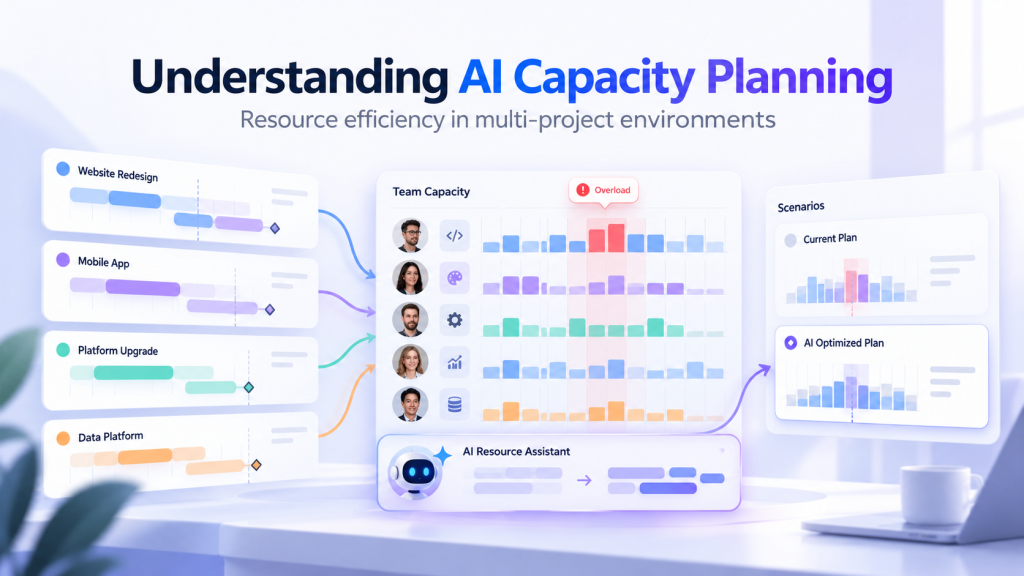
Projects grow more complex and share more specialists. AI in project management helps manage that, and AI capacity planning is one of its most practical uses.
AI capacity planning uses artificial intelligence to help forecast resource demand, compare it with available capacity, and evaluate ways to close gaps. In a multi-project environment, this means understanding whether people with the required skills can deliver the planned work, and what needs to change if they cannot.
AI now plays two roles here. It helps forecast the gap, and it can cover part of it. This article covers both: how the planning works, what data it needs, how to include AI agents in the plan, and where the limits are.
Key Takeaways:
- AI capacity planning forecasts demand by skill and week, compares it with the capacity people actually have, and helps you test ways to close the gaps.
- A capacity gap belongs to one skill in one week. Spare hours in another role do not close it.
- Forecasts and scenarios are only as good as the workload, skills and availability data behind them. A manager still makes the decision.
- AI can also add capacity. An AI agent counts for the specialist hours it gives back after review, not for the hours it works.
What Is AI Capacity Planning?
Capacity planning in project portfolio management is the process of determining the demand for resources across projects and matching it with available capacity. For example, if an important project joins the pipeline and the people it needs are already busy, you may bring in a contractor, move a less urgent project, or say "not yet". If you manage one or two projects, planning capacity isn't a big challenge. AI-driven capacity planning matters when dozens of projects draw on the same specialists.
Here, capacity means people and their skills, not computing or machine capacity. It is also narrower than AI workforce capacity planning for HR: it works at the level of skills, tasks and weeks.
First, recall the components of effective resource capacity planning:
- Forecasting resource demand;
- Knowing the available capacity of each person and skill, after leave and other commitments;
- Comparing both and identifying resource gaps;
- Deciding how to close the gap between resource demand and available supply.
In complex multi-project environments, keeping all of this current by hand gets harder as the portfolio grows, especially demand forecasting and informed decision-making. This is where artificial intelligence helps.
How AI capacity planning works
Most AI capacity planning software follows the same five steps:
- Bring demand and availability into one view: projects with effort, dates and dependencies, next to people's skills, calendars, leave and existing commitments.
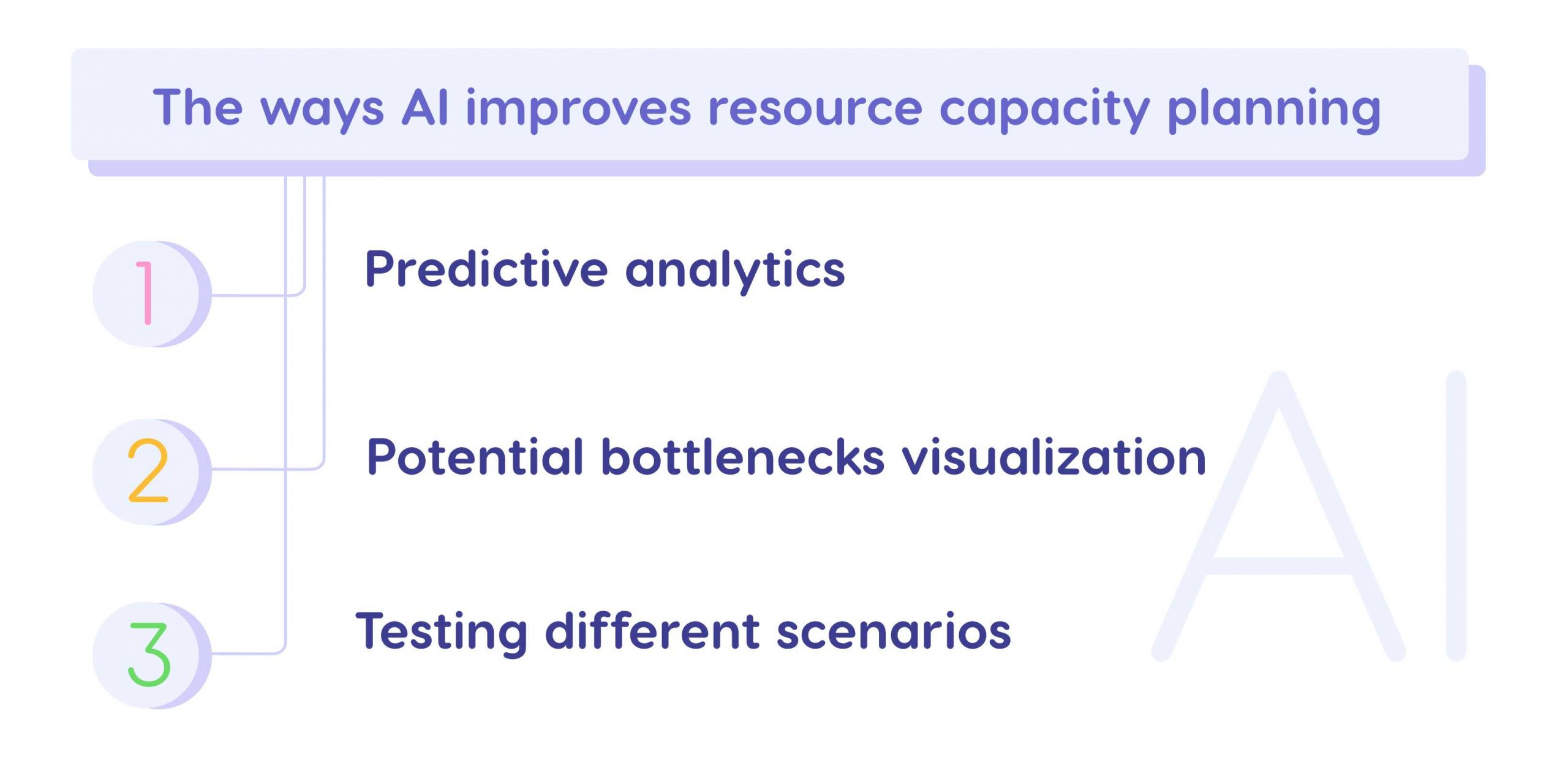
- Forecast workload by skill and week. Predictive analytics estimates how much of each skill every period will need. This resource capacity forecasting is also called predictive capacity planning. Historical data improves the estimates where it exists.
- Find the gaps and bottlenecks: not total headcount, but the specific role that is short, and when. Spare capacity in another department does not cover it.
- Compare responses: reassign work to a qualified person, change the order or dates of work, or add qualified capacity, such as a contractor, a hire or an AI agent. Here capacity planning with AI pays off, because you can test capacity scenarios before committing anyone.
- Decide, then update. A manager chooses the response, and new estimates and availability change the forecast.
These steps use different techniques. A workload forecast, a schedule built on finite capacity, a what-if simulation and a chat assistant are four different things, and only some of them learn from data. AI flags, forecasts and recommends. It should not assign people on its own.
Now that you understand how AI for capacity planning works, let's look at what it changes.
The Benefits of AI Capacity Planning
The main advantage of AI for capacity planning is a forecast that stays current and options that are faster to compare.
Increased accuracy of forecasting
With many projects, forecasting demand by hand is slow, and the forecast goes stale as soon as a date moves. AI-supported tools can recalculate forecasts as inputs change, but forecast quality still depends on the underlying data, assumptions and planning horizon. The gain is a forecast that stays current and shows demand by skill and week, so managers can spot where it disagrees with what they know.
Proactive decision-making
If you want to take on one more project, you need to know whether the people it needs can handle the extra work. With scenario analysis, you add the project to a simulated copy of the plan and see how the workload changes before anyone commits. Scenario analysis helps managers compare alternatives, validate assumptions and choose a response to a capacity gap. Managers still set the assumptions and make them explicit.
Reduced risk of bottlenecks
It may seem that the more work people take on, the faster projects will finish. In practice, overloaded specialists become bottlenecks. They make mistakes that need rework, deliver late and hold up the colleagues who wait for them. AI-powered capacity planning shows where future bottlenecks are likely to form, which gives managers time to act. The forecast does not remove the bottleneck; the action does.
Effective resource utilization
Using capacity well does not mean loading every person to 100%. It means balanced workloads, people on the projects that need their skills, and fewer surprise shortages. AI workload balancing helps by showing where work can move to a qualified person who has time. Better visibility can help distinguish work that can be resequenced or reassigned from demand that genuinely requires additional capacity.
Challenges of Capacity Planning Without AI
Let's now compare these benefits with the challenges of capacity planning done manually, in disconnected spreadsheets.
Too much data to analyze
To plan capacity, you need data on each person's capacity, availability and skills. With hundreds or thousands of people, keeping it current takes much of a planner's time. Errors creep in. As shared-resource portfolios grow, disconnected spreadsheets and manual updates become harder to maintain consistently.
Low accuracy of prediction
Nobody can predict every future event, with or without AI. What changes is how often the forecast is refreshed. A forecast built once a quarter goes stale fast when dozens of projects share the same people. Well-kept spreadsheets and statistical models can still be useful, and an AI forecast faces the same risks: wrong effort estimates, missing leave records and unclear priorities.
Unexpected resource shortages
Inaccurate capacity planning can lead to unexpected resource shortages. The usual consequences are overloaded people or unplanned hiring, and both lead to project delays and budget overruns.
Potential risk of resource overload
Unexpected shortages lead to overload, which deserves a separate mention because of its impact on project flow. When a project lacks the people it needs, it may seem a good idea to spread its tasks among existing employees. Instead of solving the problem, this lowers productivity and creates new bottlenecks.
What Data Does AI Capacity Planning Need?
A forecast is only as good as its inputs. The table shows what you need, why, and who usually keeps it current.
|
Data |
Why it is needed |
Who keeps it current |
|---|---|---|
|
Projects, milestones, effort and dependencies |
Ties work to time periods and sequence |
Project or delivery owner |
|
People, roles and required skills |
Keeps different skills from being treated as interchangeable |
Resource or engineering manager |
|
Working calendars, leave and existing commitments |
Shows available capacity, not nominal capacity |
Resource owner or HR system |
|
Priorities and planned project starts |
Separates committed work from possible future load |
PMO or portfolio owner |
|
Historical estimates and actuals, where available |
Tests assumptions and forecast quality |
PMO or analytics owner |
|
Financial inputs, only for economic comparisons |
Compares the cost and consequences of scenarios |
Finance or contract owner |
A basic capacity forecast does not need financial data. Start with a limited set of projects and the fields you trust, check the forecast against what actually happens, then widen the scope.
AI Capacity Planning Example: Can We Take On Another Project?
Here is the arithmetic behind a typical capacity question. The figures are illustrative, not a customer result. All hours belong to one skill, validation engineering, in one working week.
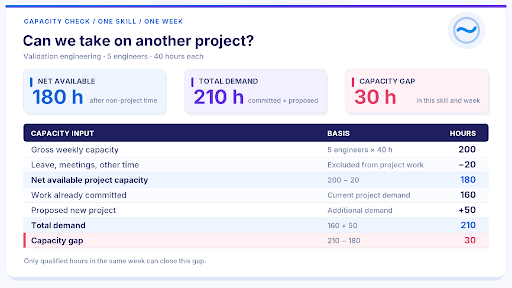
After leave and other non-project time, the five engineers have 180 hours for project work. Existing and proposed projects need 210. The team faces a 30-hour gap, and a designer with 40 free hours that week does not help.
A capacity gap belongs to one skill in one week, and hours freed anywhere else, by people or by AI, do not close it.
The PMO can compare two responses. Option A moves 30 hours of lower-priority work that can wait outside the week. Option B adds 30 hours of qualified contractor capacity, if a contractor can be onboarded and given access in time. Each option still needs a check of dependencies, availability and delivery consequences.
Which option is better is a money question: what the deferred work loses per week of delay, against what the contractor costs. Cost of delay puts a number on the first half.
The arithmetic establishes the gap. AI-powered capacity planning finds similar conflicts across the portfolio and compares responses as inputs change. The example does not predict a completion date.
How to Include AI Agents in Capacity Planning
The validation team has a third option: give part of its work to an AI agent. Many teams already use AI this way and notice the same thing. Everyone is faster, and nothing finishes sooner. The capacity plan shows why: an agent adds capacity only when it frees hours of the skill that is short, in the week it is short.
Say first-pass test reports take 40 of the team's 210 hours that week. An AI agent can draft them. Someone still has to prepare the inputs and check each draft, and who does that decides how much capacity the agent adds. The figures are illustrative.
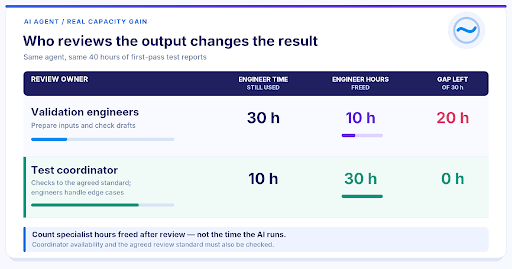
Same agent, same reports, a different gap. When the engineers check every draft, three quarters of the report work stays with them. When a test coordinator checks the drafts against an agreed standard, and the engineers keep only the edge cases, the gap closes. That works only if the coordinator has those hours in the same week, and only where a standard lets someone other than the expert judge the output. Where it does not, start with different work.
For the capacity plan, this means:
- Count the specialist hours the agent gives back after review, not the hours it works.
- Put the review time in the plan, on whoever does it. Review is load.
- Check the timing. Hours freed in a week when the team is not short move no delivery date.
Then plan the agent like any other resource: an AI resource with capacity, a rate, dates, assigned work and a named person who signs off its output. Test the change in a scenario first, and judge the agent by the delivery dates it moved, not by how busy it was.
Which work to give to AI in the first place is a separate decision. Cost of delay for AI workflows shows how to rank candidates by what their wait costs.
AI Capacity Planning with Epicflow
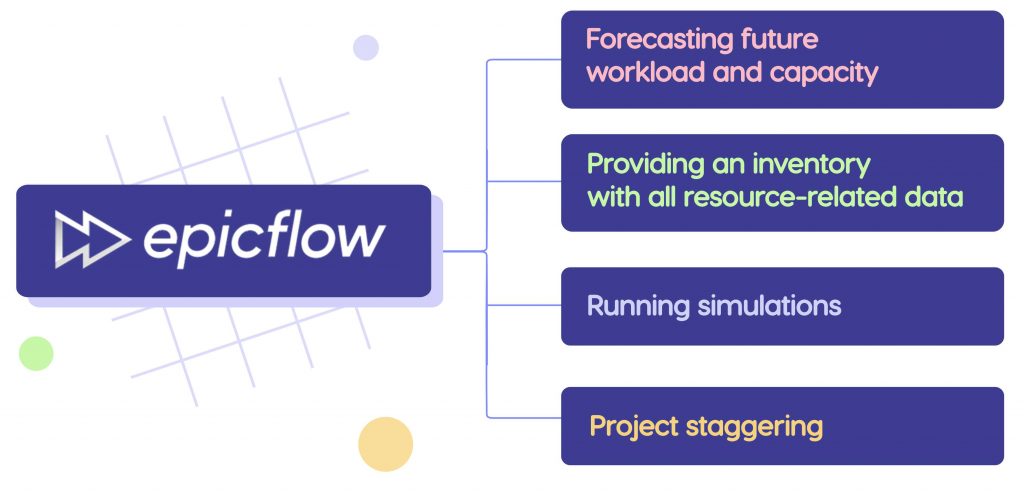
Let's take Epicflow as an example. It is AI-powered capacity planning software for multi-project environments where projects share a limited pool of people. Its focus is the bottleneck: the group every project needs at the same time.
- Forecasting future workload and capacity. The Future Load Graph, Epicflow's capacity planning software, forecasts the load of people and groups from historical data, active projects and projects added to the Pipeline. Load Analysis lists the tasks and projects behind an overload, and inactive project analysis shows the load of projects you have not started yet.
- Resource data and skills. Epicflow keeps each person's competences and matches them to what a task requires, so you can find a qualified person with time available.
- Scenario modeling. What-If Analysis tests a new project, a moved milestone or a contractor on an isolated copy of the whole portfolio. Nothing in the live plan changes until you carry the chosen changes over. What-If Analysis is part of the Enterprise plan.
- Project Staggering. It sequences project starts against the availability of the team that limits them, so fewer projects start at once and more finish on time.
- Capacity-based portfolio optimization. Epicflow Portfolio Optimizer ranks work by what each project returns for every hour it takes from the bottleneck team. Our AI searches millions of combinations within your limits. Our team runs it on your own instance, as PMO as a Service, and nothing in the live plan changes without your sign-off.
- AI agents as a resource. An AI resource joins the resource pool with capacity, a rate and dates, so it is planned against the queue it is meant to clear. It runs on the agent platform you already use, or on EpicStaff, the governed operating layer for AI agents, which is included with Epicflow.
To compare other options, see our overview of capacity planning tools. To see this on your own data, contact us: send us your project list, and we build a model of your own portfolio.
Limitations of AI Capacity Planning
AI capacity planning does not remove uncertainty. Missing leave records, optimistic effort estimates, outdated skills data or a sudden change in priorities can make a forecast misleading. A useful model should make its assumptions visible and allow managers to test alternatives before committing resources. Compare forecast demand with actual outcomes by role and time period, review recurring errors, and update the inputs. Recalculating a plan is not the same as a model learning from results, and neither guarantees an accurate prediction of every disruption.
Watch averages too. A portfolio with healthy average utilization can still hide one overloaded group that every project waits for. Recommendations support the decision; the resource or portfolio manager still owns it.
Final Words
AI-powered capacity planning helps you see a gap earlier, by skill and by week, and compare ways to close it before you commit people. It is only as good as its data, and a manager still makes the call. AI is also becoming part of the capacity itself: plan an agent like a person on the team, and judge it by the delivery dates it moves. For the wider picture, see our guide to portfolio resource management.
Frequently Asked Questions
How to use AI for capacity planning?
Bring project demand and people's skills and availability into one plan. Let AI forecast workload by skill and week, find the gaps and bottlenecks, and compare responses in scenarios: reassign, resequence or add capacity. A manager picks one, and the forecast updates as inputs change.
Can you do capacity planning in Excel?
Yes, for a limited and fairly stable plan. It gets harder as projects share more people, dependencies multiply and dates change every week, because every update is made by hand. Many teams start in Excel and move to capacity planning with AI when keeping the sheet current takes longer than the decisions it supports.
What are the benefits of AI-driven capacity planning?
Earlier sight of shortages and bottlenecks, forecasts that stay current as plans change, and faster comparison of options before you commit people. The effect depends on the data and on the actions managers take.
What are AI capacity planning data requirements?
Work demand (projects, effort, dates and dependencies), people's skills, calendars and leave, existing commitments, and priorities. Historical actuals improve forecasts where available. Financial data is needed only to compare options in money. See the data table above.
How accurate is AI capacity planning?
There is no universal accuracy rate. Forecast quality depends on the completeness of workload, skills and availability data, the planning horizon, and how quickly conditions change. Compare forecasts with actual demand for the same roles and periods, and test whether the system improves on your current planning baseline.
How is capacity planning different from resource allocation?
Capacity planning asks whether you will have enough of the right skills in a future period. Resource allocation decides who does a specific piece of work, and resource planning covers both. A capacity gap is often closed by reallocating work, which resource allocation software supports by matching tasks to competences.
Can AI agents be part of capacity planning?
Yes. Plan an AI agent like any other resource: with capacity, a rate, dates, assigned work and a person who signs off its output. Count only the specialist hours it gives back after review, in the weeks that skill is short, not the hours the agent works.