Jira Capacity Planning: Uses, Limitations & Best Practices
 Mykhailo Kulakov
.
Published
.
Resource Management
.
23 mins READ
Mykhailo Kulakov
.
Published
.
Resource Management
.
23 mins READ

Capacity planning is a high-level resource management technique that can improve resource utilization and planning capabilities across multiple projects and help it achieve more with less resources. Since Jira is one of the most widely used project management platforms that already has some resource-oriented capabilities, many organizations consider it as a potential capacity planning solution.
But how well can Jira support capacity planning?
This guide will explore Jira capabilities and limitations in terms of capacity planning and suggest ways of dealing with its shortcomings.
Key takeaways:
- Capacity planning is a strategic resource management process aimed at determining and managing resource demands across the portfolio.
- Jira does have some support for capacity planning capabilities, especially when it comes to Jira Advanced Roadmaps and Jira Align.
- Jira is limited in its usefulness as a capacity planning tool — base Jira software and Jira Advanced Roadmaps lack advanced capacity planning features and cross-project visibility, while Jira Align lacks flexibility and scalability.
- The limitations of Jira’s capacity planning capabilities suggest most organizations who want to reach high capacity planning maturity should pursue integrating Jira with a plugin or capacity planning software.
What Is Capacity Planning?
Capacity planning is a strategic resource management process aimed at determining the resource demands of the current and planned projects in the portfolio and the resource capacity the organization has to meet that demand. It can be applied to both work tools and personnel.
The capacity planning process includes:
- Forecasting resource demand.
- Analyzing available resource capacity.
- Measuring the gap between the two.
- Taking calculated measures to close it.
The goal of capacity planning is to ensure that the organization can meet resource demands of the portfolio it operates without overstraining the resource capacity.
Benefits of Capacity Planning
Introducing capacity planning to an organization allows it to:
- Improve resource capacity visibility. Highlight discrepancies between resource demand and supply to facilitate and speed up making strategic decisions.
- Plan resource utilization. Forecast and accommodate future resource demands with accuracy to avoid uncertainties.
- Optimize resource costs. Decrease waste in resource cost by reducing work delays, wait time, and focusing resources on projects and tasks that move the portfolio forward.
- Resolve bottlenecks proactively. Find and resolve capacity overload in resource groups before it has the chance of disrupting portfolio performance.
- Increase value per constrained hours. Improve resource ROI by allocating resources to projects and tasks that produce the most business value.
- Increase throughput without headcount increase. Create more with less by reducing overload and delays and consolidating efforts on high-value projects.
Is Jira a Good Choice for Capacity Planning?
Jira is a well renowned project management tool, but can it provide enough capacity planning opportunities? Let’s explore Jira capacity planning capabilities and limitations below.
There are three major software packages in Jira that allow for capacity tracking:
- Base Jira software.
- Jira Advanced Roadmaps available in Jira Premium.
- Jira Align, an enterprise-grade package.
We’ll explore all three briefly.
Jira Capacity Planning Capabilities
The base Jira software allows users to set time duration estimates, use capacity-to-estimate ratio to ensure no resource is overbooked, and use the burnup chart to track capacity. Some visualization and reporting is available through custom widgets in dashboards.
Smaller teams that already use the platform can use the capabilities for resource capacity planning in Jira for very basic capacity planning, even though they lack the complexity proper capacity and resource planning requires.
Jira Plans, previously known as Jira Advanced Roadmaps, allows more opportunities for capacity management. It can measure team velocity, a metric that shows how many story points a team can finish in a sprint, providing a way to plan capacity. It also provides a way to visualize cross-team capacity and monitor it for overload as well as providing scenario modelling capabilities.
Jira Plans is a better choice for small or medium sized organizations as it provides a more comprehensive view of an organization’s capacity and more ways of analyzing it.
Jira Align is an enterprise-grade solution fit for managing capacity at the level of programs and portfolios. It allows users access to all of the features described in the two Jira versions above as well as tracking non-billable time and performing advanced capacity calculations for Program Increments. It also supports cross-project visibility better and offers capacity forecasting capabilities.
Jira Align is a good choice for enterprises as its advanced analytical capabilities require a heavy level of investment.
Jira Capacity Planning Limitations
When it comes to base Jira software, its limitations include:
- Incomplete capacity data availability.
- Cumbersome and incomplete capacity visualization options.
- Lack of simulation analysis.
Jira Advanced Roadmaps is a much better solution, but it lacks:
- Cross-project visibility.
- Individual capacity tracking.
- Competence management.
- Time-off tracking.
Jira Align can be a great solution for enterprises, but is somewhat lacking in areas of:
- Individual time tracking.
- Flexibility of capacity tracking.
- Scalability as a tool due to high upfront cost.
Overall, Jira can be used for capacity planning in smaller organizations, but doesn’t provide enough features to be used effectively as a capacity management tool. It requires integration with purpose-built software.
Using Jira in conjunction with a capacity planning tool like Epicflow allows you to achieve seamless cross-project visibility and improve your decision making.
How to Enhance Jira for Capacity Planning
The limitations above are the reason most companies using Jira opt for enhancing its capacity planning capabilities with a third-party tool, either with a plugin available on the Atlassian marketplace or with a specialized capacity planning tool.
Below, we’ll briefly explore the pros and cons of using the two solutions.
| Plugin | Capacity planning software | |
|---|---|---|
| Capacity planning features | Medium | Advanced |
| Jira integration | Native | Varies |
| Scalability | Medium | High |
| Best for | Small to medium companies starting out in capacity planning. | Mid to large-sized companies with the need for advanced capacity planning and scalability. |
Jira Capacity Planning Plugins
Jira capacity resource planning plugins are extensions that can be purchased on the Atlassian marketplace. Tools in categories of resource management and portfolio management typically will provide some capacity planning features. Here is a comparison of their pros and cons.
Pros:
- Native Jira integration facilitates quick setup.
- Pricing lower than that of a typical enterprise capacity planning tool.
- Improved visibility compared to Jira’s built-in capabilities.
- Teams already working with Jira will have an easier time adopting the plugins.
Cons:
- Limited scalability in more complex multi-project environments.
- Restricted support for advanced features such as capacity simulations or portfolio optimization.
- Functionality constrained by Jira’s underlying data model.
- Often focused on team management, not organization-wide planning.
Capacity Planning Software with Jira Integration
Specialized capacity planning software are third-party tools built for managing resource capacity across multiple projects, teams, and portfolios. Since Jira is one of the most widespread work management environments, many of these tools can be integrated with Jira either natively or with the help of API.
Pros:
- Advanced cross-project capacity planning features.
- Capacity forecasting capabilities
- Detailed cross-project visibility into workload and bottlenecks.
- Scenario modeling for evaluating capacity planning decisions
- Optimized resource allocation across multiple projects
Cons:
- Pricing may be higher than that of Jira plugins.
- Some tools require difficult implementation due to lack of native Jira integration.
- The learning curve may be steeper due to the complexity of the tools.
Overall, plugins are a good fit for smaller organizations that don’t deal with that many projects at the same time. For companies that deal with more complex project portfolio environments or want a scalable solution, integration with a specialized tool is the best option.
How to Do Capacity Planning in Jira with Epicflow
Capacity planning with Jira can be done in a most effective way by integrating it with a capacity planning tool. Let’s explore how to do capacity planning using one such tool, Epicflow. It is project portfolio management software that has a native Jira integration and supports resource capacity planning in complex enterprise environments.
Connect Jira to Epicflow
The first step in this process is to connect Jira to Epicflow. In Epicflow, Jira is integrated natively, which saves organizations time and resources that could have been spent on manual integration.
All you have to do is to connect your Jira account in the admin panel. Then, select which projects you need to import.
It’s best to import the portfolio as a whole to receive full information on all projects affecting capacity. In some cases, for instance, when you only need to manage a few programs, or in pilot applications, you can import all projects relevant to the resources you’re managing.
Analyze Resource Load
Once the data on resource capacity is available, analyze the resource load using the Historical Load Graph. This analytical tool shows the relation between resource capacity and current load.
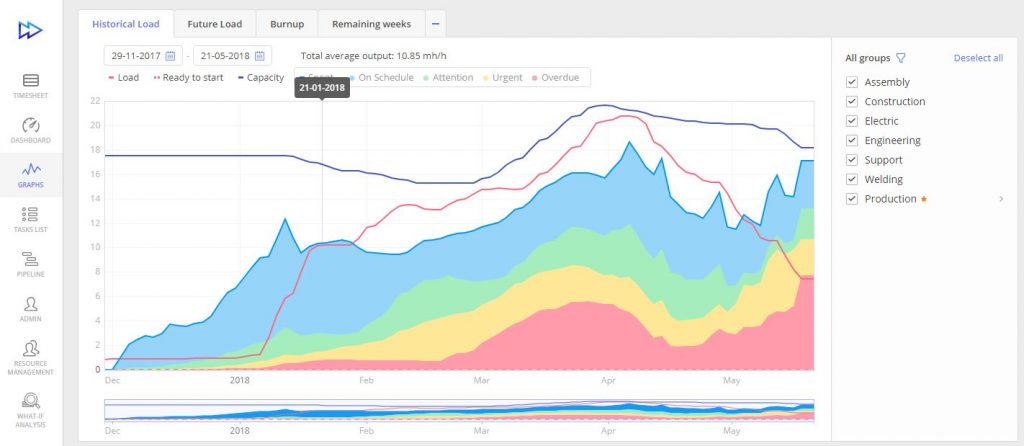
If the load graph shows that resource demand is higher than the capacity, this signals resource overload, which with time will lead to loss of productivity and throughput. If the load is significantly lower than the capacity, it signals underload which leads to loss of revenue because the team could be doing more.
Ideally, you want to see the load graph at 80-90% capacity, which leaves a buffer to account for unpredictable events like equipment malfunction or sick leaves.
In most companies that are starting to implement capacity planning software, the load graph will show several inefficiencies. This provides an opportunity to locate exactly what resource groups and projects are stopping progress and fix them to increase throughput.
Prioritize Work Across Jira Projects
Intelligent, data-based capacity planning requires prioritizing projects based on their urgency and value they bring to the company. This is typically done by going through the following steps:
- Develop criteria across which you will rank each project.
- Develop a ranking scale for each criteria.
- Go through each project ranking them for each criteria.
Upload that data into Epicflow, and you will be able to visualize project priority when making capacity planning decisions. This data can also be used for automatic resource allocation.
Prioritization is essential for focusing company efforts on projects that bring the most benefits to the organization, whether it be financial gain or strategic benefits.
Predict Resource Capacity
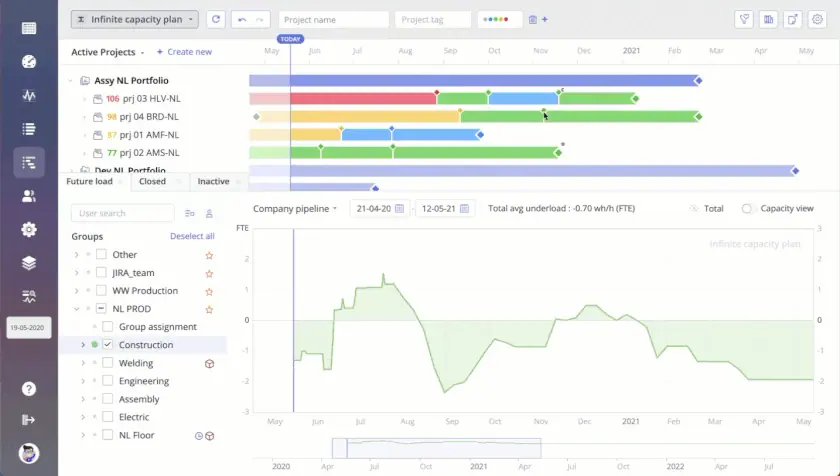
The next step in capacity planning is predicting future capacity. Based on data on company or team capacity and estimates of the projects planned for the following period of time, the Future Load Graph will provide an estimate of how your company’s capacity is going to look.
This information gives you the ability to predict capacity shortages before they have the chance of interfering with future productivity. Rescheduling resources to match available capacity limits allows for improving long-term planning capabilities and resource performance.
Simulate Portfolio Scenarios
Once you know what to expect in the future, you can look for ways to optimize capacity with the AI-driven What-If analysis. This feature lets the user experiment with project staggering and resource allocation decisions in a simulated environment.
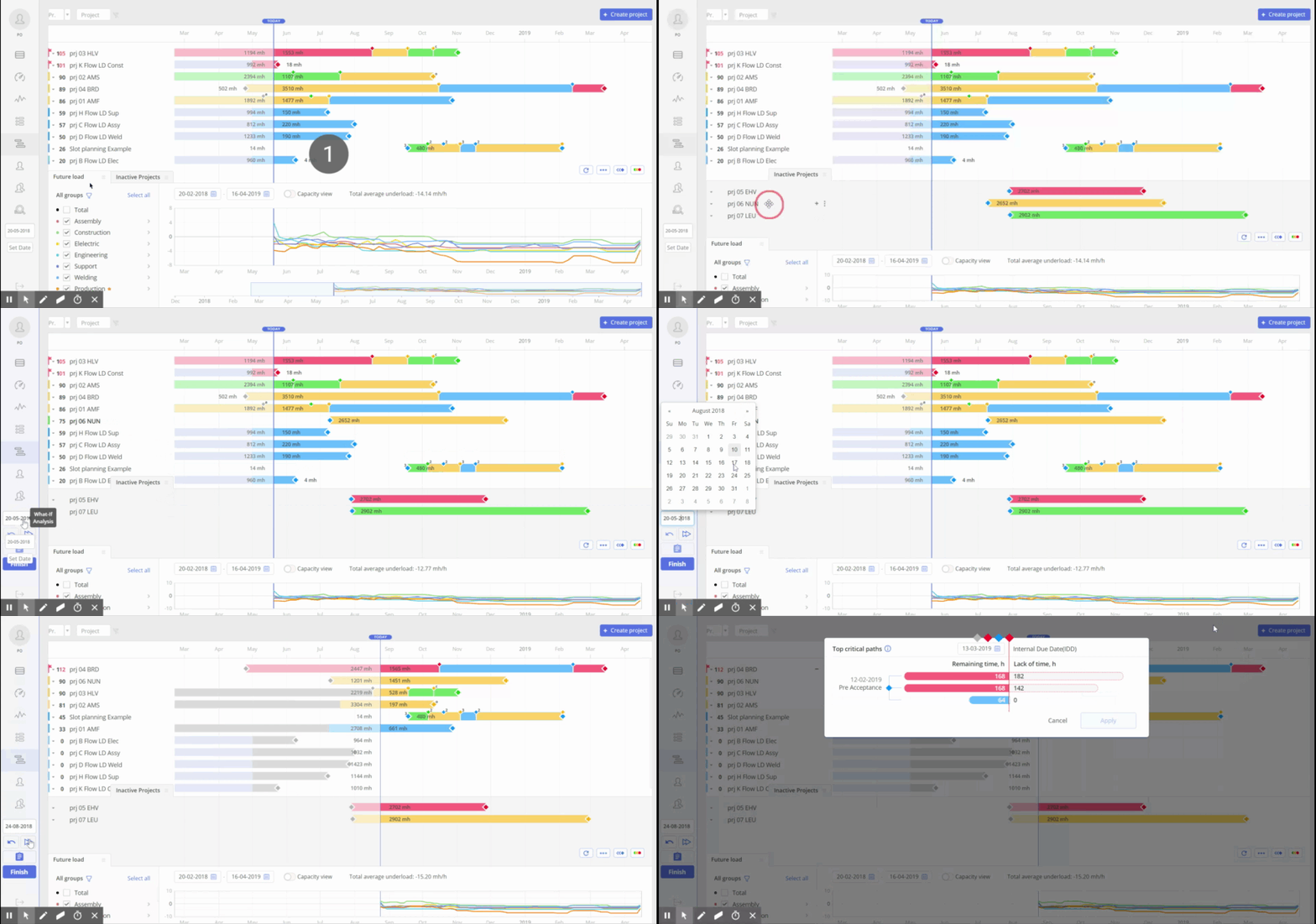
Try different options to find a portfolio composition that would maximize the number of high-value projects delivered without overloading capacity.
Using this feature increases the accuracy of capacity planning and increases potential for benefits delivery.
Stagger Projects
Use the findings from simulations above to inform your decisions on portfolio composition and resource allocations. In cases where an overload is present in a portfolio, the most common way of resolving it is staggering projects. Postpone projects that don’t hold as much value to focus the available capacity on the ones that can provide more business value.
Another option of making those decisions is using Epicflow’s Portfolio Optimizer, EPO. This AI-based tool can optimize your portfolio based on two factors: resource capacity availability and project priority. The result of its analysis is a portfolio composition that maximizes business value per constrained hour without overloading resources.
Consider the DIPP metric in your decision making process. It puts resource costs into perspective and highlights projects that are no longer worth investing in.
Monitor and Adjust
When project staggering and resource allocation decisions are made, you need to monitor resource performance and make small adjustments if you see that an overload is about to happen. Use the load graph and Epicflow dashboard to monitor performance.
Book a call with our experts to learn more about how Epicflow in combination with Jira can enhance your company’s capacity planning capabilities.
FAQ
Can Jira be used for capacity planning?
Jira capacity planning features allow it to be used in this role, but not as efficiently as when paired with third-party tools. Jira’s native capabilities in capacity planning are limited in the depth of the analysis possible and Jira Align might not be suited for all companies.
That’s why organizations typically prefer to supplement Jira with either a plugin or a capacity planning tool.
How to use Jira for capacity planning?
To use Jira’s base software for capacity planning, you should set up capacity requirements for the projects and tasks in custom fields. Then you can use custom widgets to create a dashboard that helps you track capacity.
How to do capacity planning in Jira Align?
Jira Align provides plenty of capacity planning capabilities. To use them to your company’s full benefit, all you have to do is create correct estimates of capacity requirements for projects and tasks and include data on employee absence. From there, you’ll be able to access analytical data on resource capacity and plan your company’s activities accordingly.
What are the different types of capacity planning?
There are multiple ways to categorize capacity planning. One of the most common categorizations is by the strategy of responding to mismatch in capacity supply and demand. In this regard, we can differentiate between three types of capacity planning:
• Lead capacity planning: Adjusting capacity in advance to meet projected demand.
• Lag capacity planning: Responding to capacity demand changes after the fact.
• Match capacity planning: Adjusting capacity in small incremental steps.
What is the best tool for capacity planning?
The best tool for capacity planning is one that provides your organization with the features it needs at the moment and offers some scalability at a fair price. A good example of a tool like that is Epicflow.
What capacity planning tools integrate with Jira?
Jira plugins for capacity planning available on the Atlassian marketplace are natively integrated with the tool, as well as some specialized capacity planning tools like Epicflow. Many other capacity planning tools that do not have a native integration can be integrated with API connectors, even if that’s more cumbersome.