Microsoft Project Online Retirement 2026: Migration Guide and Alternatives
 Victoria Sokolova
.
Updated
.
Project Portfolio Management
.
25 mins READ
Victoria Sokolova
.
Updated
.
Project Portfolio Management
.
25 mins READ

Microsoft Project Online is retiring on September 30, 2026. After that date, organizations will no longer be able to access Project Online or the project data stored inside the service. For PMOs, CIOs, CTOs, and delivery leaders, this is not a small product update. It is a hard stop for a platform many organizations still use for portfolio governance, resource planning, demand intake, reporting, and multi-project execution.
The difficult part is that replacing Project Online is not just a scheduling-tool decision. Microsoft is moving customers toward Planner with premium capabilities, Project Server Subscription Edition, and Dynamics 365 Project Operations. Each option can work for some teams. None is automatically the right answer for every enterprise PMO.
If your organization manages a few standalone projects, Planner Premium may be enough. If you manage 50+ concurrent projects, shared specialists, cross-project dependencies, portfolio approvals, and executive reporting, the retirement of MS Project Online is a chance to rethink the operating model behind your project portfolio.
This guide explains why Microsoft Project Online is being retired, the key dates, what happens to your projects and data, the limitations of Microsoft’s recommended replacements, and how to choose the right alternative before the September 2026 deadline.
Why Is MS Project Online Being Retired?
Microsoft is retiring Project Online because the product is built on legacy architecture. Project Online has served organizations for more than a decade, but Microsoft has made it clear that future investment is moving into Planner, Microsoft 365 Copilot, and AI-powered work management experiences.
In practical terms, Microsoft wants to consolidate project and task management into a more modern Microsoft 365 experience. Planner now brings together basic task management, premium project-planning capabilities, and AI assistance. The former Project Manager Agent has also been renamed Planner Agent, reflecting Microsoft’s broader shift toward Planner as the center of its work-management strategy.
That does not mean every Project Online customer should simply move to Planner. Project Online was not only a task board or a Gantt chart. For many organizations, it became the backbone of project intake, approvals, portfolio prioritization, timesheets, resource capacity planning, reporting, and governance. Those processes need to be rebuilt or replaced before the service disappears.
When Will Microsoft Project Online Retire?
Microsoft has published a clear retirement timeline. The most important date is September 30, 2026, but PMOs should pay attention to the earlier milestones as well.
| Date | What happens | Why it matters |
|---|---|---|
| October 1, 2025 | End of sale for Project Online-only SKUs for new customers | New customers can no longer buy Project Online-only subscriptions. |
| April 1, 2026 | Creation of new Project Web App sites is blocked | Expanding or rebuilding PWA environments becomes harder. |
| April 2, 2026 | SharePoint 2013 workflows stop working in SharePoint Online | Project Online governance, approval routing, and stage-gate workflows built on legacy SharePoint workflows may break. |
| September 30, 2026 | Project Online officially retires | Project Online and associated data become inaccessible in the service. |
For enterprise PMOs, the operational deadline may be earlier than September. If your Project Online environment depends on SharePoint 2013 workflows for demand management, approval routing, project type governance, or stage-gate automation, those processes need urgent attention. The governance layer can fail before the scheduling layer disappears.
What Does MS Project Online Retirement Mean for Companies?
The retirement of Project Online affects any organization still using Project Web App, Project Online project sites, Project Online OData reporting, Project Online resource management, or Project Online-driven workflow processes.
The most important risk is data access. If your PMO has years of portfolio history, baselines, dependencies, timesheets, resource assignments, risks, issues, custom fields, and executive dashboards inside Project Online, you should not assume that data will be recoverable after retirement. Export and back up what you need before the deadline.
It also means your PMO needs to rebuild the way it manages work. A basic migration of project plans is not enough. You need to map the full operating model:
- How project requests enter the portfolio.
- How projects are approved, prioritized, postponed, or rejected.
- How shared resources are allocated across competing projects.
- How project managers update schedules and actuals.
- How leadership sees portfolio risk, capacity pressure, and delivery confidence.
- How historical project data is retained for audit, forecasting, and reporting.
This is why the Microsoft Project Online retirement is a category decision, not a tool swap. You are not just choosing where to move tasks. You are deciding whether to stay with a scheduling-centric setup or move to a portfolio execution model that connects strategy, capacity, and delivery.
Project Online vs. Planner vs. Project for the Web vs. Project Desktop
A lot of confusion comes from Microsoft’s overlapping product names. Here is the simple explanation.
Project Online is the retiring cloud PPM platform built around Project Web App and SharePoint. This is the product with the September 30, 2026 retirement deadline.
Planner is Microsoft’s modern work-management experience. Planner includes basic task planning and premium project-planning capabilities such as Timeline/Gantt view, dependencies, milestones, custom fields, People view, and Copilot-related features.
Project for the Web has been folded into the Planner direction. Users of Project for the Web are being redirected into Planner, but Project for the Web and Project Online are not the same product. Do not assume a Project for the Web transition plan automatically solves your Project Online retirement problem.
Project Desktop is not being retired as part of the Project Online retirement. Many project managers can still use Microsoft Project Desktop for local schedules or desktop-based planning. The issue is what replaces the Project Online portfolio and resource layer.
Project Server Subscription Edition is Microsoft’s on-premises or self-managed path for organizations that need a closer match to Project Online’s PPM feature set.
What Are the Limitations of Project Online?
Project Online has been powerful, but it was never perfect. Many PMOs adopted it because it gave them structure: centralized project plans, resource pools, timesheets, portfolio views, workflows, and reporting. At the same time, the platform often created heavy administration, complex customization, slow governance changes, and dependency on SharePoint-based architecture.
Typical limitations include:
- Complex configuration and administration.
- Heavy reliance on custom fields, workflows, and SharePoint components.
- Limited modern AI support.
- Reporting setups that often require Power BI, OData, and custom data models.
- Resource planning that can show capacity but does not automatically solve bottlenecks.
- Scenario planning that often requires manual analysis outside the tool.
- User adoption challenges for project managers who prefer Microsoft Project Desktop.
The retirement deadline makes these limitations more visible. Replacing Project Online with a tool that recreates the same weaknesses is a missed opportunity. The better question is: what did Project Online never help your PMO do well enough?
For many enterprise organizations, the answer is predictable resource flow: knowing which projects can realistically be delivered with the people available, where bottlenecks will appear, and what happens if leadership adds another strategic initiative to an already overloaded portfolio.
What Are the Microsoft Project Online Alternatives?
Microsoft recommends several paths depending on your needs. The right option depends on portfolio complexity, resource-sharing pressure, governance requirements, reporting expectations, and how much of your current Project Online setup you need to preserve.
Option 1: Microsoft Planner Premium
Planner Premium is Microsoft’s main direction for modern project and work management. It includes Timeline/Gantt view, task dependencies, milestones, custom fields, critical path, People view, goals, custom calendars, and other premium features.
Planner Premium can be a good fit when:
- Teams manage relatively simple projects.
- Most work is team-level rather than portfolio-level.
- Resource conflicts are limited.
- Governance is lightweight.
- The organization wants deep Microsoft 365 integration.
However, Planner Premium is not a like-for-like replacement for Project Online in enterprise PMO environments. It has project-level limits, including 3,000 tasks per project, 10 custom fields per project, and 20 dependency links per task. It also does not replace the full portfolio governance, centralized timesheet model, master/sub-project hierarchy, or advanced cross-project resource-capacity decision-making that many Project Online customers rely on.
Planner is excellent for collaboration but it may not be enough for portfolio control.
Option 2: Project Server Subscription Edition
Project Server Subscription Edition is the closest Microsoft option for organizations that want to preserve a traditional PPM model. It supports advanced planning, scheduling, and resource management and may be suitable for organizations that need a familiar Project Online-style architecture.
The trade-off is ownership. Project Server Subscription Edition is not a modern SaaS migration. It is on-premises or self-managed infrastructure, often hosted in Azure but still requiring your organization to manage the environment. It can preserve familiar capabilities, but it does not give you the same kind of modern AI, predictive analytics, or portfolio-flow optimization that forward-looking PMOs may want.
Choose Project Server Subscription Edition if continuity matters more than modernization.
Option 3: Dynamics 365 Project Operations
Dynamics 365 Project Operations is a stronger fit for organizations that need project financials, timesheets, billing, resource scheduling, and service-delivery operations. It is not a simple Project Online migration path. It is a broader business-platform decision.
Choose Dynamics 365 Project Operations if your project environment is closely tied to finance, billing, utilization, and professional-services delivery.
Option 4: Enterprise PPM and resource management platforms
For enterprise PMOs with shared specialists, bottlenecks, complex dependencies, and high cost of delay, the strongest alternative may be a dedicated multi-project resource management and portfolio execution platform.
This is where Epicflow fits. Epicflow is built for organizations that run many projects at the same time with the same limited pool of people. It adds the portfolio and resource layer Project Online customers often wanted but never fully had: bottleneck prediction, cross-project resource management, realistic priorities, and what-if scenario planning.
Epicflow also works alongside Microsoft Project Desktop through two-way synchronization. That matters because project managers can keep working in the tool they know, while the PMO gains visibility across the portfolio.
Alternatives and Decision Paths by Industry
Not every industry has the same migration risk. The more your organization depends on shared specialists, regulated delivery, physical engineering constraints, and hard deadlines, the more dangerous it is to choose a replacement based only on Gantt charts.
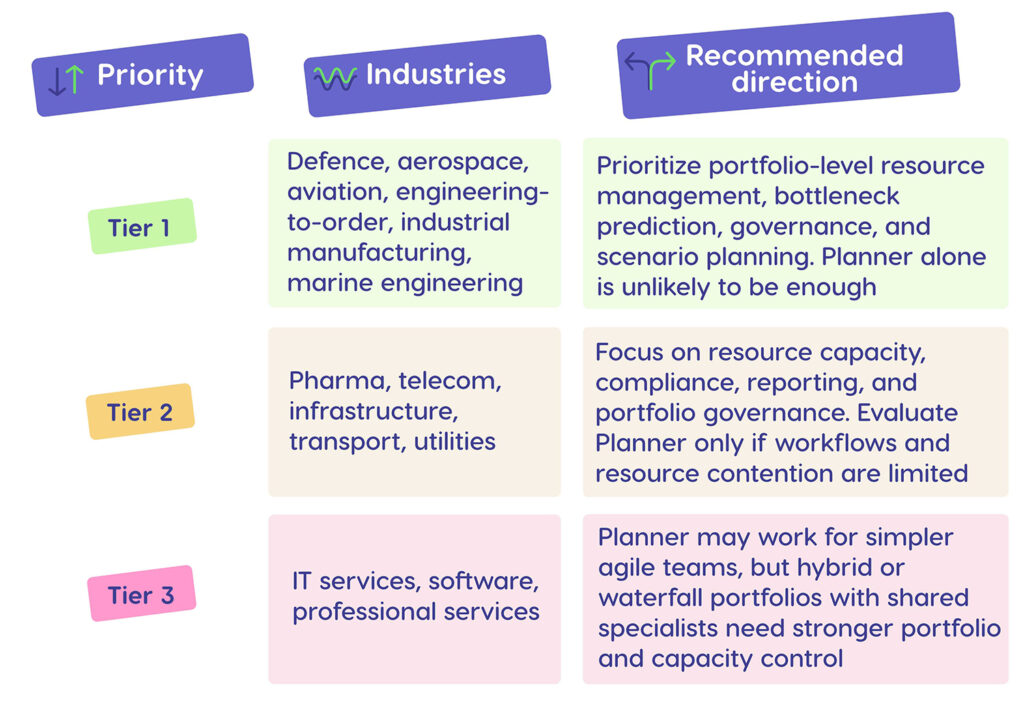
A simple rule: if projects mostly compete for the same people, you need more than a task-management replacement. You need a way to protect flow across the whole portfolio.
What Should Your PMO Do Now?
The worst migration strategy is waiting until the final quarter before retirement. Enterprise PPM migrations usually involve more than moving files. They involve data cleanup, governance design, reporting changes, integration updates, user training, and executive decision-making.
Start with these steps.
1. Export and back up your Project Online data
Export project plans, baselines, custom fields, resource assignments, risks, issues, timesheets, and reporting datasets. Store them independently from Project Online. Decide what needs to be migrated, archived, or retired.
2. Audit workflows and integrations
List every Project Online workflow, Power BI report, OData feed, Project Web App site, SharePoint dependency, approval route, and third-party integration. Pay special attention to any governance process that used SharePoint 2013 workflows.
3. Score whether Planner Premium is enough
Count your active projects, shared resources, custom fields, dependencies, reports, and governance stages. If the portfolio is small and low-conflict, Planner Premium may work. If the PMO manages dozens of concurrent projects with the same scarce specialists, Planner should be evaluated carefully.
4. Decide what must improve, not just what must moveanc
Ask what Project Online failed to solve. Did projects still compete for the same engineers? Did leadership approve too much work? Did teams discover bottlenecks too late? Did project managers spend too much time updating reports instead of managing delivery?
5. Run a real portfolio scenario before choosing a platform
Do not choose a replacement based only on demo projects. Test your real portfolio. Load actual project plans, real resource pools, real constraints, and real priorities. Then ask: can this platform show what will finish late, why it will finish late, and what decision will improve flow?
6. Protect project manager adoption
If your project managers rely on Microsoft Project Desktop, do not ignore that behavior. A migration that forces every project manager into an unfamiliar planning workflow can create resistance. A platform that works alongside MS Project Desktop can reduce change-management risk.
Conclusion: Treat the Retirement as a PMO Upgrade Opportunity
Microsoft Project Online retirement is a deadline, but it is also a decision point. Organizations that treat it as a last-minute migration will likely end up with the same delivery problems in a different interface. Organizations that treat it as a portfolio-performance opportunity can come out stronger.
The key question is not “What tool replaces MS Project Online?”
The better question is: What does our PMO need to control: tasks, schedules, resources, or portfolio flow?
If your organization runs a small number of standalone projects, Planner Premium may be enough. If your organization runs complex multi-project portfolios with shared specialists, hard deadlines, and expensive delays, you need a stronger resource and portfolio layer.
Epicflow was built for that environment: multi-project organizations that need to see bottlenecks before they damage delivery, model what-if decisions before committing resources, and keep project managers productive in Microsoft Project Desktop while leadership gains portfolio-level control.
Book a 30-minute Epicflow portfolio diagnostic — review your current Project Online setup, identify migration risks, and see whether Epicflow is a fit for your portfolio.
Frequently Asked Questions
1. What is Microsoft Project Online?
Microsoft Project Online is Microsoft’s cloud-based project and portfolio management platform built around Project Web App and SharePoint. It helps organizations manage project schedules, resources, timesheets, portfolio reporting, project intake, and governance.
2. Is Microsoft Project Online being retired?
Yes. Microsoft Project Online is retiring on September 30, 2026. After that date, organizations will no longer be able to access Project Online or the data stored in the service.
3. What is replacing MS Project Online?
Microsoft points customers toward Planner with premium capabilities, Project Server Subscription Edition, and Dynamics 365 Project Operations. The best replacement depends on whether your organization needs simple work management, traditional PPM, project financials, or advanced portfolio resource management.
4. Is Microsoft closing MS Project?
No. Microsoft is retiring Project Online, not the entire Microsoft Project family. Project Desktop, Project Server Subscription Edition, and Planner are not being retired as part of this change.
5. Can I still use Microsoft Project?
Yes. You can still use Microsoft Project Desktop. However, if your desktop schedules currently connect to Project Online, you need a plan for what replaces the online portfolio, reporting, and resource-management layer after retirement.
6. What is MS Project called now?
The naming depends on the product. Microsoft Planner is now the central Microsoft 365 work-management experience. Project for the Web has moved into the Planner direction. Project Online remains the retiring legacy cloud PPM product. Project Desktop and Project Server Subscription Edition remain separate products.
7. What’s happening with Microsoft Project?
Microsoft is consolidating modern project and task management into Planner while retiring Project Online. This reflects Microsoft’s move toward AI-powered, integrated work management across Microsoft 365.
8. What happens to my existing Project Online data after retirement?
After Project Online retires, your Project Online projects and associated data will no longer be accessible through the service. Export and back up project plans, baselines, resource assignments, custom fields, timesheets, risks, issues, and reporting data before September 30, 2026.
9. Is Microsoft Project Desktop also being retired along with Project Online?
No. Project Desktop is not being retired as part of the Project Online retirement. The key issue is that Project Online will no longer be available as the cloud PPM environment connected to your portfolio.
10. What is the timeline for transitioning away from Project Online?
The official retirement date is September 30, 2026, but PMOs should move earlier. New Project Online-only sales ended for new customers on October 1, 2025. New Project Web App site creation was blocked from April 1, 2026. SharePoint 2013 workflows stopped working in SharePoint Online from April 2, 2026. Enterprise PMOs should complete data backup, replacement selection, migration, testing, and user training before the final shutdown date.