13 Best Engineering Project Management Tools for Complex, Multi-Project Environments
 Mykhailo Kulakov
.
Updated
.
Project Management
.
43 mins READ
Mykhailo Kulakov
.
Updated
.
Project Management
.
43 mins READ

The engineering industry faces multiple challenges, from supply chain disruptions to sudden changes in project scope coming from customers. This changing environment needs a strong approach to project management that’s industry specific to excel and get ahead of the competition.
The difference between constant firefighting and a proactive well-balanced approach lies in choosing the right engineering project management tool. The one that fits your company and your specific needs.
In this article, we’ll explore where most PM tools underperform in the engineering industry, what the criteria are for choosing the right tool, and explore 13 best engineering project management tools.
Key takeaways:
- If your organization needs a governance and compliance-heavy tool, choose Deltek, Oracle Primavera P6, Planisware, or Siemens Teamcenter.
- If your organization needs to need to steer live portfolio execution under shifting specialist constraints, choose Epicflow. It operates effectively on its own or as a strategic overlay to traditional governance systems.
- For a mix between the two, go for Planview, Smartsheet, or MS Project.
- For specialist applications, use Wrike, Monograph, Jira, or OpenProject.
Why Most Project Management Tools Break in Engineering Environments
There are multiple project management tools out there, but some are simply not suited for engineering environments. Here is what companies need to be aware of when looking for an optimal solution for their project management needs.
The single-project assumption
Many PM tools focus on a single type of project as the template and treat other projects independently. The issue with that is that in most engineering environments, projects don’t exist independently. They are competing for the same limited pool of resources, whether those are machinery or highly skilled personnel.
A tool that can’t take resource-based interdependencies into account and focuses on each project individually can’t effectively do engineering PM and will often lead to bottlenecks due to lack of planning foresight.
Static Gantt dependencies vs. shifting scope
One of the challenges of the engineering industry is shifting priorities, either due to introduction of new competitive technologies, market pressures, or supply chain disruptions. Traditional PM tools typically can handle changes in schedule, but not massive changes in priorities.
The ability to recalculate changes in due dates and critical chain paths is an important part of project management. But what matters more for engineering companies is the ability to reassess priorities and reorganize project dates based on what project is the most critical at the present time.
A good engineering project management tool should have the ability to do both.
No skill-level capacity visibility
Skill management is an important feature for all industries, but it’s even more crucial for industries with high skill requirements and importance of certifications.
A tool with no skill management features can show that a company has a certain number of engineers with certain capacity at the moment. But without data on what their skills are and what tasks they are legally certified to perform, information about their availability is useless.
A good engineering project management tool should provide data on skill levels of personnel and give users the ability to assign work based on skills through the UI. Otherwise, either work is assigned incorrectly, or the need to keep track of that data separately puts additional administrative pressure on the management team.
As a side note, some tools that don’t have those features, like Trello, or Asana, can be used effectively for team-level task tracking. That’s because they can be operated in tightly controlled environments where the manager knows all the information they leave out or cannot process.
For more of a high-level application, they won’t be useful as management positions higher than team leaders simply can’t know everything about every team and need a way of centralizing that data for quick access.
What to Look for in Engineering Project Management Software (7 Buyer Criteria)
Each engineering company has a different set of requirements and challenges it needs to face with its choice of project management software. But there are a few criteria that most if not all engineering organizations should focus on when choosing software.
Multi-project resource allocation across shared, constrained pools
One of the most important features in a project management tool for a large organization is it having resource allocation capabilities. Engineering companies often work with a vast pool of specialized resources, sometimes distributed across multiple locations, that are shared between projects.
The highly skilled ones are often in high demand, and overbooking them with work leads to bottlenecks and delays in production schedule. Resource allocation capabilities focused specifically on managing multi-project environments can improve planning and resolve this issue.
In the demo, pay attention to:
- Does the tool show information about user skillsets or certifications?
- Can the tool assign resources by skill?
- Does the tool show how borrowing resources from one project to another affects both?
Capacity forecasting and scenario planning under shifting scope
In multi-project environments, it’s often impossible to arrive at an optimal project schedule manually on the first try. To do justice to the process, multiple options have to be weighed against each other.
Scenario planning tools remove the uncertainty from planning as they allow users to experiment with project management decisions without ruining the integrity of the production environment. It creates a separate testing environment and lets users predict how one or the other decision impacts the portfolio as a whole.
In the demo, pay attention to:
- Does your tool of choice have a sandbox testing environment?
- How effective the system is at recalculating resource load and project timeline projections in different scenarios?
- Can you see a side-by-side comparison of projections for several scenarios?
Bottleneck and overload detection
Bottlenecks in project management are resources that are overloaded and stand in the way of progress of multiple projects. Often, bottlenecks occur in highly skilled and in-demand resource groups which are needed for multiple projects at once.
Simple utilization reporting can only show how much resource capacity is left in the company. Bottleneck and overload detection features can highlight which groups are overloaded, pinpoint the reason behind the overload, and help resolve it in the most efficient way possible. This helps companies find and fix the overload before it has the chance to hurt productivity.
In the demo, pay attention to:
- Can the tool follow critical path delays?
- Can the tool distinguish between non-critical and milestone blocking tasks?
- Can the tool highlight the main constraint instead of general team-based metrics.
Dynamic re-prioritization when reality changes
In most industries that have complex project interdependencies and supply chains, priorities may change quite dramatically over the short span of time. The ability to adjust to the new realities on the go is what distinguishes superior engineering project management tools from the subpar ones.
In the demo, look for:
- Can the tool cascade changes in resource availability and project schedules down the pipeline?
- Can it automatically balance hundreds of individual tasks instead of forcing the user to do it manually?
Integration with PLM / CAD / ERP
The engineering industry depends on multiple tools to run its projects, and integrating data from them with the project management solution is crucial for speeding up the management process.
In the demo, look for:
- Does the tool have native connectors to the tools you need?
- If not, how can the automated integration be realized?
- How often errors in data exports and how are they handled?
Portfolio governance: stage-gate, EVM, WBS, compliance/audit trail
Depending on the specific industry an engineering company operates in, compliance can be pretty strict. Using a tool that supports an audit trail can save significant amounts of time and effort on keeping separate records.
In the demo, look for:
- Integrated earned value management capabilities.
- Time-stamped audit trails.
- Security features proven by international certifications.
Time-to-value and administrative burden
In any tool a company uses, the final choice comes down to a single question: does the tool pay for itself or does it cost more to run than the benefits it brings? This might not be apparent before using it for some time, but here are a few things that can be revealed during the demo:
- Do run of the mill tasks require using code or creating tickets or can they be done via UI?
- How intuitive is the UI for the engineers to use?
- How many full-time employees are required to run the system?
Keep in mind that these features would have differing levels of importance depending on the specific engineering field. Look for the mix of strong features that fit your company.
Engineering Project Management Tools Compared (2026 Comparison Matrix)
This quick comparison matrix will help judge all tools on our list of best engineering project management tools before going into more details.
| Tool | Core Capability | Best For | Primary Industry |
| Epicflow | Constraint-driven engineering portfolio orchestration and bottleneck economics | Engineering PMOs, VPs of Engineering, and COOs needing to prevent delivery delays, protect project margins, and maximize revenue throughput across concurrent engineering initiatives constrained by shared specialist pools. | Complex Engineering, Aerospace & Defense, Industrial Automation & Equipment, High-Tech Electronics, Civil & Systems Infrastructure |
| Celoxis | Multi-project scheduling with resource capacity and cost control | Engineering PMOs running many concurrent projects that need dependency-based scheduling, baselines, cross-project workload visibility, and milestone timelines for leadership, in the cloud or on-premise. | Industrial Manufacturing, Medical Devices, Technology, Aviation Services |
| Planisware | Enterprise PPM / R&D stage-gate | Multi-year R&D portfolio selection, gate-controlled capital investments, and strict financial tracking tied to PLM/ERP frameworks. | Pharmaceuticals, Automotive, Medical Devices, Aerospace |
| Planview (Vantage / PPM Pro) | Enterprise portfolio + capacity planning | Connecting C-suite strategic planning to enterprise-wide capital allocation, hybrid work tracking, and top-down capacity forecasting. | IT Services, Financial Services, Healthcare, Enterprise R&D |
| Oracle Primavera P6 | Large-scale infrastructure scheduling | Baseline variance control, high-density Work Breakdown Structure (WBS) scheduling, and critical path tracking for massive programs. | Construction, Oil & Gas, Civil Infrastructure, Energy |
| Deltek (Vantagepoint / Cobra) | Government & A/E firm project accounting, EVM | Passing strict regulatory audits (DCAA, FAR) with earned value management (EVM) and integrated project accounting. | Government Contracting, Aerospace & Defense, AEC Consultancies |
| Microsoft Project / Project for the Web | Familiar Gantt + Microsoft 365 estate | Individual project planning, traditional waterfall schedule building, and seamless integration with Power BI and Teams. | General Business, Mid-Market Operations, Corporate IT |
| Siemens Teamcenter (Program Management) | PLM-anchored engineering programs | Linking WBS schedule milestones directly to CAD revisions, Bills of Materials (BOMs), and Engineering Change Requests (ECRs). | Discrete Manufacturing, Automotive, Aerospace & Defense |
| Smartsheet | Flexible grid-based coordination | Migrating teams off static Excel spreadsheets into automated, collaborative tracking sheets and executive dashboards. | Operations, Marketing, Professional Services, General PMO |
| Wrike | Cross-functional engineering ops | Managing cross-departmental work intake, interactive Gantt timelines, custom request forms, and proofing workflows. | Mid-Market Product Design, Agencies, Corporate Operations |
| Jira | Software & firmware engineering | Sprint planning, issue/bug tracking, Kanban/Scrum backlog management, and team-level agile execution tracking. | Software Development, Embedded Systems, IT Ops |
| Monograph | Architecture & civil engineering firms | Visual phase-based fee management, architectural resource planning, time-tracking, and practice profitability analytics. | Architecture, Interior Design, MEP & Structural Engineering |
| OpenProject | Open-source / self-hosted requirement | Maintaining strict data privacy, local data sovereignty (GDPR), and self-hosted agile/waterfall project management. | Public Sector, Data-Sensitive Tech, Higher Education, European Enterprise |
The 13 Best Engineering Project Management Tools (Detailed Reviews)
Now, let’s look at each tool in more detail. This section takes a closer look at core features, limitations, pricing, and best use case for each of the 13 engineering PM tools.
Epicflow
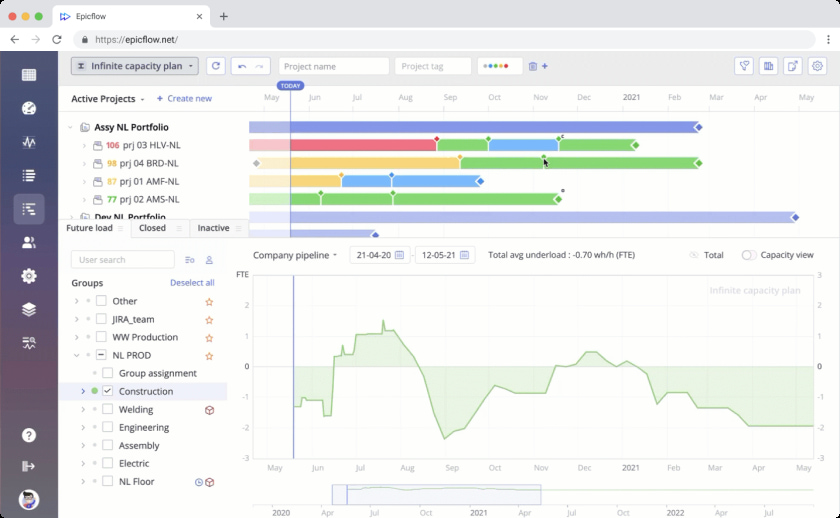
Epicflow is a constraint-driven engineering portfolio orchestration platform focused on eliminating specialist bottlenecks and optimizing throughput across shared resource pools. Operating as an executive decision overlay above existing task management and engineering systems, it uses predictive algorithms to dynamically align finite specialist capacity with value-driven portfolio priorities.
Best use case
Optimizing concurrent, complex engineering portfolios where shared specialist bottlenecks govern delivery velocity, margin protection, and throughput, particularly across manufacturing and A&D industries. Epicflow sequences work by value per constrained-resource hour to maximize portfolio revenue and prevent capacity-related delays.
Core features
- Predictive bottleneck analysis: Identifies upcoming capacity shortages across shared specialist pools before they disrupt portfolio delivery.
- AI Portfolio Optimizer (EPO): Recommends portfolio optimization scenarios and sequences projects by value per constrained hour.
- Portfolio load & capacity forecasting: Visualizes future demand against actual capacity across teams and skill groups.
- What-if Scenario Planning: Evaluates trade-offs in value per constrained hour and financial impact across alternative project starts and resource allocations in isolated sandboxes.
- Constraint-based buffer management: Protects delivery commitments by managing project buffers and controlling work-in-progress across shared bottlenecks.
- Value-driven portfolio economics: Quantifies delay impact using drag, drag cost, and Return on Remaining Investment (RRI) to focus capacity on high-margin work.
- Predictive financial orchestration: Links feasible delivery dates directly to expected revenue timing, invoice dates, and penalty/bonus exposure.
- Native ecosystem integration: Connects seamlessly with Jira, Microsoft Project, Oracle Primavera P6, and enterprise ERP systems.
Limitations
- Requires a multi-project portfolio with shared specialist constraints to deliver its core value and economic return
- Not a standalone system for financial accounting, heavy EVM reporting, or stage-gate portfolio intake, even though it has financial capabilities.
Pricing
The Enterprise plan is quote-based. For small teams, there’s a public-facing plan priced at €25 per user per month for teams up to 50 users.
Celoxis
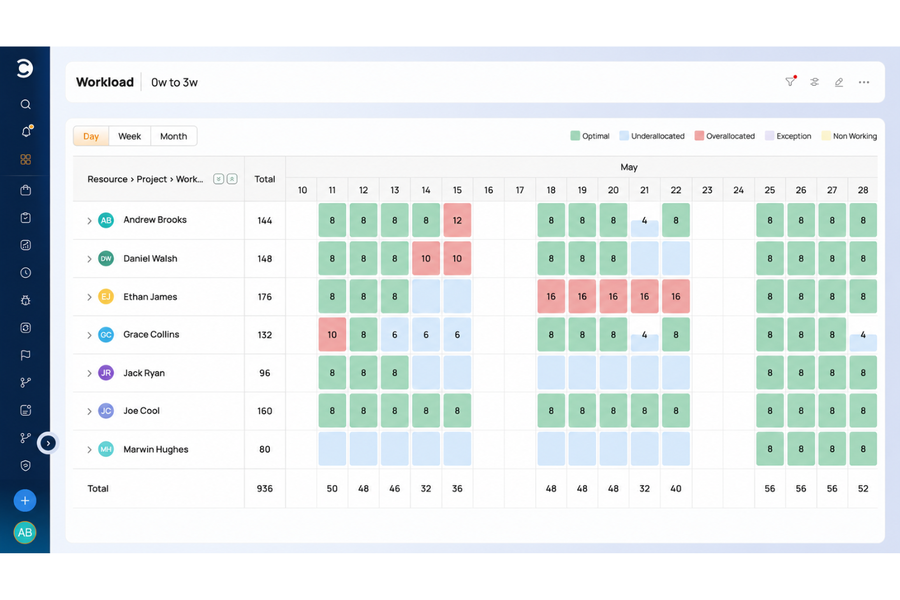
Celoxis is a web-based project and portfolio management tool that pairs advanced scheduling with resource capacity planning and cost tracking, so engineering PMOs can run many concurrent projects from one system.
Best use case
Engineering and product development organizations with shared engineers across many projects, where leadership needs milestone visibility and the PMO needs workload and cost control, in the cloud or on-premise.
Core features
- Gantt scheduling with dependencies, baselines, and WBS hierarchy.
- Elapsed-duration tasks for work that runs on calendar time, such as testing or curing.
- Earned value metrics (CPI, SPI) and cost variance by project and task.
- Timeline report and dashboard widget for key tasks and milestones across projects.
- Cross-project workload heatmaps, with allocation by percentage or by hours (beta).
- Compact Mode for working through large engineering plans on one screen.
- Webhooks and MCP (beta) to connect schedules with engineering systems and AI assistants.
Limitations
- No native CAD, BOM, or PLM linkage, so schedules are not driven by engineering deliverable maturity.
- Hours-based allocation is still in beta and applies company-wide once enabled.
- Jira and Azure DevOps sync are paid add-ons below the Enterprise plan.
Pricing
Celoxis offers Core ($10), Essentials ($25), Professional ($35), and Business ($45) plans per Standard User per month, billed annually, plus custom Enterprise pricing with cloud or on-premise deployment. A 14-day free trial is available.
Planisware
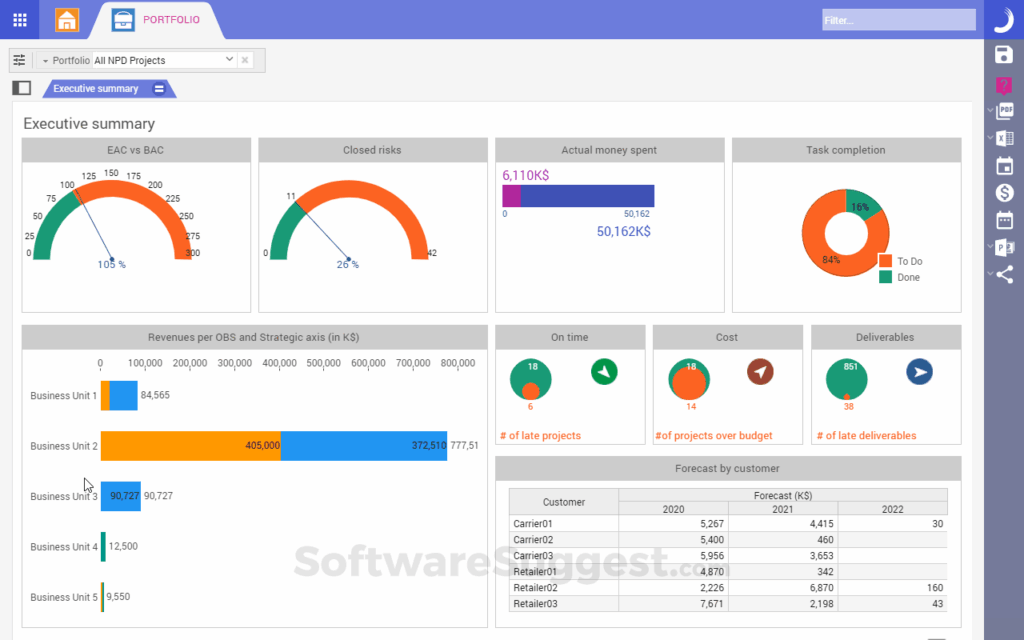
Planisware is a PPM platform suited for complex product development, long engineering lifecycles, and research and development. It features strong portfolio governance, financial tracking, stage-gate tracking, and integration with PLM and ERP systems.
Best use case
Planisware is best for enterprise-level PPM, R&D/NPD stage-gate depth, strong scenario planning and financial control.
Core features
- Stage-gate portfolio management.
- Advanced Earned Value Management.
- Multi-year capacity planning.
- Portfolio roadmapping.
- Native PLM/ERP integration.
Limitations
- Steeper learning curve.
- Configuration typically requires professional services.
- High administrative burden requiring dedicated PMO resources.
- Ad-hoc reporting often needs external tools.
Pricing
Planisware operates on quote-based pricing.
Planview
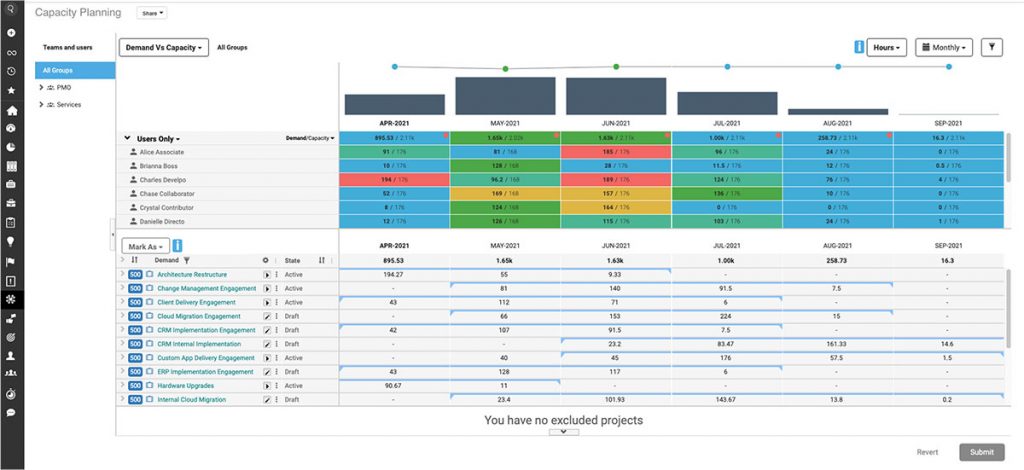
Planview is an enterprise-grade PPM and work management tool that combines strategic portfolio planning and resource management, making it suitable for large hybrid organizations.
Best use case
Corporate portfolio planning, capacity and demand management, strategic-to-delivery alignment across a fragmented product line.
Core features
- Strategic portfolio prioritization.
- Resource capacity planning software.
- Financial baselining.
- Scenario modeling
- Hybrid work tracking (agile + waterfall).
Limitations
- High implementation complexity.
- Can feel rigid for frontline engineering leads.
- Multiple products in the ecosystem complicate the choice.
- Complicated enterprise integration.
- Better for governance than responsiveness.
Pricing
Planview operates on quote-based pricing.
Oracle Primavera P6
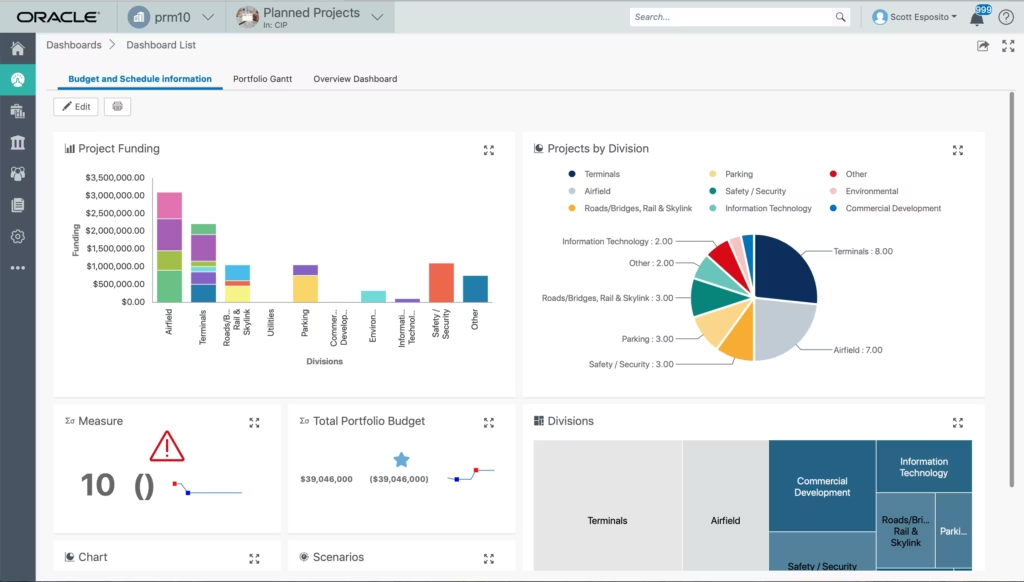
Oracle Primavera P6 is the industry standard software for managing massive capital projects such as construction and aerospace and defence that focuses on complex Work Breakdown Structures, contractor integration, and schedule baseline enforcement.
Best use case
Large-scale capital projects, aerospace project management software for master schedules, defense project management software, heavy civil engineering construction.
Core features
- High-volume WBS scheduling.
- Formal baseline variance analysis.
- Deterministic Gantt scheduling.
- Multi-project critical path analysis.
- Risk analysis.
- Contractor schedule rollup.
Limitations
- Outdated user interface.
- Struggles with dynamic, unpredictable daily task re-prioritization.
- Useful only in large-scale capital projects.
- Weak at cross-portfolio human-resource contention
Pricing
Base Oracle Primavera license starts at $2,750 per user per year, with additional fees for support and add-ons.
Deltek
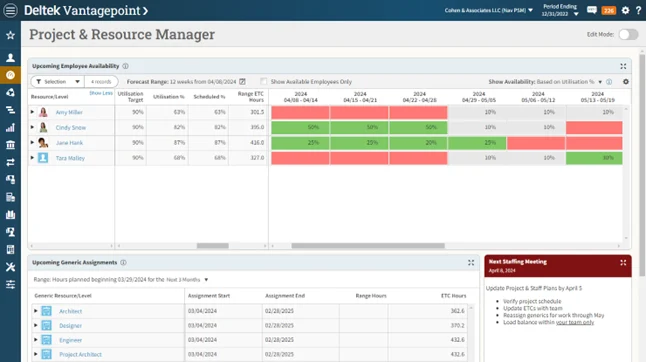
Deltek offers specialized PPM software for government contractors, professional services, engineering firms, and A&D companies. Deltek Vantagepoint focuses on Enterprise Resource Planning, while Deltek Cobra focuses on cost management and Earned Value Management.
Best use case
Government contractors requiring strict regulatory and audit compliance.
Core features
- Certified EVM engine (Cobra).
- DCAA compliant timekeeping/accounting.
- WBS cost accounting.
- Pipeline forecasting.
- Audit trail reporting.
Limitations
- High administrative overhead.
- Complex setup.
- Rigid UX optimized for compliance auditors.
- Finance-first application that doesn’t work well for execution optimization.
Pricing
Both versions of Deltek operate on quote-based pricing.
Microsoft Project
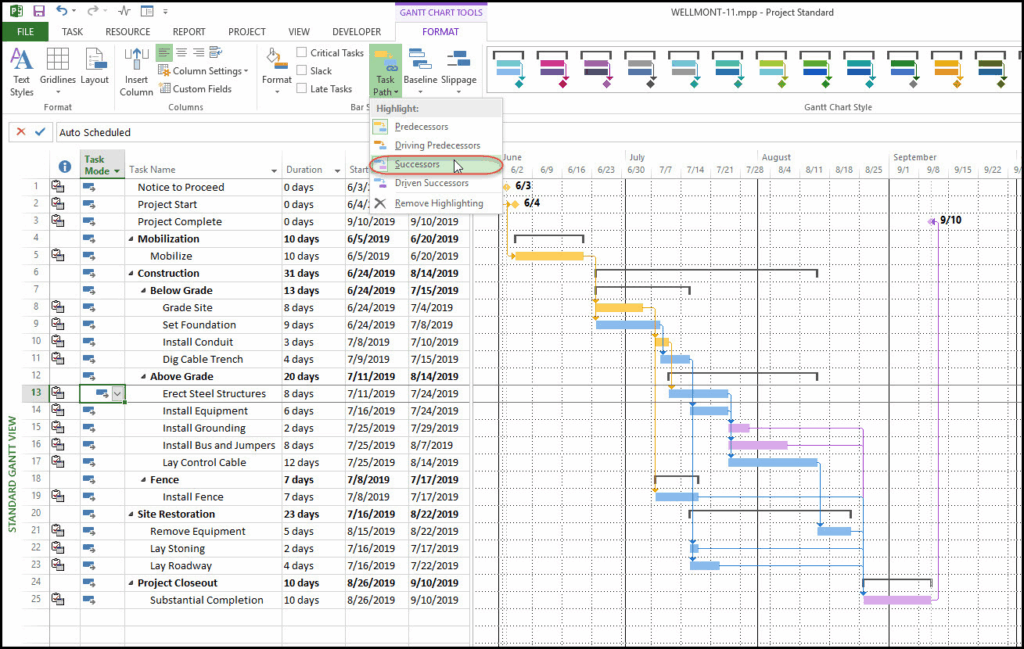
MS Project is a project scheduling tool that offers all the basic features and integrates deeply into the Microsoft 365 ecosystem.
Best use case
Single-project management, medium-complexity waterfall scheduling, and teams standardized on Microsoft 365.
Core features
- Interactive Gantt charts.
- Critical path calculations.
- WBS creation.
- Power BI reporting integration.
- Basic resource utilization heatmaps.
Limitations
- Single-project mental model.
- Struggles with cross-project real-time skill-matrix bottleneck optimization.
- Project for the Web lacks advanced enterprise features found in the desktop version.
Pricing
MS Project licensing costs $679.99 for Standard and $1,129.99 for Professional as a one-time purchase. Cloud plan that includes MS Planner costs $30 per user per month paid annually.
Siemens Teamcenter
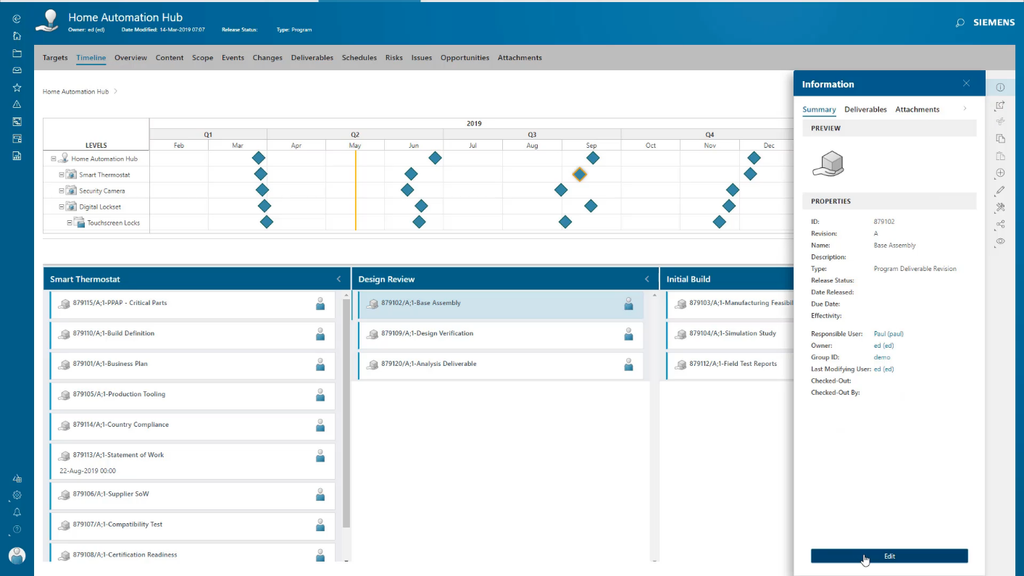
Siemens Teamcenter embeds PPM software in the Product Lifecycle Management environment, bridging the gap between schedule milestones and CAD models and Engineering Change Orders.
Best use case
Discrete manufacturing, Automotive, and Aerospace engineering teams whose schedules are directly driven by CAD/BOM maturity.
Core features
- Direct CAD/BOM-to-WBS linking.
- Automated stage-gate workflows driven by engineering deliverable maturity.
- Change management synchronization.
- ERP cross-integration.
Limitations
- Cost and implementation weight.
- Complex to configure outside of existing Siemens CAD/PLM environments.
- Limited native advanced multi-project resource optimization algorithms.
Pricing
Siemens Teamcenter operates on a quote-based pricing model.
Smartsheet
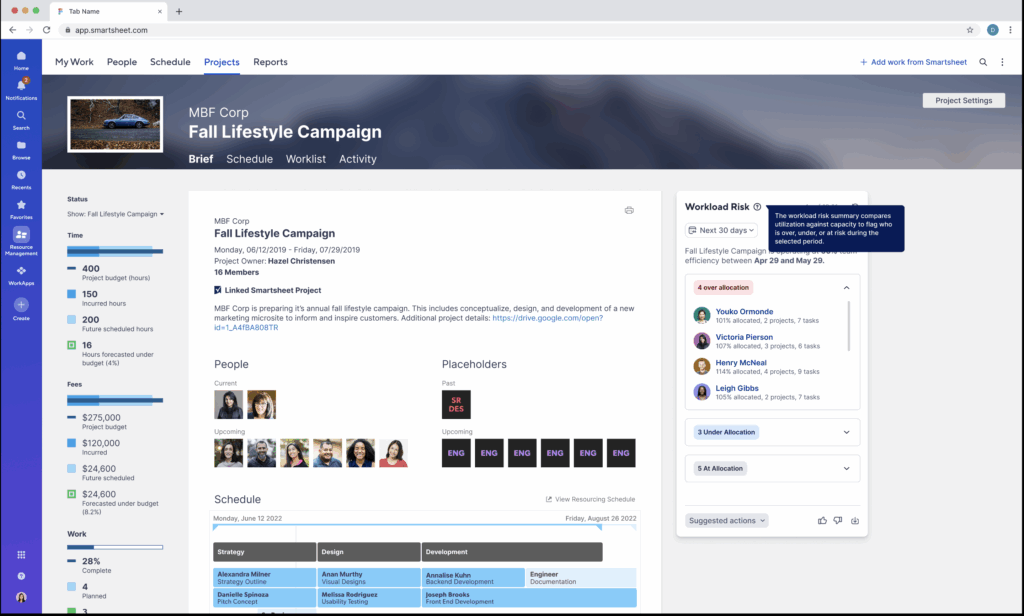
Smartsheet is a spreadsheet-based work management platform offering tracking sheets and dashboards, workflow automation capabilities, and basic Gantt timelines, making it a highly accessible tool for non-technical managers.
Best use case
Lightweight project coordination, cross-departmental tracking, and teams migrating away from manual Excel spreadsheets.
Core features
- Spreadsheet-style grid.
- Automated workflow triggers.
- Multi-view (Gantt, Card, Grid, Calendar).
- Sheet cross-linking.
- Customizable dashboards.
Limitations
- Lack of native skill-matrix resource allocation.
- Lack of automated critical-path queue calculations.
- No native EVM.
- No enterprise-grade multi-project constraint algorithms.
Pricing
Smartsheet has two public tiers at $12 and $24 per user per month and two plans with quote-based pricing.
Wrike
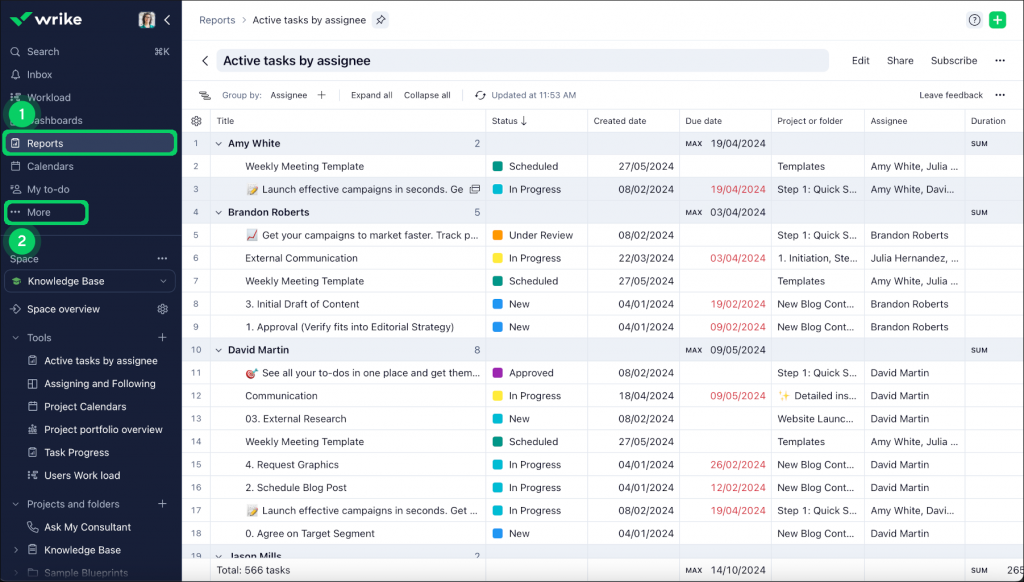
Wrike is a work management platform that connects task management features with basic PPM features. It can be of limited use in engineering companies, mostly for team work management at a lower level.
Best use case
Mid-sized product design teams managing cross-functional work intake.
Core features
- Custom request forms.
- Cross-folder project tagging.
- Workload capacity heatmaps.
- Automated task dependencies.
- Proofing tools.
Limitations
- Does not support formal government compliance (DCAA/EVM).
- Does not support complex PLM/BOM.
- Resource allocation is largely manual.
Pricing
Wrike has a free forever plan, two public plans priced at $10 and $25, and two quote-based plans.
Jira
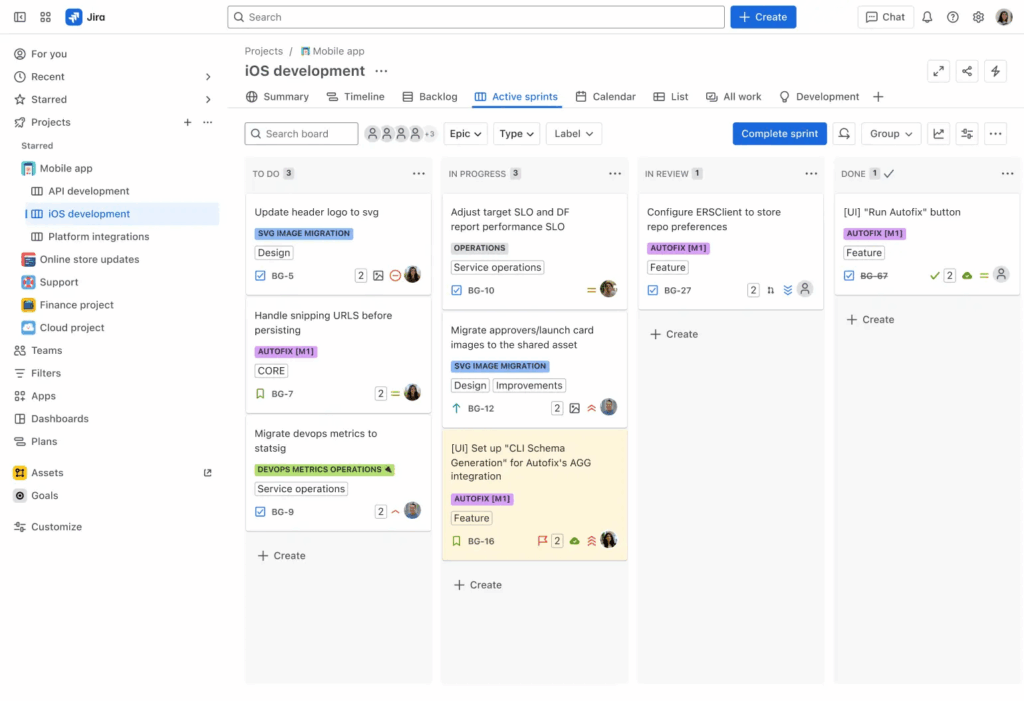
Jira is an industry standard for agile software development and issue tracking, with some Jira Align features expanding its capabilities into PPM. But Jira has its limitations in portfolio and resource management and is of limited use in large engineering applications.
Best use case
Software development in engineering, agile engineering groups, and issue/bug tracking workflows.
Core features
- Scrum/Kanban boards.
- Sprint planning.
- Agile velocity tracking.
- Custom workflow engines.
- Rich API ecosystem.
- Jira Align portfolio views.
Limitations
- Weak for traditional waterfall scheduling.
- Lack of complex physical resource skill-matrix optimization.
- No support for hardware manufacturing baselines.
- No financial compliance instruments.
Pricing
Jira has a free forever plan, two public plans at $7.91 and $14.54 per user per month, and a quote-based enterprise plan.
Monograph
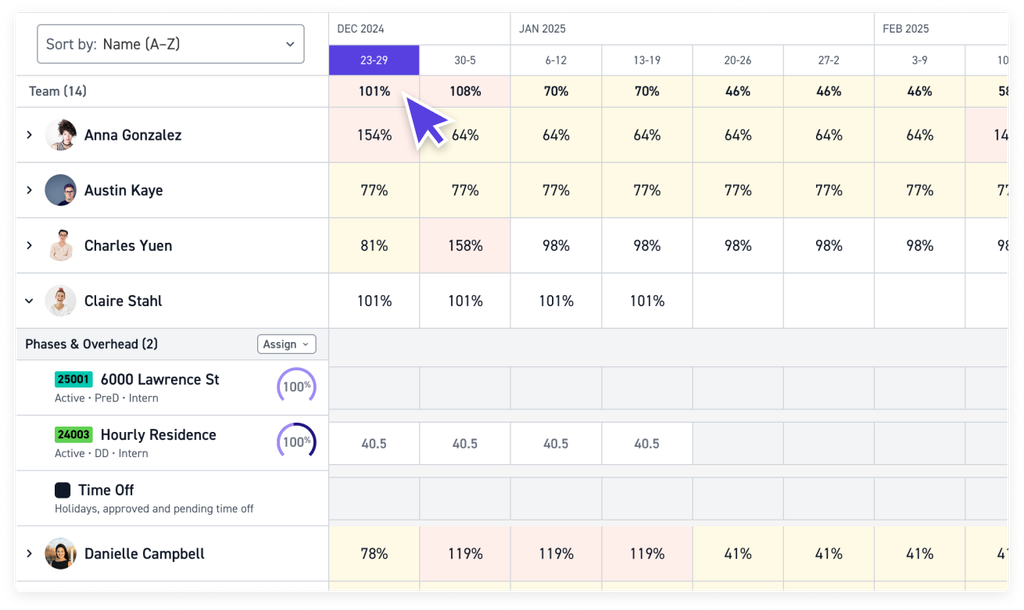
Monograph is a project management and accounting platform built for architectural and engineering firms. Its usefulness in the engineering industry is confined to smaller contractors.
Best use case
Architectural firms, interior design practices, and specialized MEP engineering consultancies.
Core features
- Resource allocation by project phase.
- Fixed-fee/hourly tracking.
- Visual Gantt schedules.
- Invoice generation.
- Project profitability dashboards.
Limitations
- Only useful for AEC professional services firms.
- Lacks capability for discrete manufacturing.
- No PLM integrations.
- No ITAR/DCAA compliance.
Pricing
Monograph pricing starts at $300 per month with a minimum of 5 users.
OpenProject
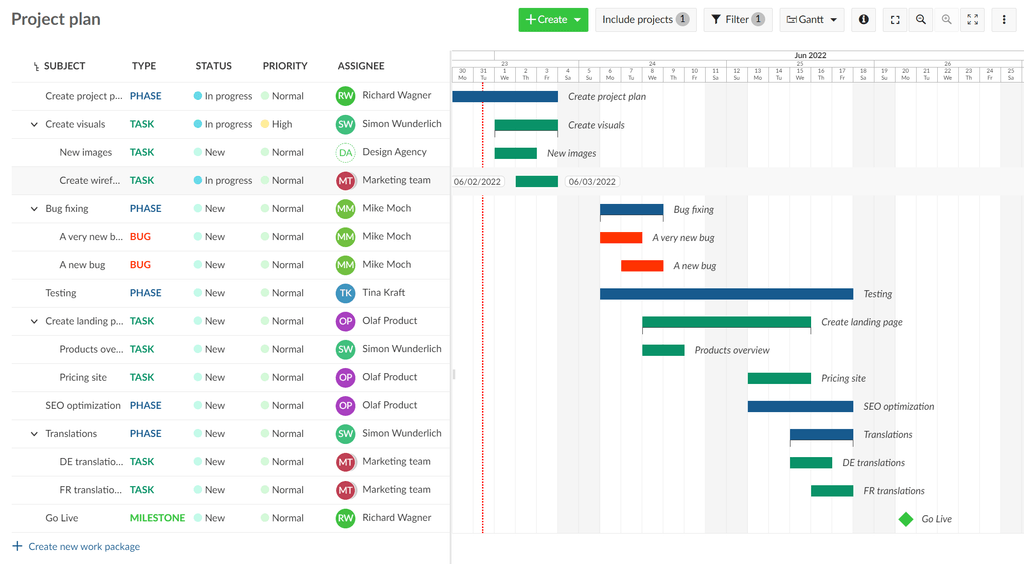
OpenProject is the leading open-source engineering management platform that is free for self-hosted operations. It provides classic project management features with a focus on data sovereignty and GDPR compliance.
Best use case
Organizations requiring open-source code, strict data privacy controls, and self-hosted project/task infrastructure.
Core features
- Gantt charts.
- WBS creation.
- Scrum/Kanban boards.
- Bug tracking.
- Cost reporting.
- Self-hosting/data privacy compliance options.
Limitations
- Requires internal technical expertise to host and manage on-premise.
- Lacks native advanced skill-matrix constraint engines or formal defense EVM systems.
Pricing
Self-hosted service is free for up to 25 users. For the cloud application or the self-hosted version with over 25 users, the price is $7.25 per user per month with annual subscription and significant discounts for multi-year subscriptions.
Enterprise PPM vs. Resource-First Management: Which Layer Do You Actually Need?
In most engineering management software, there are two crucial layers: governance and execution responsiveness. These are not counterparts, rather complementary layers of features and capabilities that are present in different tools up to a different degree.
Governance depth and financial control focuses on top-down control and includes:
- Portfolio prioritization.
- Earned value management.
- Risk management.
- Compliance.
- Accurate resource allocation under projected demands.
Execution responsiveness focuses on bottom-up management of project flow and includes:
- Critical chain management.
- Buffer creation for critical work.
- Dynamic reprioritization.
- Resource overload prediction.
- Proactive responses to resource constraints.
In general, governance can be characterized as the planning layer, and execution responsiveness as monitoring and adaptability layer for cases where not everything goes according to plan.
All tools on the list have some elements of both of these layers to a different degree. Here they are mapped across the two axes.
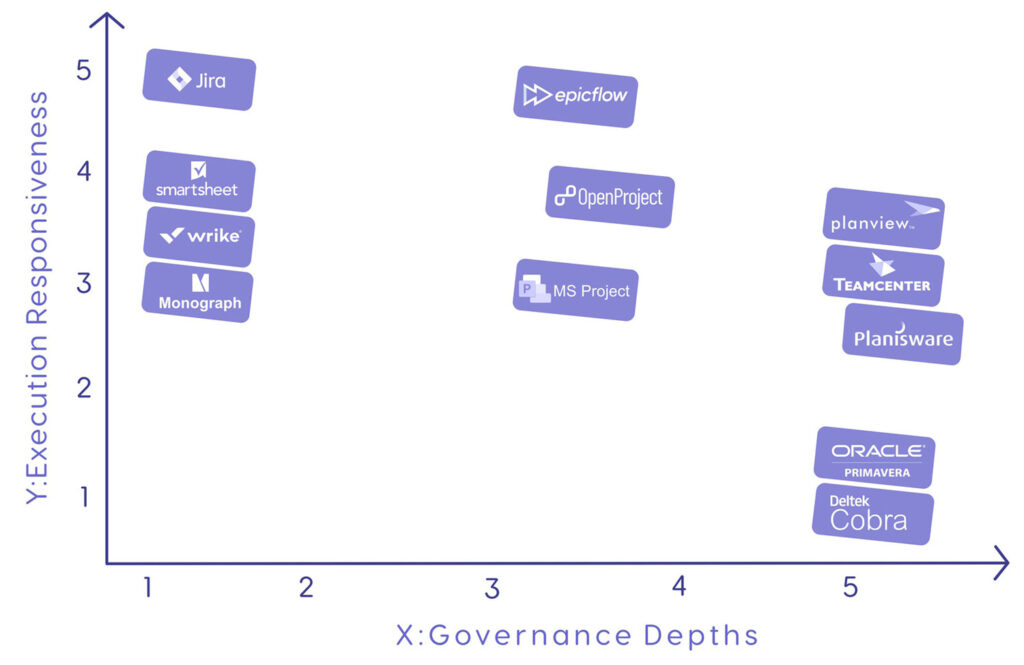
But how do you choose which layer is more important for your specific organization? Here’s a quick comparison matrix for making the choice between the two or settling on a middle-ground solution.
| Governance depth | Execution responsiveness |
| Strict compliance requirements. | Speed-to-market means more than passing audits. |
| Relatively fixed and standardized scopes. | Rapidly changing scopes. |
| Siloed resource pools. | Distributed and shared resource pools. |
| Revenue depends on strict accounting. | Revenue is throughput driven. |
| Standardized administrative scheduling. | Bottom-up scheduling with need for high-level oversight. |
In most cases, an engineering organization has a mix of these factors, and choosing a solution that’s in between governance depth and responsiveness would be the right choice.
How to Choose the Right Tool for Your PMO
Let’s dive a little deeper into choosing the right tool. Here is a quick buyer’s guide for engineering project management software based on a few scenarios.
If you run one program at a time
Engineering organizations that focus on a single program at a time typically don’t face resource contention issues as resources are typically siloed and project progress tends to follow a specific preplanned pattern. This means their need for governance is higher than the need for responsiveness, and they would be better off focusing on tools with higher governance depth.
Good choices in this category are:
- MS Project for a clean Work Breakdown Structure.
- Smartsheet or Wrike as lightweight applications in organizations that don’t require strict formal controls.
- OpenProject for on-premise security.
If you run 10–40 concurrent projects on shared engineering resources
Companies that run multiple projects at the same time with a shared resource pool, resource contention becomes much more of a problem. Tools without proper execution responsiveness might not spot bottlenecks before they appear, leading to significant delays and production issues.
Good choices for this category are:
- Epicflow as an integrated layer on top of an execution tool that can recalibrate priority and availability in real time.
- Jira for companies that deal strictly with software teams.
- Planview or Wrike as lightweight applications striking the middle ground.
If you're an ETO / MTO manufacturer
Engineer-to-Order or Make-to-Order organizations have high needs in both governance and execution responsiveness as they combine the need for engineering software integration, strict controls, and managing shifting scopes.
Good choices for engineer to order software are:
- Siemens Teamcenter for when CAD/PLM integration is crucial.
- Planisware for complex product development cycles with SAP/ERP integration.
- Oracle Primavera for heavy capital project equipment manufacturing.
If you're in defense or aerospace with compliance obligations
Aerospace and defence companies need to focus a lot more on risk management and compliance as legal standards are quite high and cost of failure can be counted in hundreds of millions. However, they also have a moderate to high need for responsiveness to accommodate for changing scopes and supply chain risks.
Good choices for this category are:
- Deltek or Planisware for strict defence compliance and audit trail requirements.
- Oracle Primavera for sub-contractor integration and managing government master schedules.
- Planisware or Oracle Primavera in combination with Epicflow for bridging the gap between governance and managing shared resource pools with an A&D-oriented solution.
A 30-day evaluation checklist
To sum up this guide for choosing the optimal engineering project management tool for your company, here’s a list of questions you can direct towards the vendor before or during the demo:
- How does the software assign a role with specific certifications across several overlapping projects and how it handles conflicts across the shared pool of resources?
- How does the software highlight overload if a resource is under maximum capacity but its allocation conflicts with critical paths of two projects?
- How does the system show milestone changes of a project if several hours are borrowed for a high-priority project?
- Can the system branch live project data into a simulated environment and compare metrics between the two side by side?
- Can the system automatically adjust task queues across dependent projects if a priority of one major project is shifted?
- Does the system automatically update schedule upon a revision in an PLM/CAD tool and how does it manage synchronization errors?
- How billable hours and milestones are logged and exported to the ERP/SAP solution?
- How does the system create a time-stamped audit log and how does it calculate EVM metrics?
- Does the system support customization from company administrators without opening support tickets?
- What does the daily workflow of an engineer look like to enter required data in the software?
- How many full-time administrators or PMO staff are required to manage the system based on previous deployments in similarly sized teams?
Depending on your company’s exact needs, some questions from this list might be more relevant than the others.
Frequently Asked Questions
What is engineering project management software?
Engineering project management software refers to tools that help engineering organizations to organize work across multiple projects in an environment of a shared and constrained resource pool. Engineering PM tools might require different sets of features depending on the specific industry of the organization implementing them and their other tools.
What's the difference between project management software and PPM software?
Project management tools deal with tactical, day-to-day management of project execution, while PPM tools focus on strategic, long-term planning.
Can Jira or Asana work for engineering project management?
Both Jira and Asana are good at managing work in the day-to-day applications, but fail when it comes to high-level planning or resource management.
What is the best project management software for engineers in manufacturing?
What the best engineering project management software is depends on the specific needs of the company. If the goal is to manage audit trails and follow industry regulations, Deltek, Oracle Primavera, or Planisware are good choices. When the primary goal is dynamically steering portfolio execution and eliminating live bottlenecks as capacity changes, Epicflow is the optimal choice. The latter can be used in combination with multiple other tools.
How does multi-project resource management differ from resource scheduling?
Resource scheduling is more of a tactical process that looks at day-to-day activities that need resource investments. Multi-project resource management contains resource scheduling and includes more activities such as strategic portfolio alignment, bottleneck prevention, and handling resource conflicts.
What is Critical Chain Project Management, and do I need it?
CCPM is a project management technique that focuses on tasks that are blocking further progress instead of viewing project progress as a string of tasks with equal importance. It’s an integral part of effective project management in multi-project environments. Critical chain project management software focuses on detecting and managing interdependencies between projects.
Do engineering project management tools integrate with CAD and PLM systems?
Some engineering PM tools do so natively and some don’t. It all depends on the type of software you’re looking at and its intended use.
How much does engineering project management software cost?
Most engineering PM tools operate on a quote-based system. Some start with a public-facing plan with a pre-defined price and set of features. The final price, depending on the software you’re adopting, may range from as little as $12 per user per month to as high as $100,000 per implementation.