Bottlenecks in Project Management: When One Constraint Slows Down Progress
 Anna Balyuk
.
Updated
.
Epicflow Updates
.
21 mins READ
Anna Balyuk
.
Updated
.
Epicflow Updates
.
21 mins READ

You can plan your projects perfectly, allocate resources properly, but still miss deadlines and face low performance. This is because in a multi-project environment, success is largely affected by bottlenecks. They are often invisible and underestimated, but their impact is critical: they cause delays, disrupt workflows, overload teams, and prevent organizations from achieving expected portfolio outcomes.
Read the article to learn more about bottlenecks in project management and how to deal with them effectively to keep your project environments on track.
Key Takeaways:
- A bottleneck in project management is a resource or a process that hampers progress and causes delays across the entire project environment.
- Bottlenecks are common and at the same time dangerous for a multi-project environment; when unmanaged, they cause cascading delays, overload key resources, and reduce overall performance.
- To prevent bottlenecks in projects, you need to balance workloads across projects, reduce the amount of work in progress, prioritize tracking resource performance over project progress, and manage bottlenecks proactively.
- To resolve an existing bottleneck, you need to identify the overloaded resources or processes and what exactly overloads them, reprioritize projects in line with available capacity, and reallocate resources.
What Is a Bottleneck in Project Management?
Let’s start with the bottleneck definition. A bottleneck in project management is a constraint within a workflow that slows down further work, creating a queue of pending tasks and leading to delays and reduced throughput. In multi-project management, it’s not just a single delay but a point that determines the speed and productivity of the entire project system. A bottleneck appears when there's a mismatch between the demand for work and actual capacity to process and inability to handle the workload.
The key symptoms of a bottleneck include:
- Unfinished work piling up
- People waiting for input from the same resources
- Long lead times and frequent delays
- Overloaded team or individuals.
Types of bottlenecks
Despite the diversity of bottleneck types, most of them come down to the inability of a resource to handle their workload and/or finish their work on time.
Resource bottlenecks
Resources become bottlenecks when too much work is assigned to the same person (resource group). Another example of a resource bottleneck in project management is when a key specialist is overloaded. We can also call them a performer-based bottleneck.
Process bottlenecks
This happens when a task or process takes longer than estimated and hampers further project work.
Dependency bottlenecks
When one task or a project is waiting for another to finish, this causes cascading delays across projects.
Decision bottlenecks
These bottlenecks are caused by slow approval from managers or stakeholders.
Technical bottlenecks
These bottlenecks occur when a technology or a technical process limits the speed of work and is slowing down project progress.
As we see, in most cases bottlenecks are caused by excessive workload and the inability of a resource or a resource group to handle work on time.
Why Are Bottlenecks Dangerous for Your Project Environment?
Multi-project environments are most vulnerable to bottlenecks because of shared resources and interdependencies between projects. The effect of even one bottleneck can be dramatic for the entire project environment:
- Cascading delays lead to missed project due dates;
- Overloaded resources are stressed, non-productive, and prone to making mistakes;
- Delays and inefficiencies caused by bottlenecks increase costs;
- Lead times increase, which limits overall throughput and leads to missed opportunities.
As you can see, in a multi-project environment a bottleneck doesn’t just slow down work, it hampers performance of the entire system.
At Epicflow, we believe that the main cause of bottlenecks in a multi-project environment is overload. This is why one of the essential rules of the Epicflow approach to resource management in a multi-project environment runs “Make sure not a single resource is overloaded”.
At one point, a large defense program at the Dutch Ministry of defense was running hundreds of projects simultaneously, all treated as equally important. On paper, everything was funded and approved, but in reality, the progress was painfully slow:
- Engineers were assigned to multiple projects at one, overloaded with massive tasks, while new projects kept starting without considering actual capacity.
- Work piled up around a few critical specialists, creating hidden bottlenecks that blocked the entire workflow.
- Delays spread from one project to another and most projects were about to miss their due dates by hundreds of dates.
- Achieving the expected portfolio outcomes seemed impossible without adding more resources.
The real issue was unmanaged bottlenecks that silently controlled performance of the entire system.
By implementing Epicflow, the organization gained full visibility into resource workloads and system constraints, which helped identify bottlenecks and prioritize work more effectively. Asa result they were able to rebalance workloads, reduce delays, and significantly improve the overall performance on their portfolio.
4 Important Steps to Prevent Bottlenecks in Projects
Don’t overload your resources
As we’ve figured out, one of the main causes of bottlenecks is overload. To prevent your team members from overload, you need to make sure that:
- You perform resource capacity planning and plan each new project in line with real-world capacity of your resources;
- You allocate resources in line with their competencies, capacity, and availability;
- You don’t assign work to 100% of available capacity;
- You don’t assign large time-consuming tasks to a single person;
- You balance workloads across projects.
Monitor resource performance regularly
Focusing on project progress and underestimating the importance of tracking resource performance is a typical mistake of work in a multi-project environment. However, resource performance is the key indicator of the project environment's health: if resources aren’t overloaded and cope with their workload well, the risk of bottlenecks and delays is minimal. Also, resource performance analysis helps you identify bottlenecks early on, before they affect the entire project environment and cause cascading negative impacts.
Control work-in-progress
If overload is the key factor causing resource bottlenecks, too much work in progress is what leads to overload. Executing too many parallel projects spreads available resources too thin instead of focusing them on the most important work. How to reduce work-in-progress?
- Perform portfolio rationalization to identify which projects are still worth the effort, which can be postponed or even terminated; this will free resources’ capacity for the most valuable initiatives.
- Make sure that team members know task priorities: this will eliminate multitasking, overload, and will help execute the most parts of a project on time.
Take a proactive management approach
Proactive approach to managing projects means forecasting potential difficulties and preventing them rather than reactive firefighting. For example, you can forecast future workload of your resources and notice periods of overload – this is where bottlenecks are likely to occur. So, you can balance workload across projects in advance and, by doing so, prevent future bottlenecks. Also, you can perform scenario analysis to predict future issues and test the ways to prevent them: reallocate resources, reschedule projects, move the due date, etc.
How to Manage Bottlenecks?
It’s hard to imagine a complex multi-project environment without a single bottleneck. Though we always try to do our best to avoid them, they can appear in resource-constrained project settings. So, upon detecting the symptoms of bottlenecks listed above, you can take the following steps.
1. Identify the bottleneck.
Use project management tools or real-time dashboards to detect overloaded resources or resource groups: these are the points where demand will exceed available capacity. Then, figure out what projects and tasks cause the overload. You can also detect bottlenecks by analysing task queues and work stages where work is piling up.
2. Prioritize work based on the constraint.
Assess your current project environment and the value of each project in execution. Prioritize the ones with the highest business value to focus constrained resources on the most important work and free up their capacity. If possible, reschedule lower-value projects for later.
3. Reallocate resources.
As soon as you’ve reprioritized projects or created a new portfolio environment with the selected highest-value projects, it is time to reallocate resources and focus them on the most important work.
4. Perform scenario analysis.
To be more confident in your resource allocation decisions, you can use scenario analysis to simulate changes like adding resources, delaying projects, changing priorities, etc. This helps select the right course of action on the first try and improve project flow immediately.
5. Monitor and adjust continuously.
As multi-project environments are dynamic, you need to monitor them on a regular basis to spot bottlenecks early on and make sure that projects are on the right track.
Effective bottleneck management becomes possible with right software – the one designed for managing multiple projects and having advanced capabilities. We’ll consider the bottleneck management capabilities of such tools through the example of Epicflow in the next section.
Managing Bottlenecks with Epicflow
Epicflow, being a specialized multi-project and resource management software, treats bottlenecks with particular attention. Its functionality makes it possible not only detect bottlenecks but also predict them, find their causes and ways to resolve them.
How to find a bottleneck with Epicflow
You can detect bottlenecks with the help of a Future Load graph. Let us briefly remind you of the way this graph’s data should be interpreted. The Future Load graph shows the resource workload in the future based on the resources’ capacity and demand up to a date you select in the calendar. Its Y-axis shows FTE (full-time equivalent = 8 man-hours) and the Z-axis shows a time frame. The zero line represents an employee’s or a group’s capacity.
- If the graph is under the zero line, the resource or the group is underloaded (has less tasks than they are capable of doing),
- If it’s over the zero line, they’re overloaded (can’t cope with their tasks), which means there’s a bottleneck hampering your workflow.
How to find the source of a bottleneck
Epicflow team has developed three essential features that will help you analyze the workload of your resources, predict and avoid bottlenecks: Load Analysis, Inactive Analysis, and Bottleneck Analysis. All of them are available on the Future Load graph, which in turn now can be opened either from the Pipeline or the Task List’s Group tab. From both places you can analyze the load of individual resources and resource groups and check the projects and tasks that are causing the overload. What’s important, the analysis is carried out automatically, and you don’t have to make any calculations. It can be done with a few clicks. Let’s consider these features in more detail.
Load Analysis
With the Load Analysis feature, you can get information about the tasks and projects they belong to, which are overloading your resources or resource groups. You can further use this data to balance workload by moving milestones or reassigning the tasks to other employees or groups. You can choose one or several groups and check their workload on the Future load graph. Then just select the period on the graph where you can see overload of the chosen group and ask Epicflow to perform a load analysis.
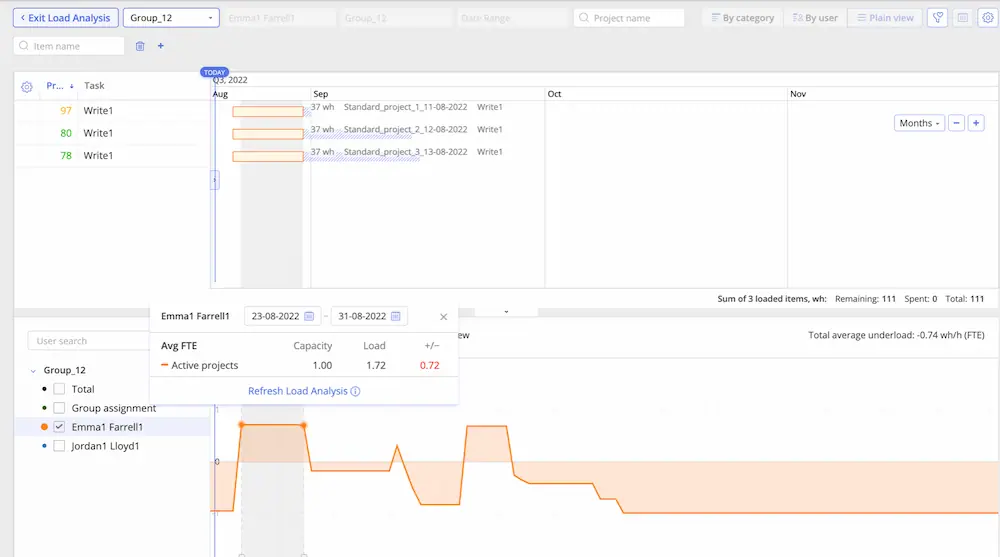
In a couple of seconds you will see the list of tasks (with all related information) overloading the resource/group. At that, you can switch between the modes (plain, category, user) for a detailed analysis.
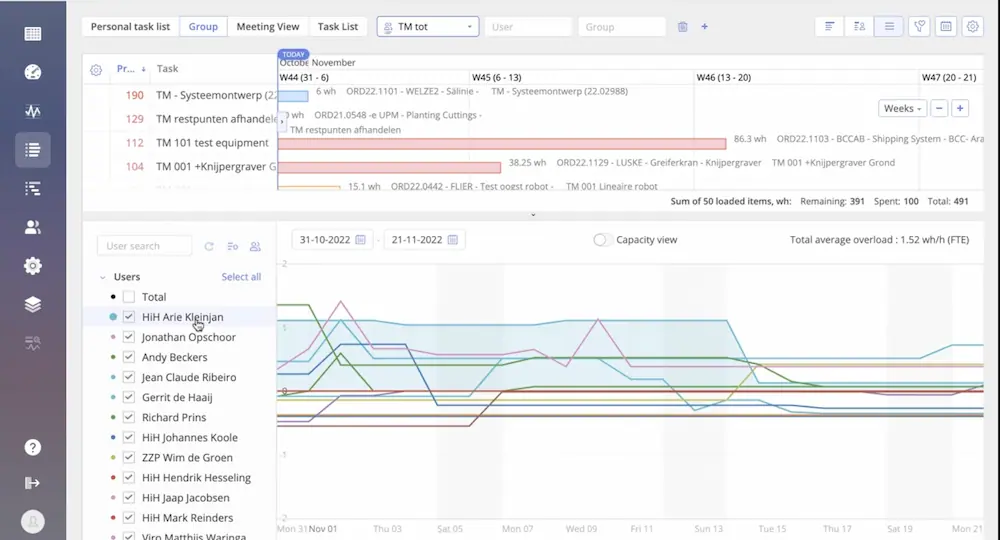
You can move milestones to balance the workload of the overwhelmed groups. Besides, from this page, you can jump to the Task Card to see what competences are required for its completion and find an available resource with the same skills to reassign this task to (within the selected group or outside this group).
Watch a video to see Load Analysis in action:
Bottleneck Analysis
With this feature, you can not only see how loaded your resources are within the chosen timeframe, but check the most overloaded one(s) and take measures to eliminate this bottleneck(s). You can order groups by the criteria as shown in the picture below:
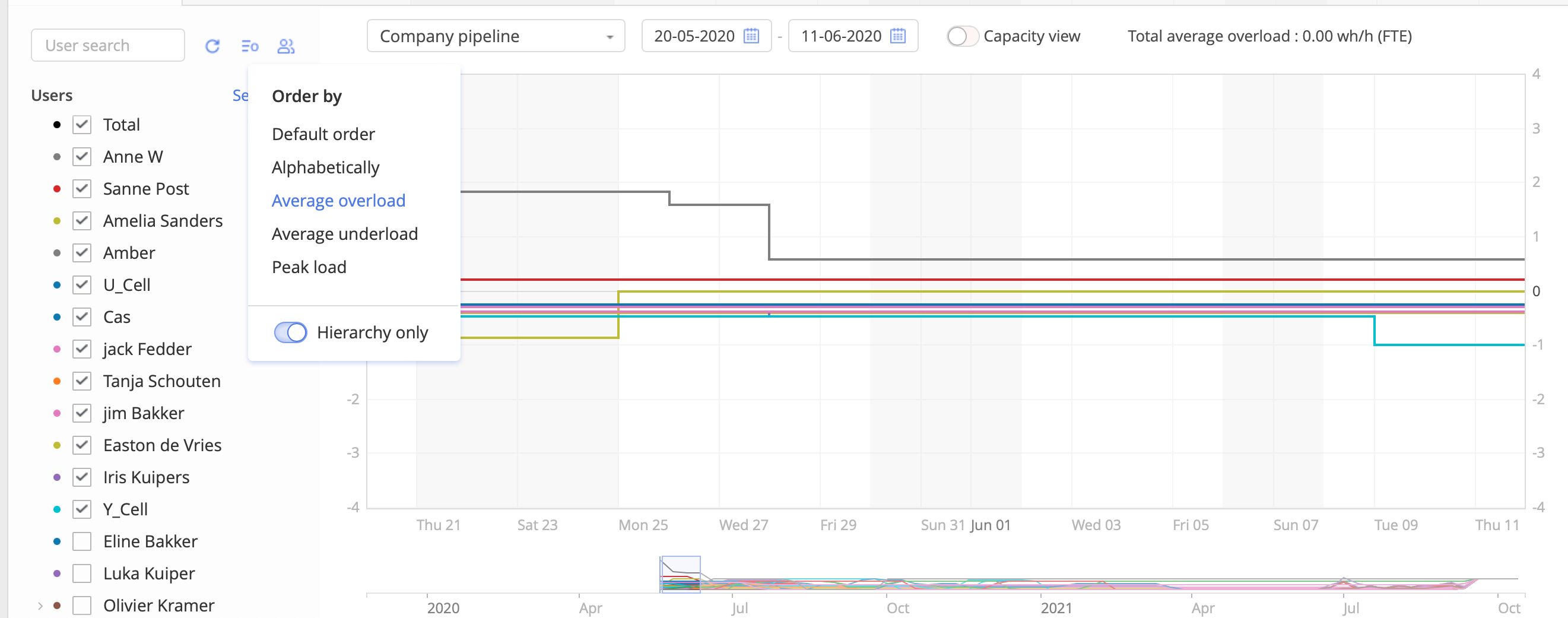
As you can see in the picture, when the load of multiple resources is shown, the graph may look rather messy, which complicates the analysis. To understand what is overwhelming your most loaded employees, you can order deselect all and then select only one or several groups from the top (the most overwhelmed ones). Take a look at the picture below.
Now you have a clear view of your most loaded groups and can make the Load Analysis and then takes measures to balance it. Having reviewed the tasks that are overwhelming your resources, you can either move a milestone and see if this helps avoid overload in the future or open a Task Card of the most constraining task and go to the Resource Allocation Advisor to find another resource or a resource group for it (the one who has necessary competences, capacity, and is currently available). It also may happen that there are no suitable resources for the task in the group, so you can look for another resource outside this group.
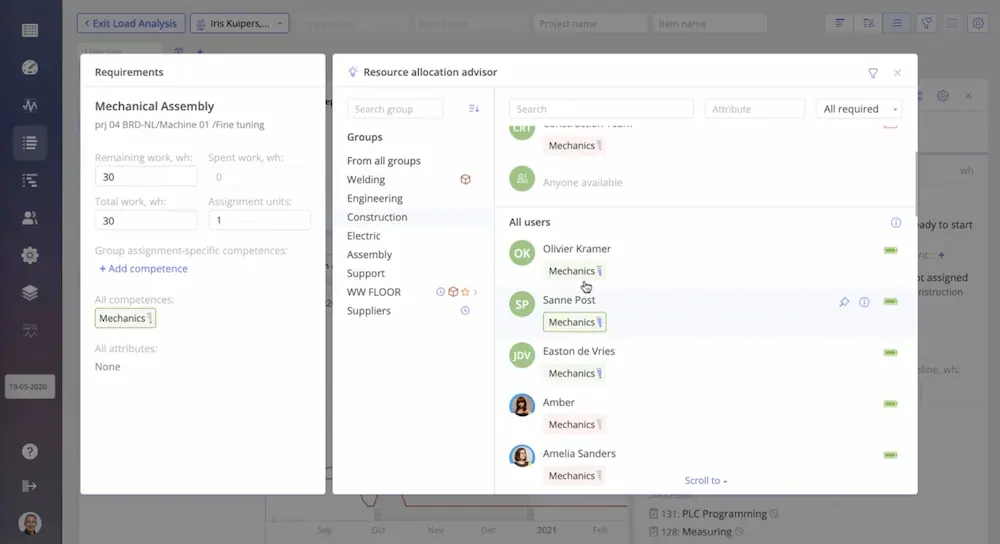
Watch this video to see Bottleneck Analysis in action:
Inactive Project Load Analysis
Besides, now Epicflow users can make a more detailed load analysis involving inactive projects. The Inactive Load Analysis feature makes it possible to see how loaded your resources will be in the future if you initiate them. You can filter your resource groups to see how exact group or individual resource will be loaded by the new amount of work. Take a look at the picture below.
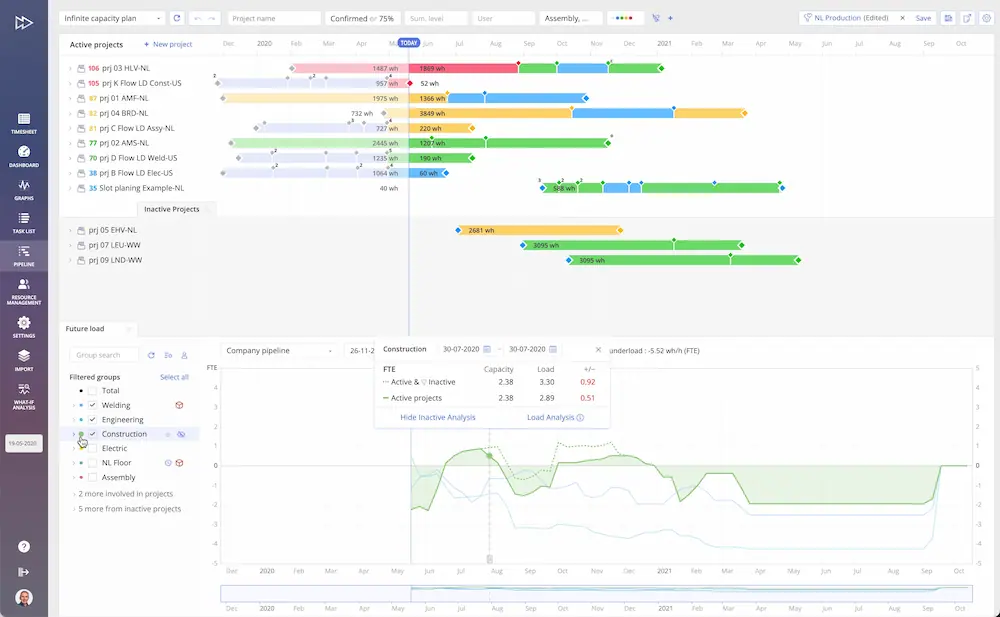
The load created by the inactive projects is presented by the dashed line on the graph. All necessary calculations are presented in the Load Analysis box. As you can see, we're lacking 0,51 FTE with the active projects running together, and if we initiate the inactive projects, the figures will increase to 0.92 FTE. This means that we don't have enough capacity in the selected group to cope with the demanded scope of work. If details of the inactive project are available, you can check what tasks are expected to overwhelm your resources and take measures (move milestones, reassign tasks, or hire extra resources) to avoid the bottleneck.
Watch this video to see Inactive Analysis in action:
To learn more about our new features and to see Epicflow in action, don’t hesitate to contact us or book a demo at your convenience.
Frequently Asked Questions
What are bottlenecks in project management?
In project management, bottlenecks are resources or processes that hamper further work due to limited capacity and cause delays and reduce overall efficiency. Bottlenecks impact performance most negatively in multi-project environments.
What are examples of bottlenecks?
To understand bottleneck meaning in project management, here are some common examples: overloaded resources, slow approval processes, limited testing environments, task dependencies, outdated tools or equipment that delays work.
How to avoid bottlenecks in project management?
To avoid project bottlenecks, you need to balance team members’ workloads to avoid overload, plan resource capacity, limit work in progress, set the right priorities, and monitor resource performance.
What is bottleneck management?
Bottleneck management is the process of identifying, controlling, and optimizing constraints to improve workflow and overall system performance.
What are the 4 principles of bottleneck management?
The four principles of bottleneck management include:
- Identifying the bottleneck
- Prioritizing and optimizing it work
- Aligning the rest of the system with it
- Monitoring continuously
How to do bottleneck analysis?
Identify where work accumulates, compare demand with capacity, find the root cause of delays, and determine which resource or process limits overall performance.
How to identify bottlenecks in project management?
Look for overloaded resources, growing task queues, repeated delays at the same stage, and tasks waiting for the same person or process.
What is a bottleneck in Agile?
In Agile, a bottleneck is any stage of the workflow where work accumulates and slows down the delivery of user stories.
What is a bottleneck in business?
A bottleneck in business is any constraint that limits the performance or output of a process, system, or organization.