10 Best Aerospace Project Management Tools for Defense Contractors
 Victoria Sokolova
.
Published
.
Project Management
.
50 mins READ

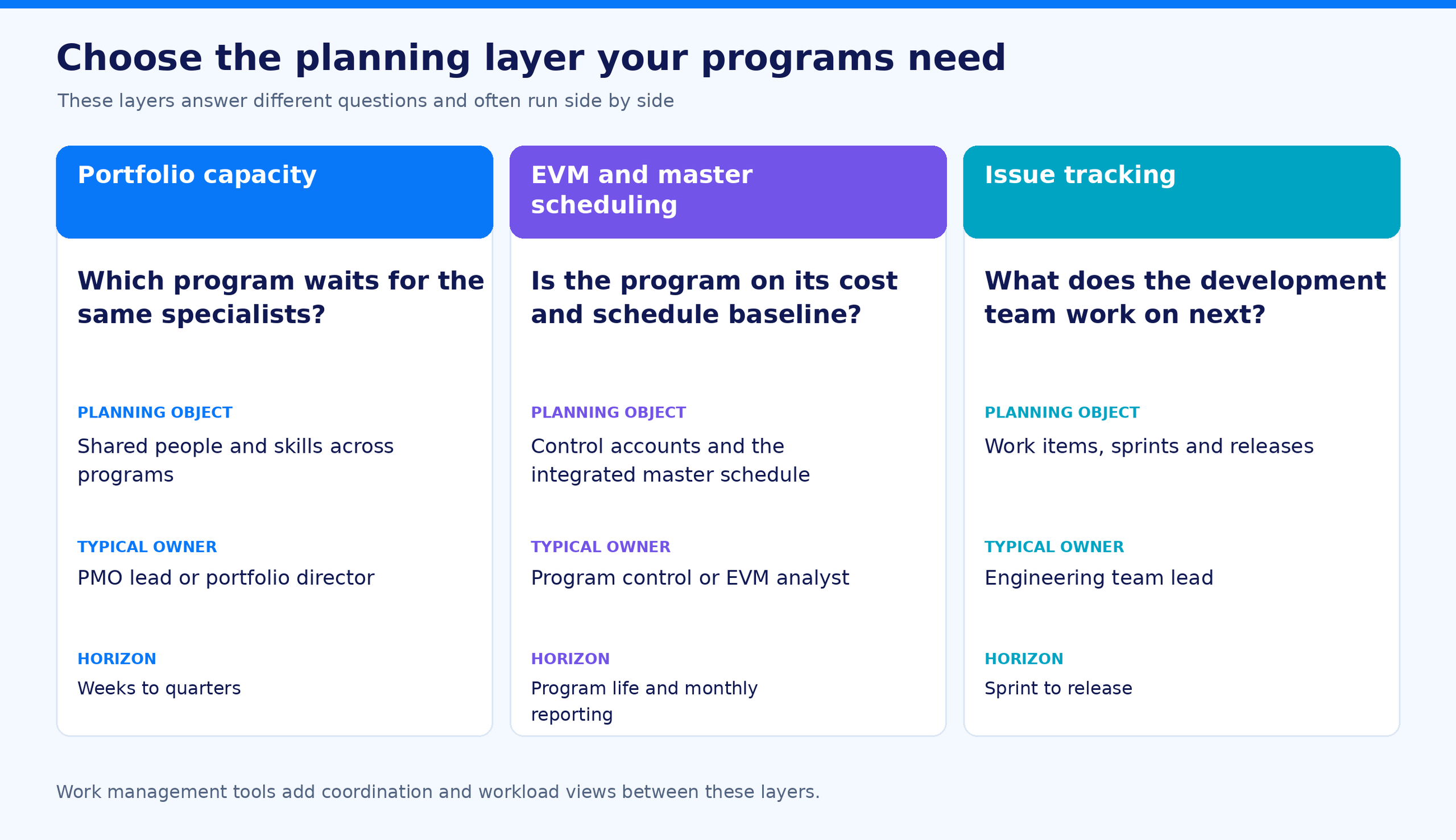
Aerospace project management tools fall into three camps. EVM and master scheduling systems answer whether a program is on its baseline. Portfolio capacity tools answer which program waits when the same test engineers are needed by two programs at once. Issue trackers answer what a development team does next. Most defense contractors run two of the three, and the camp that matters most depends on where programs actually lose time.
This list is for PMO leads and portfolio directors at aerospace and defense contractors and suppliers. It compares 10 aerospace project management tools on the same questions, with facts checked on official vendor pages on November 5, 2026, and shows which requirements rule each tool out.
Which Aerospace Project Management Tool Fits Your Planning Problem?
In this list, an aerospace project management tool plans or controls engineering work across several programs: schedules, shared specialists, cost and the records an audit asks for. We include the EVM and master scheduling systems that PMOs in the aerospace industry use as their schedule of record, because buyers shortlist them, and we label their camp. Out of scope: PLM, MES and quality management systems, and the aerospace ERP that runs inventory, procurement, the aerospace supply chain and aircraft maintenance management.
| Aspect | Portfolio capacity planning | EVM and master scheduling | Issue tracking |
|---|---|---|---|
| Core question | Which program waits when the same people are needed twice, and what does that cost? | Is the program on its cost and schedule baseline? | What does this team work on next? |
| Planning object | Shared specialists and skill groups across programs | Control accounts and the integrated master schedule | Work items, sprints, releases |
| Horizon | Weeks to quarters, whole portfolio | Program life, monthly reporting | Sprint to release |
| Typical owner | PMO lead, portfolio director | Program control, EVM analyst | Engineering team lead |
A program can be green on its EVM baseline and still lose three weeks in the test lab because another program got the engineers first. That gap is why many aerospace and defense teams run a capacity tool next to their EVM system.
Quick picks by situation. Use these to shortlist aerospace project management tools by the problem you need solved. Epicflow publishes this comparison and sells one of the tools in it. The organizations below are examples.
- A tier-1 supplier with 30 programs, 150 engineers and 8 test engineers shared by all of them, with late-delivery penalties in most contracts: Epicflow or Planisware. Deciding check: load two programs that share the test team and ask each tool which program waits and what that week costs.
- A defense prime with a validated EVMS and monthly IPMDAR submissions: Deltek Cobra and Open Plan or antaivo by Cora. Deciding check: produce one IPMDAR submission from your own control accounts during the demo.
- An aircraft or satellite program whose integrated master schedule is maintained by a planning team: Primavera P6 EPPM or Microsoft Project. Deciding check: import your schedule and run resource leveling on the roles that are your bottleneck.
- A 200-person engineering services firm coordinating documents and approvals with a federal customer: Smartsheet or Teamhood. Deciding check: whether controlled unclassified information will sit in the tool. Smartsheet Gov holds a FedRAMP Moderate authorization; Teamhood states it holds no FedRAMP authorization.
- An avionics development team that must keep work items inside its own network: Plane self-hosted or Airgapped, or Jira if you already hold a Data Center license. Deciding check: Jira Data Center is no longer sold to new customers, so confirm your license path before the pilot.
Screen Hosting and Compliance Before Features
Two questions eliminate aerospace project management tools before any demo: will controlled data sit in the tool, and where must that data live?
Controlled unclassified information. If covered defense information will be stored in a vendor's cloud, DFARS 252.204-7012 requires that the cloud provider meet security requirements equivalent to the FedRAMP Moderate baseline. If the provider does not, choose an on-premise or self-hosted deployment. Data that is only federal contract information carries no FedRAMP requirement.
ITAR. No product holds an ITAR certification. ITAR requires authorization from the State Department's Directorate of Defense Trade Controls before technical data is released to foreign persons, including inside the U.S. Unclassified technical data stored with end-to-end encryption that meets the conditions of 22 CFR 120.54(a)(5) is not an export. Ask each vendor who can access your data and in which countries it is stored.
CMMC. CMMC Level 2 assesses the 110 security requirements of NIST SP 800-171 Rev 2. A tool that stores or processes controlled unclassified information is in scope. The program is phased into contracts over several years, so check each solicitation for the level and assessment type it requires.
Quality and supplier registration. AS9100, the quality standard of the aerospace industry (EN 9100 in Europe), certifies the supplier's quality management system, not the tool. The tool has to produce the records your auditors request. In the UK, aerospace and defense supply chains use JOSCAR to pre-qualify suppliers, so ask whether the vendor is registered.
Each profile below lists the deployment options the vendor documents.
How We Built This Shortlist
Epicflow publishes this comparison and sells one of the products in it. It is listed first, and the order groups tools by the planning problem they solve rather than ranking them. On November 5, 2026 we reviewed official product, pricing, documentation and trust pages for 13 aerospace project management tools. We included a tool if its vendor documents planning or tracking work across multiple projects, and its official pages address aerospace, defense or government buyers through an industry page, a government edition or authorization, or a customer story.
We compared the planning object, cross-project capacity, scenarios, delay and contract economics, earned value, deployment for controlled data and published prices. This is documentary research: we did not run hands-on trials, interview users or score the products. A capability we could not find on official pages is marked "not verified", which does not mean it is missing.
Reviewed but not included:
- Celoxis: documents multi-project capacity and an on-premise option, but covers the same situation as Smartsheet and Teamhood in this list.
- Planview Portfolios and AdaptiveWork (project portfolio management): Planview's official pages show no aerospace and defense industry page, and its aerospace customer story (LISI Aerospace) uses Planview ProjectAdvantage, a different product.
- Azure DevOps: covers the same situation as Jira; Microsoft documents that Azure DevOps Services is not available in GCC or Azure Government, where Azure DevOps Server is the documented path.
Read more: Aerospace Program Management: A Practical Guide for PMO Leads
Aerospace Project Management Tools Compared
Facts for all 10 aerospace project management tools were checked on November 5, 2026. Prices are published list prices per user (or member) per month with annual billing, in the vendor's currency, unless the cell says otherwise. They are not total cost: implementation, connectors and hosting are extra. "Not verified" means we did not find it on official pages. The order follows the camps above and is not a ranking.
| Tool | Camp | Cross-project capacity | Scenarios | Delay and contract economics | Earned value | Deployment for controlled data | Published entry price |
|---|---|---|---|---|---|---|---|
| Epicflow | Portfolio capacity | Native: future load per skill group and per project | Native: What-If Analysis (Enterprise) | Native: cost of each week of delay, bonus and penalty, cash flow forecast (Enterprise) | Not an EVMS; runs alongside yours | On-premise available. Hosted on ISO 27001-certified infrastructure | EUR 22.50 (Growth), from EUR 45 (Enterprise, minimum 50 users) |
| Planisware | Enterprise PPM | Native: bottleneck and supply vs. demand vs. capacity views | Native: what-if and scenario analysis | Not verified | Native, with IPMDAR reports | SaaS, on-premise, air-gapped | Quote only |
| antaivo by Cora | Enterprise PPM | Native: capacity across every project | Native: what-if and scenario modeling | Not verified | Native, ANSI/EIA-748-aligned | Cloud or on-premise; FedRAMP Moderate Ready | Quote only, platform fee with unlimited users |
| Oracle Primavera P6 EPPM | EVM and master scheduling | Native: role-based capacity planning, cross-project leveling | Native: what-if on the Capacity Planning page | Not verified | Not verified | On-premise or cloud | Not verified |
| Microsoft Project | EVM and master scheduling | Configured: shared resource pool in Project desktop | Native in Project Server Subscription Edition portfolio analysis (analysis only) | Not verified | Not verified | Project desktop in GCC High and DoD; Project Server Subscription Edition on-premise | USD 10 (Planner Plan 1), USD 30 (Planner and Project Plan 3) |
| Deltek Cobra and Open Plan | EVM and master scheduling | Native: multi-project resource loading in Open Plan | Native: what-if replanning in Open Plan | Not verified | Native: supports an EIA-748-compliant EVMS, IPMDAR | Not verified for Cobra and Open Plan | Quote only |
| Smartsheet | Work management | Add-on: Resource Management in percent, hours per day or total hours | Native in Enterprise: Scenario Planning, up to 3 scenarios and 5 sheets | Not verified | Not verified | Smartsheet Gov: FedRAMP Moderate, DISA IL4 | USD 9 (Pro), USD 19 (Business) |
| Teamhood | Work management | Native: planned hours per person across projects | Not verified | Not verified | Not supported (documented) | Enterprise on-premise or hybrid; no FedRAMP authorization | USD 12, from 3 users |
| Jira (Cloud Premium) | Issue tracking | Native at team level in Plans | Native: plan scenarios (Premium) | Not verified | Not verified | Atlassian Government Cloud: FedRAMP Moderate | USD 8.48 (Standard), USD 15.56 (Premium), tiered by user count |
| Plane | Issue tracking | Not supported (documented) | Not verified | Not verified | Not verified | Self-hosted; Airgapped Edition from 100 seats | USD 6 (Pro), USD 13 (Business) |
The 10 Aerospace Project Management Tools, Compared on the Same Questions
Tools 1 to 3 plan capacity across the portfolio. Tools 4 to 6 are EVM and master scheduling systems. Tools 7 and 8 are work management tools with workload views. Tools 9 and 10 are issue trackers for development teams.
1. Epicflow for deciding which program waits when the same specialists are needed twice
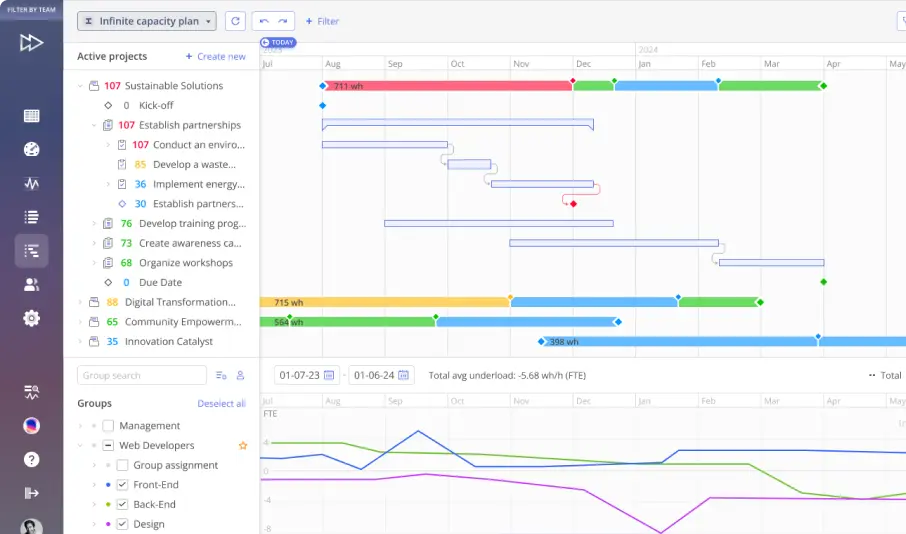
Epicflow is a portfolio platform that plans multi-project engineering work around finite specialist capacity. It fits PMOs whose test, certification or systems engineers serve 10 to 100 programs.
What you can do: sync project plans from Microsoft Project, Primavera P6 or Jira, see the future load of every skill group across all programs, and test a re-sequence in What-If Analysis before the live plan changes (Enterprise).
What differs: every week of delay is costed per task and project, alongside contract bonus and penalty, revenue and margin, and an invoice and cash flow forecast derived from the schedule (invoiceable value and payment timing, not a bank balance). The Epicflow Portfolio Optimizer, delivered as PMO as a Service, returns a proposed project order as a What-If next to the live plan.
What is needed: effort on every task (required), skill groups, due dates and, for the money view, project revenue and penalty terms. Enterprise includes the Microsoft Project and Primavera P6 connectors; Jira is a separately priced module.
Pricing: Enterprise from EUR 45 per user per month billed annually (EUR 50 monthly), minimum 50 users. Growth (EUR 22.50 billed annually, 20 to 50 users) lacks What-If Analysis and the cost of delay and cash flow features.
Where it may not fit: Epicflow does not replace an EVM system, ERP, PLM or issue tracker; teams keep working in their own tools. Fewer than 10 concurrent programs, or a dedicated team per program, gains little. On-premise deployment is available. Hosted on ISO 27001-certified infrastructure. JOSCAR-registered.
Evaluate next: load two programs that share a test team and check which one waits.
Sources: Epicflow pricing page; Epicflow AI project management page.
2. Planisware for enterprise portfolios that need capacity, cost and government reporting in one system
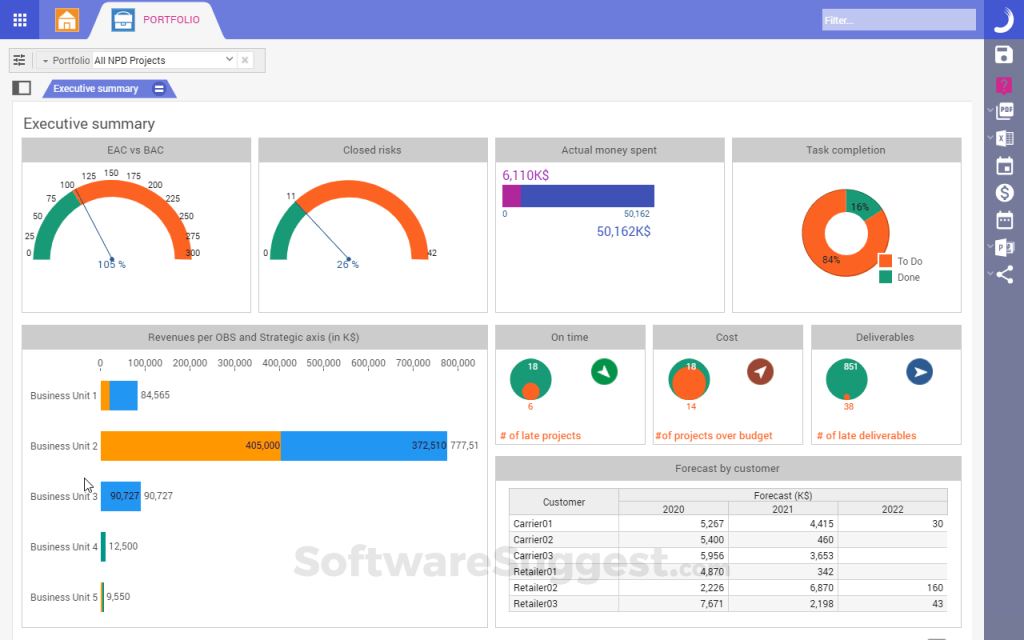
Planisware fits a large aerospace and defense contractor that wants one enterprise project portfolio management system for portfolio selection, resource capacity, cost and government-mandated reporting. Its aerospace and defense page shows Airbus, Safran, Northrop Grumman, L3Harris and CAE among its users.
What you can do: in Planisware Enterprise, find over-allocations in the Resource Bottleneck and Supply vs. Demand vs. Capacity views, then simulate resourcing changes with what-if tools and see the impact across the portfolio. Planisware Orchestra, the packaged edition, plans capacity and the skills inventory and prioritizes at portfolio level with scenario analysis.
What differs: earned value management and government-mandated IPMDAR reports run in the same platform as portfolio planning.
What is needed: an enterprise implementation; Planisware does not publish implementation timelines on the pages we checked.
Pricing: not published. Quote only.
Where it may not fit: we did not find contract penalty or cost-of-delay modeling documented; ask for it in the demo if your contracts carry delivery penalties. FedRAMP is not mentioned on the pages we checked. Deployment: SaaS, on-premise and air-gapped, and Planisware states support for "ITAR-sensitive programs".
Evaluate next: ask for the bottleneck view on your own shared roles and an IPMDAR export from the same data.
Sources: Planisware Aerospace and Defense page; Planisware Enterprise page; Planisware Orchestra page; Planisware government page.
3. antaivo by Cora for contractors that run EVM and portfolio capacity in one platform
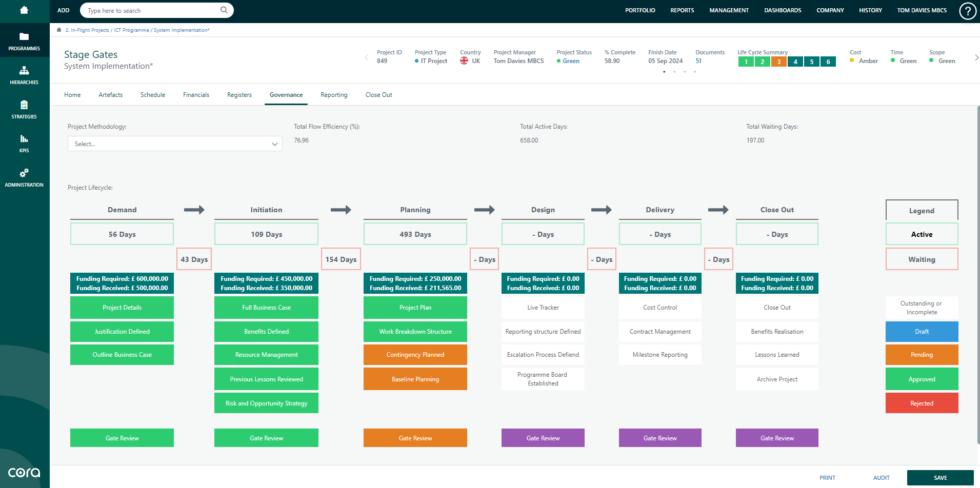
Cora Systems now brands its project portfolio management platform antaivo by Cora; its government pages still call it Cora PPM. It fits government contractors and aerospace and defense programs that want earned value next to portfolio and resource planning. Its aerospace and defense page features a case study from MDS Aero.
What you can do: see resource capacity across every project, run what-if scenarios to assess capacity during bid management, and use scenario modeling to compare portfolio configurations.
What differs: Cora describes its earned value as "ANSI/EIA-748-aligned", with CPI and SPI, control accounts and performance measurement baselines, and says it supports EVMSIG and EIA-748-D guidelines for DCMA oversight.
What is needed: a choice of tier (Standard, Premium or Enterprise); agent groups and integration modules cost extra.
Pricing: quote only. Every tier includes unlimited users and is priced as a platform fee; currency and minimum are not stated.
Where it may not fit: Cora is "FedRAMP Moderate Ready" and listed on the FedRAMP Marketplace since March 2025, which is not the same as Authorized. The government cloud behind the hosted option is not stated, so confirm data location before controlled data goes in. On-premise deployment is available.
Evaluate next: run a month-end EVM close and a capacity what-if on the same program.
Sources: Cora Systems homepage; Aerospace and Defense page; government contracting page; project portfolio management page; antaivo pricing page; FedRAMP Ready announcement (March 13, 2025).
4. Oracle Primavera P6 EPPM for master schedules maintained by a planning team as the schedule of record
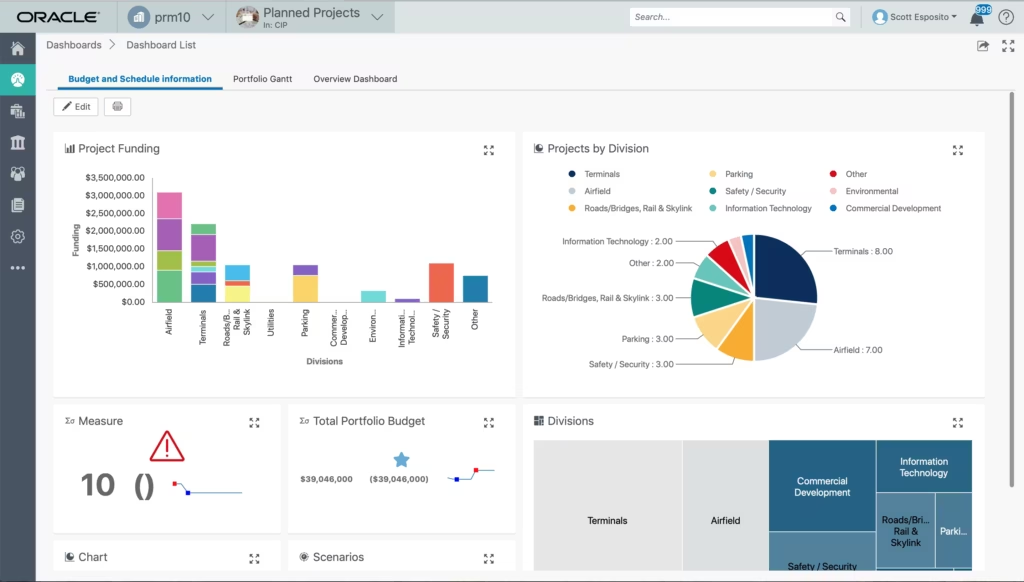
Primavera P6 Enterprise Project Portfolio Management fits primes and integrators whose integrated master schedule is the contractual schedule of record. Oracle describes it as a way to "prioritize, plan, manage, and execute projects, programs, and portfolios", on-premises or in the cloud.
What you can do: level resources across projects by priority, so assignments in other projects with equal or higher priority are considered. On the Capacity Planning page, run what-if analysis, change project forecast dates, apply waterline analysis, then build portfolios of the projects that meet your planning criteria.
What differs: Oracle Primavera Cloud, the related cloud product, adds role allocation scenarios and an Optimization tool that selects projects under input constraints.
What is needed: role estimates per project, because capacity planning in P6 EPPM works by role.
Pricing: not verified; Oracle's product and pricing pages were unavailable during our check.
Where it may not fit: a specialist shared by several programs is planned through role estimates rather than as an individual constraint. Cost of delay and contract penalties were not documented on the pages we checked. Oracle announced a FedRAMP "In Process" designation for Primavera Cloud in January 2026; FedRAMP status for P6 EPPM was not verified.
Evaluate next: import your schedule and run a Capacity Planning what-if on your bottleneck roles.
Sources: Oracle Primavera P6 EPPM documentation (Capacity Planning, Leveling); Oracle Primavera Cloud user documentation (resource planning scenarios); Oracle announcement of January 21, 2026.
5. Microsoft Project for critical-path schedules in Microsoft-standardized program offices
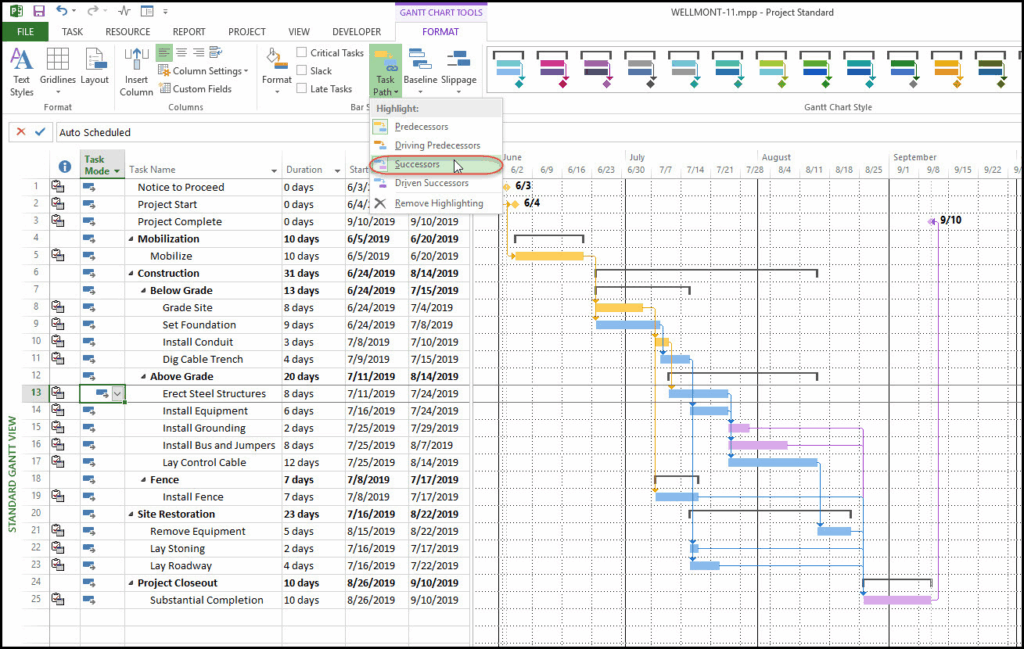
Microsoft Project fits program offices on Microsoft 365 that need critical-path schedules and a shared resource pool. Edition matters in 2026. Project Online retired on September 30, 2026, and Project for the web moved into Microsoft Planner's premium plans in August 2025. Project desktop and Project Server Subscription Edition remain supported.
What you can do: in Project desktop, combine resource information into a shared resource pool, so overallocations caused by assignments in several projects become visible. In Project Server Subscription Edition, portfolio analysis models new hires, moved start dates and forced-in projects, and compares saved scenarios.
What differs: availability in government tenants. Project desktop is available in GCC, GCC High and DoD subscriptions; the Planner premium plans are available in GCC but not yet in GCC High or DoD.
What is needed: the edition that matches your tenant; a move plan if you were on Project Online.
Pricing: Planner Plan 1 USD 10 and Planner and Project Plan 3 USD 30 per user per month, paid yearly. Project Server Subscription Edition is sold through volume licensing; prices are not published.
Where it may not fit: Microsoft notes that the portfolio resource analysis "won't affect the resource allocation of your projects. It's just an analysis tool." Cross-project leveling is not documented on the pages we checked.
Evaluate next: rebuild one shared resource pool with two live programs and see how overallocations get resolved.
Sources: Microsoft Lifecycle pages (Project Online, Project Server Subscription Edition); Microsoft Planner blog post on the Project Online retirement (updated August 24, 2026); Project desktop and Project for the web service descriptions; Microsoft Support resource pool article; Microsoft Learn "Analyzing portfolios"; Planner plan pages.
6. Deltek Cobra and Open Plan for EVMS reporting to DCMA and the customer
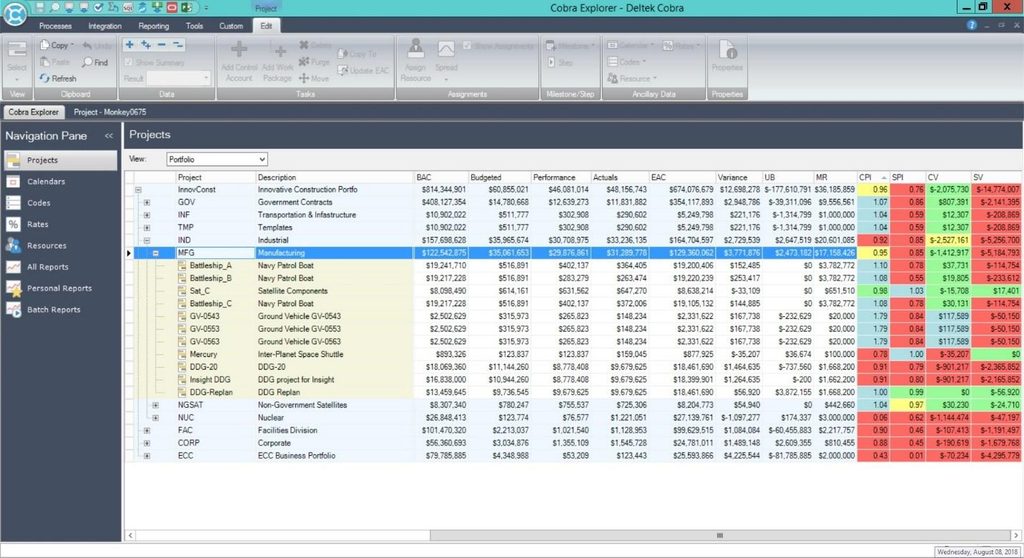
Deltek Cobra and Deltek Open Plan fit defense primes and subcontractors whose contracts require an EIA-748-compliant earned value management system and IPMDAR reporting. Deltek states that "9 of the top 10 DoD contractors rely on Cobra for Earned Value Management."
What you can do: in Cobra, generate audit-ready IPMDAR (CPD and SPD) reports with built-in validation for DCMA, CAS and EIA-748 standards. In Open Plan, build multi-project schedules on shared corporate resource definitions and calendars, run automated DCMA 14-point checks, and model what-if replanning.
What differs: Deltek words the EVM claim as support: "Cobra supports compliance with DCMA, CAS, and EIA-748 standards." Validation applies to the contractor's EVMS; the tools support it. Spirit AeroSystems uses Cobra for cost management and reporting and is implementing Open Plan as its enterprise scheduler.
What is needed: an accounting system for DCAA-aligned cost data; Deltek offers Costpoint for that.
Pricing: not published. Quote only.
Where it may not fit: current documentation of cross-project leveling and capacity planning in Open Plan was not found. Hosting options for Cobra and Open Plan were not stated on the pages we checked; Costpoint GovCon Cloud Moderate is "FedRAMP Moderate Ready" on AWS GovCloud.
Evaluate next: run one month-end from Open Plan into Cobra and check how a resource conflict between two programs appears.
Sources: Deltek Cobra product page; Deltek Open Plan product page and help (8.8); Deltek Aerospace and Defense page; Spirit AeroSystems customer story; Deltek article on Costpoint GCCM (February 21, 2024); Deltek Security and Trust compliance page.
7. Smartsheet for cross-team tracking that has to run in a FedRAMP Moderate cloud
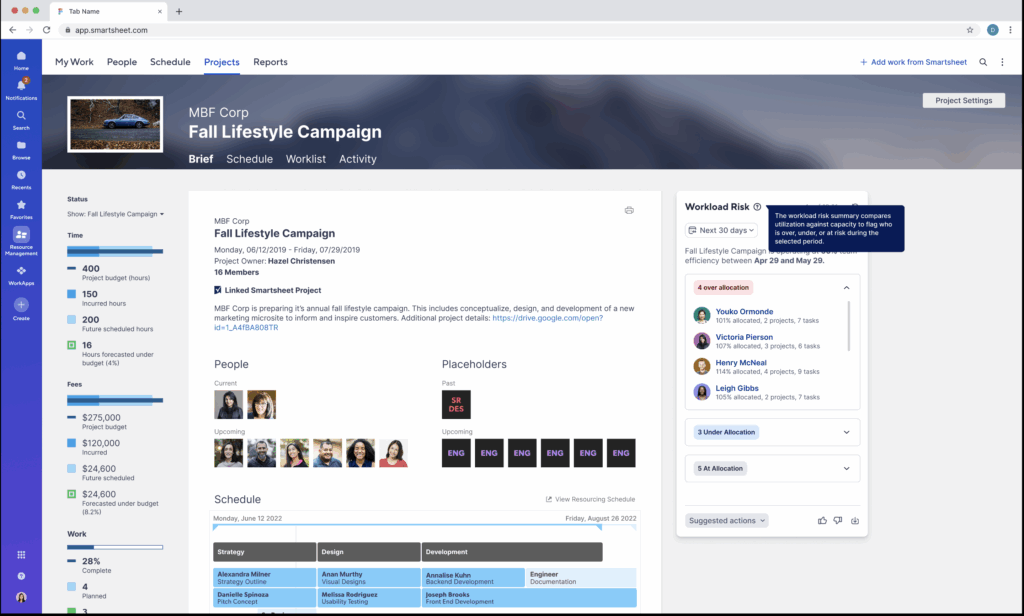
Smartsheet fits PMOs that coordinate documents, approvals and status across departments, including teams that need a government cloud. Smartsheet Gov holds a FedRAMP Moderate authorization and a DISA Impact Level 4 provisional authorization, on AWS GovCloud (US).
What you can do: with the Resource Management add-on, assign people as a percentage of time, hours per day or total hours, and show tentative projects on the schedule. On Enterprise plans, Scenario Planning (May 2026) shows project timelines alongside capacity so teams can test changes before applying them.
What differs: a grid interface with workflow automation, plus a separate Gov environment. Resource Management became available in Smartsheet Gov in July 2026.
What is needed: the Resource Management add-on for people planning; Enterprise for Scenario Planning.
Pricing: Pro USD 9 and Business USD 19 per member per month billed yearly (Business minimum 3 members); Enterprise custom, minimum 10 members. Resource Management is a paid add-on without a public price; Smartsheet Gov pricing is not public.
Where it may not fit: Scenario Planning allows up to 3 scenarios and 5 project sheets per plan, excludes organization-level capacity planning and cross-portfolio trade-offs, and is not yet available in Smartsheet Gov. On ITAR, Smartsheet notes there is no formal certification and each customer evaluates its own use.
Evaluate next: model one shared specialist group across two programs in Resource Management.
Sources: Smartsheet Trust pages (FedRAMP, ITAR); Smartsheet Gov overview and capabilities; Resource Management help; Scenario Planning overview; Smartsheet pricing page.
8. Teamhood for engineering teams that plan visually across several projects
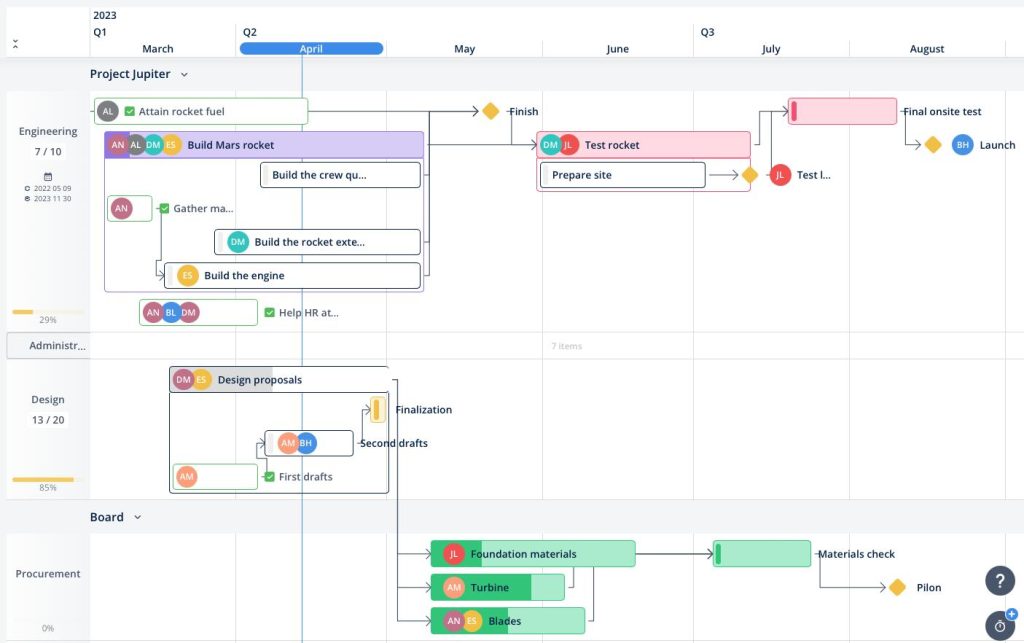
Teamhood fits mid-size engineering groups and suppliers that run work in Kanban and Gantt and need to see who is free across projects. Its defense and space page offers Kanban, Gantt and Workload views across multiple projects.
What you can do: plan in a Gantt chart that shows the critical path, total float per task and baselines of up to 5,000 tasks. The workload view adds planned hours from every project per person, so you see who is free before you book them.
What differs: unlimited subtask levels with WBS numbering, shown in Gantt, List and Kanban views.
What is needed: a due date, an assignee and a time estimate on each item, or the workload report leaves it out.
Pricing: USD 12 per user per month billed yearly (USD 16 monthly; EUR 11 or EUR 14), from 3 users. Enterprise is priced by agreement.
Where it may not fit: Teamhood states there is "no native earned value management engine, so formal EIA-748 reporting needs an external tool", and that it "does not hold FedRAMP authorization". What-if scenarios were not documented on the pages we checked. Cloud hosting runs in Microsoft Azure EU regions; Enterprise offers dedicated, hybrid or on-premise deployment, with a two-year minimum for on-premise.
Evaluate next: load two programs with real estimates and check the workload view per specialist.
Sources: Teamhood defense and space page; Gantt chart product page; Workload knowledge base article; Teamhood aerospace comparison (updated October 22, 2026); pricing page; security and compliance page; FAQ.
9. Jira for development teams that plan sprints and team capacity across projects
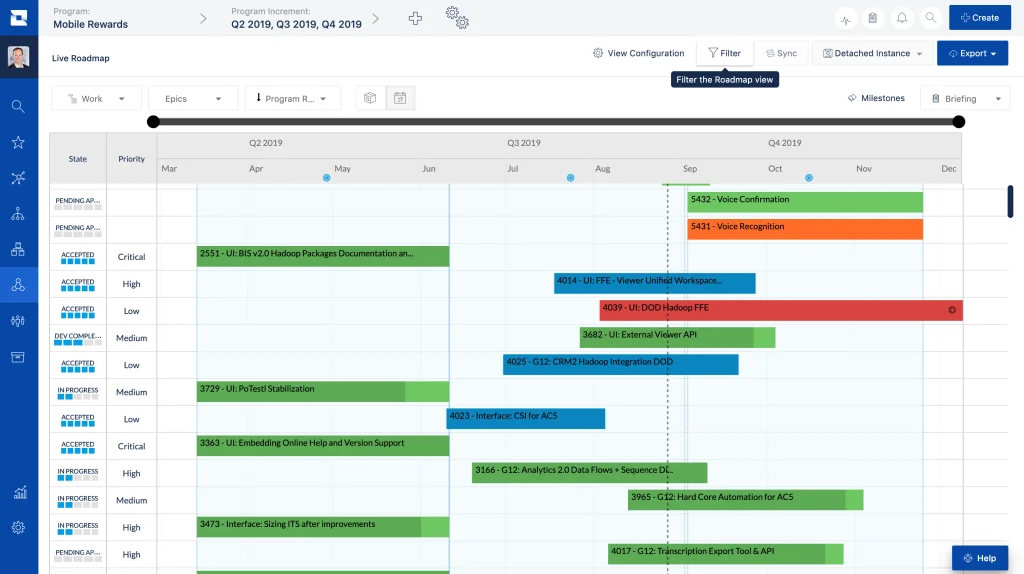
Jira fits avionics and embedded development teams that plan in sprints and need one plan across several teams. This profile covers Jira Cloud Premium with Plans (formerly Advanced Roadmaps). Jira Align is a separate product, sold through Atlassian sales.
What you can do: combine work items from boards, spaces and filters into one plan across teams, plan against each team's capacity and velocity, and explore alternative versions of the plan as scenarios.
What differs: capacity is set per team per iteration. Per-person capacity is the team figure divided equally, and Plans assume each team member works on one story-level item at a time.
What is needed: Jira Premium or Enterprise; cross-team planning is a Premium feature.
Pricing: Standard USD 8.48 and Premium USD 15.56 per user per month; rates are tiered by user count. Enterprise and Jira Align: contact sales.
Where it may not fit: a test engineer shared by three programs appears inside team averages, not as an individual constraint. Jira Data Center is no longer sold to new customers since March 30, 2026 and reaches end of life on March 28, 2029. Atlassian Government Cloud is FedRAMP Moderate authorized; High and IL5 are not yet authorized.
Evaluate next: build one plan with two teams that share a specialist and check whether the overload shows.
Sources: Atlassian Support "What is Advanced Roadmaps" and "Assign capacity from your timeline"; Jira pricing page; Atlassian Data Center end of life page; Atlassian FedRAMP compliance page; Jira Align product page.
10. Plane for development teams that need self-hosted or air-gapped issue tracking
Plane is an issue tracker for development teams that must keep work items on their own servers or on a disconnected network. Its Community Edition is open source under AGPL v3; the Commercial and Airgapped editions are closed source, and Plane describes the air-gapped option as designed for classified networks and SCIF environments.
What you can do: track work items, cycles, milestones and initiatives across projects, with dashboards that span the whole workspace.
What differs: deployment choice. Plane runs in its cloud, self-hosted with Docker or Kubernetes, or as the Airgapped Edition.
What is needed: the Airgapped Edition requires Enterprise Grid with a 100-seat minimum.
Pricing: Free up to 12 users; Pro USD 6 and Business USD 13 per user per month billed annually. The Airgapped Edition is priced through sales.
Where it may not fit: Plane's own comparison states "no formal capacity planning", with no workload or resource booking views. No FedRAMP, ITAR or CMMC authorization is claimed, and Plane's official pages name no aerospace customers.
Evaluate next: deploy in a test enclave and check the audit history against what your quality team needs for AS9100.
Sources: Plane developer documentation (editions and versions, self-hosting); Plane pricing page; Plane airgapped page; Plane defense page; Plane vs Wrike comparison (updated June 3, 2026); Plane dashboards documentation.
Operational Root Causes of Schedule Slips in Defense Programs
The U.S. Government Accountability Office's 2026 Weapon Systems Annual Assessment (GAO-26-108457), published July 2, 2026, found that schedule delays persisted across major defense acquisition programs, signaling overly optimistic time frames. The average time for these programs to deliver a capability rose to over 12 years. Six mechanisms explain how that happens inside a contractor's portfolio, and each one is something aerospace project management tools have to catch.
Immature technology on fast pathways. The Department of Defense plans to invest at least $49 billion across 23 of its most expensive Middle Tier of Acquisition (MTA) programs, which are intended to be completed in five years. GAO counts 18 of the 40 programs that entered the MTA pathway between 2018 and 2025 as starting with immature technologies. Rework on one program then pulls specialists away from the programs that share them.
Milestones move while delivery dates stay. When an interim milestone slips and the delivery date does not, the remaining work is squeezed into less time. The PMO sees the exposure only when there is no time left to recover.
Shared specialists. In the aerospace industry, test, certification and systems engineers are booked on several programs at once. Plans that assume dedicated capacity fail when one overrun takes those people away from the next program in line.
ERP and engineering run on different clocks. An ERP plans materials, procurement and cost. It does not re-sequence engineering work when a part arrives late or a repair interrupts the plan.
Contract terms tied to dates. Some contracts attach incentive fees or penalties to delivery dates, so a schedule slip becomes a financial loss for the contractor.
Compliance records. The aerospace industry runs on audit trails: AS9100 and ITAR require records of approvals, access and changes. Records kept by hand slow every approval in the chain.
Key Evaluation Criteria for Aerospace Project Portfolio Management Tools
Five criteria separate aerospace project management tools that can carry a multi-program portfolio from those that cannot. Each one comes with the question to ask in a demo.
1. Capacity model. Does the tool plan individual specialists, roles or whole teams? A role-based or team-based model hides the one engineer that three programs depend on. Ask whether calendars, skills, location and security clearance can be set per person.
2. Current load, future load and scenarios. Separate three things: actual workload from logged work and task status, future load forecast across all programs, and historical output used to refine estimates. Then ask whether scenarios run apart from the live plan and whether the tool only forecasts dates or also searches for a better project order. For a wider view of scenario features, see our comparison of scenario planning tools.
3. Schedule logic and integration. Critical path, baselines and dependencies matter within a program. Across programs, ask which connector the vendor offers for your schedule of record, in which direction data flows and which editions it supports.
4. Economics of delay and contract terms. Ask whether the tool attaches money to dates: cost, revenue, incentive and penalty terms, invoice timing. Ask which plan includes it, because several vendors reserve these features for top tiers.
5. Earned value and government reporting. If your contracts require an EIA-748-compliant EVMS, decide whether the tool is your EVM system or connects to the one you already run.
Read more: Project Profitability Analysis: How Delivery Dates Change the Financial Picture
How to Run a Proof of Fit
A proof of fit tests aerospace project management tools on a small sample of your own portfolio, with tasks that rule tools out.
Illustrative example (all figures assumed). A supplier runs two programs that share one environmental test team of four engineers. Each program needs the full team for a three-week test campaign starting in week 10, and only one campaign can run at a time. Program A is a $1.2 million qualification contract with a $60,000 penalty for each late week. Program B is an internal demonstrator without a penalty, where we assume a late week costs about $10,000 in delayed follow-on work.
| Choice | Program that waits | Delay | Cost of the delay |
|---|---|---|---|
| B tests first | A | 3 weeks | 3 x $60,000 = $180,000 |
| A tests first | B | 3 weeks | 3 x $10,000 = $30,000 |
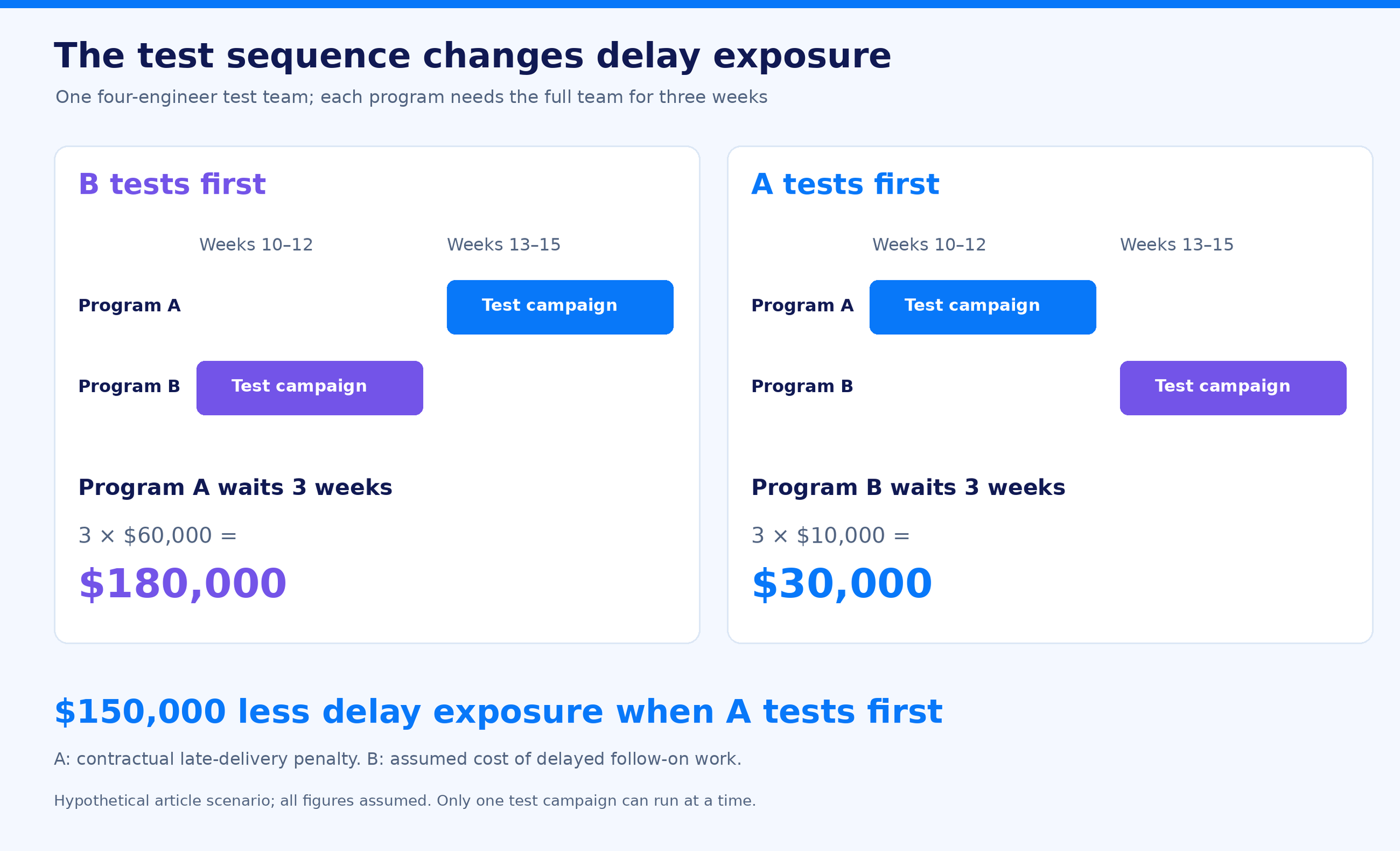
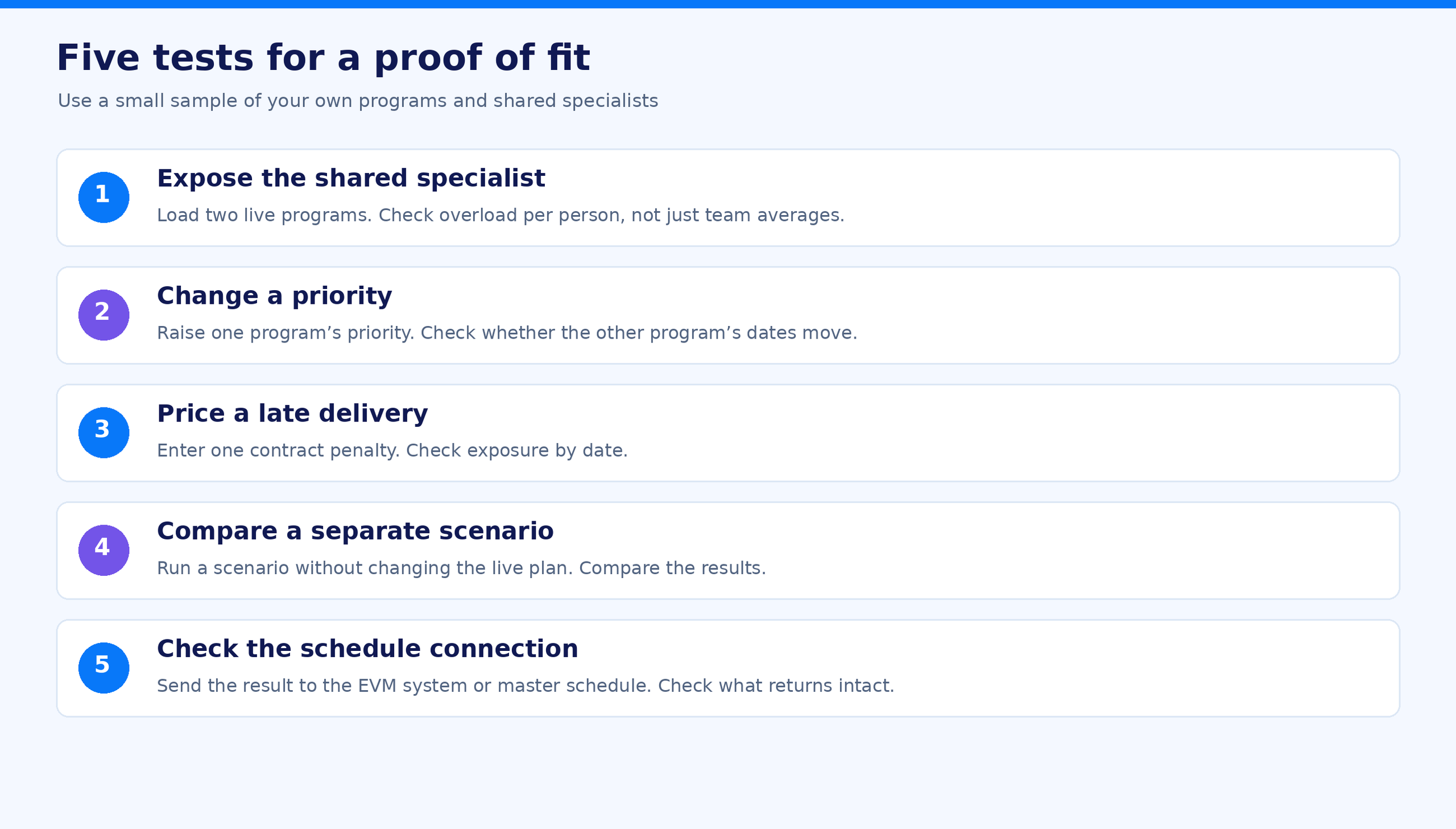
A load chart shows the test team at 200% for three weeks and stops there. The decision is worth $150,000, and the tool you choose should show it. Run five test tasks on your own data:
- Load two live programs with the specialists they actually share. Does the tool show overload per person, or only per team?
- Raise one program's priority. Do the dates of the other program move?
- Enter one contract penalty. Does the tool show the exposure by date?
- Run a scenario without touching the live plan, then compare the two.
- Send the result to your EVM system or master schedule and check what comes back intact.
How to Implement an Aerospace Project Management Tool
The steps below are a practical sequence, not a standard. Adjust them to your programs and contracts.
Step 1: Map specialist capacity. Record shared engineering pools by competence group, location, skills, availability and security clearance level. Replace flat utilization targets with real availability per person.
Step 2: Build the portfolio hierarchy. Break programs into phases and delivery milestones, and link phase dates to the project baseline so that upstream shifts move downstream dates.
Step 3: Enter contract terms. Where the tool supports it, map payment terms to milestones and enter incentive and penalty clauses, so a schedule change shows its financial effect.
Step 4: Connect ERP, PLM and schedule data. Sync financial actuals and material lead times from the aerospace ERP, and engineering change orders and design releases from PLM.
Step 5: Pilot on a representative subset. Compare the tool's forecast with what the teams actually deliver, and run scenarios on real re-allocation questions before rollout.
Step 6: Roll out with decision rights. Decide who approves a re-sequence, and review the portfolio on a fixed cadence with the people who own the bottleneck teams.
Read more: PPM Tool Requirements: The Complete Guide to Selecting the Right Project Portfolio Management Tool
Strategic Recommendations: Which Requirements Change the Choice
- Controlled data decides the deployment. If covered defense information must stay on your network, start from the aerospace project management tools whose profiles list on-premise or air-gapped editions, and check FedRAMP status word by word: Authorized, Ready and In Process are different things.
- A validated EVMS decides the EVM system. If contracts require EIA-748 compliance and IPMDAR, choose the EVM system first and judge the capacity tool on how it works next to it.
- Shared specialists decide the capacity model. If programs wait on the same engineers, judge tools on per-person capacity across programs, not on Gantt features.
- Penalties decide the economics. If delivery penalties are material, ask every vendor to show penalty exposure by date on your own data.
- Count the full operating cost. License, optional connectors, implementation, hosting and administration add up. Compare equivalent bundles: an entry plan of a work management tool does not cover the same scope as an enterprise project portfolio management deployment.
Dashboards do not stop schedule slips. Decisions about who works on which program next do, and the right aerospace project management tool shows what each of those decisions costs.
Build Your Evaluation Shortlist
Pick the two camps your programs need, shortlist two aerospace project management tools from each, and run the proof of fit on your own data. If shared specialists are where your programs lose time, see how Epicflow plans aerospace and defense programs.
See how Epicflow models your own portfolio and shows you what team holds it back, two or three ways to change the plan, and what each does to dates and money. Build your own demo. Pick your role and the problems you want solved. Watch a short demo built around them, no call needed.
FAQs
What is an aerospace project management tool?
An aerospace project management tool plans and controls engineering work across aerospace and defense programs: schedules, shared specialists, cost and the records audits require. The category spans three camps: portfolio capacity tools, EVM and master scheduling systems, and issue trackers for development teams. Most aerospace and defense organizations run more than one of them.
How much do aerospace project management tools cost?
The lowest published list price on November 5, 2026 is USD 6 per user per month (Plane Pro, billed annually). Microsoft Planner and Project Plan 3 costs USD 30 paid yearly, and Epicflow Enterprise starts at EUR 45 billed annually, minimum 50 users. Prices are shown in the currency each vendor publishes. Planisware, antaivo by Cora, Deltek and Oracle quote prices on request. Implementation, connectors, on-premise hosting and administration come on top of the license.
Can aerospace project management tools replace ERP or PLM systems?
No. PLM manages CAD data, product configurations and engineering changes. An aerospace ERP runs inventory, procurement, billing and the aerospace supply chain, and MRO organizations run aircraft maintenance management in dedicated systems. Aerospace project management tools plan the work and the people across programs and connect to both.
Can aerospace project management tools support remote or distributed engineering teams?
Yes, if access control matches your obligations. Distributed engineering is common in the aerospace industry, so look for role-based access, multi-factor authentication, encryption and a data location that fits your ITAR and DFARS duties. Aerospace and defense teams that include foreign persons need DDTC authorization before technical data is released to them, whichever tool you use.
Should aerospace organizations run aerospace project management tools in the cloud or on premises?
It depends on the data. Covered defense information in a vendor cloud requires a provider that meets the FedRAMP Moderate baseline or its equivalent. Classified or disconnected networks need on-premise or air-gapped editions. Cloud lowers maintenance work; on-premise keeps data behind your firewall and needs internal IT time.
What security and compliance standards must aerospace project management tools support?
For U.S. defense work: DFARS 252.204-7012, NIST SP 800-171 Rev 2 as assessed under CMMC Level 2, and ITAR access rules. For quality: records that support AS9100 or EN 9100 audits. For UK supply chains: JOSCAR registration. No tool is "ITAR certified", because no such certification exists; ask how access and data location are controlled instead.