AI in Project Management: Benefits, Use Cases, and Future Trends [2026]
 Anna Balyuk
.
Updated
.
Digital Transformation
.
38 mins READ
Anna Balyuk
.
Updated
.
Digital Transformation
.
38 mins READ
![Epicflow – AI in Project Management: Benefits, Use Cases, and Future Trends [2026]](https://www.epicflow.com/wp-content/uploads/2023/03/AI_in_Project_Management_HERO_ORIGINAL-1024x576.png)
AI in project management helps teams analyze project data, draft information, and evaluate decisions, from spotting schedule risks to comparing resource allocation options. Its value depends on the task, the quality of the data, and the checks around its output. A generated status report is not the same as a delivery forecast that respects the capacity you actually have.
This guide explains practical ways to use AI for project management, the benefits and limitations to expect, and how to introduce it without handing over accountability. We also look at multi-project environments, where several projects compete for the same specialists and a faster task does not always mean an earlier delivery.
Key takeaways:
- AI can support planning, resource management, risk analysis, reporting, and portfolio decisions, but different kinds of AI do different jobs.
- Generative AI drafts and summarizes information. Predictive and optimization methods analyze project data and capacity.
- Hours saved on tasks move delivery dates only when they are saved where projects are waiting.
- Data quality, permissions, and human review matter most when AI output affects commitments or costs.
- Start with one measurable use case, compare it with a baseline, and scale only after checking quality and value.
So will AI replace project managers, which use cases pay off, and what does the future of AI in project management look like? Let's start with the definition.
What Is AI in Project Management?
AI in project management is the use of artificial intelligence and related methods, such as machine learning and predictive analytics, to improve how projects are planned, executed, and monitored. In practice, AI applications in project management help managers get data-driven insights, automate routine work, and make better forecasts.
AI project management is not one technology. It is also not the same as managing a project that builds an AI system. This guide is about using AI to manage projects.
Generative AI, predictive analytics, optimization, and AI agents: what's the difference?
Four kinds of AI show up in project work. They take different inputs, produce different outputs, and need different checks.
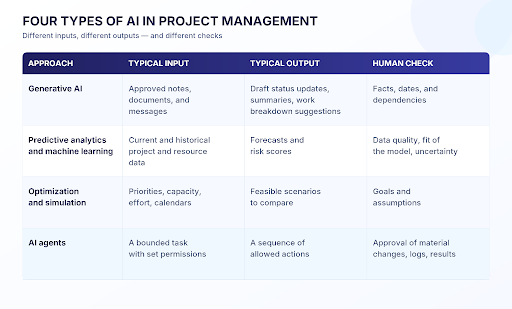
Optimization is not necessarily machine learning, and a chat assistant is not a forecast. Knowing which kind of AI you are using tells you what to check.
AI and Project Management: The Real Role of Artificial Intelligence
In 2019, Gartner forecast that 80% of today's project management tasks would be eliminated by 2030 as AI takes over. It is a forecast about tasks, not about the role.
Paul Boudreau, an author of books on applying AI to project management, reads it the same way. Talking to your email or having meetings scheduled automatically are not really project management tasks, he argues. Project managers should lead the change in how projects are managed.
He gives three reasons why AI won't replace project managers:
- Managing data. Models need organized, current data. Someone has to own it: the project manager, the PMO, operations, IT, or the team.
- Interpreting results and taking action. AI provides insights and suggestions. People decide what to approve.
- Collaborating. Results come from the cooperation between AI and experienced managers, not from the tool alone.
So AI does not replace a project or resource manager. It changes what they spend their time on. That is the real impact of artificial intelligence on project management, and it starts with the benefits and the conditions attached to them.
What are the benefits of artificial intelligence in project management?
The benefits of AI in project management are real, but they depend on the use case and the data. Four results come up most often, each with a way to measure it:
- Less reporting effort. Generative AI drafts updates from approved data. Measure the time per accepted report, including review.
- Earlier warnings. Forecasts flag schedule and resource risks sooner. Measure how far ahead a warning came and how often it was right.
- More realistic resource decisions. Capacity forecasts show overload before work is committed. Measure overload and on-time milestones.
- Better portfolio choices. Scenarios show what each option does to every project. Measure on-time delivery and the number of projects the portfolio finishes.
Adoption is growing fast. In a 2025 APM survey of 1,000 UK project professionals, carried out by Censuswide, 70% said their organizations were using AI. Evidence on results is older and thinner. In 2019, PMI's study "AI Innovators: Cracking the Code on Project Performance" compared organizations it classed as AI innovators with AI laggards. The innovators delivered 61% of their projects on time, the laggards 47%. That is an association, not proof that AI caused the difference.
The role of AI is especially important in multi-project environments with a shared resource pool. They combine large volumes of project data, many dependencies between projects, many variables, and high uncertainty.
One caution: higher utilization is not the same as better delivery. People loaded to 100% create queues, and queues delay projects. Smaller teams benefit from AI too, mostly from drafting, summaries, and task support.
Will AI replace project managers?
AI automates parts of the job: collecting status, drafting reports, flagging risks. Accountability for goals, priorities, stakeholder trade-offs, and commitments stays with people and the organization. The role shifts toward decisions, data quality, and reviewing what AI produces. No one can say what the job will look like in ten years, but so far the evidence points to a changed role, not a removed one.
AI Use Cases in Project Management
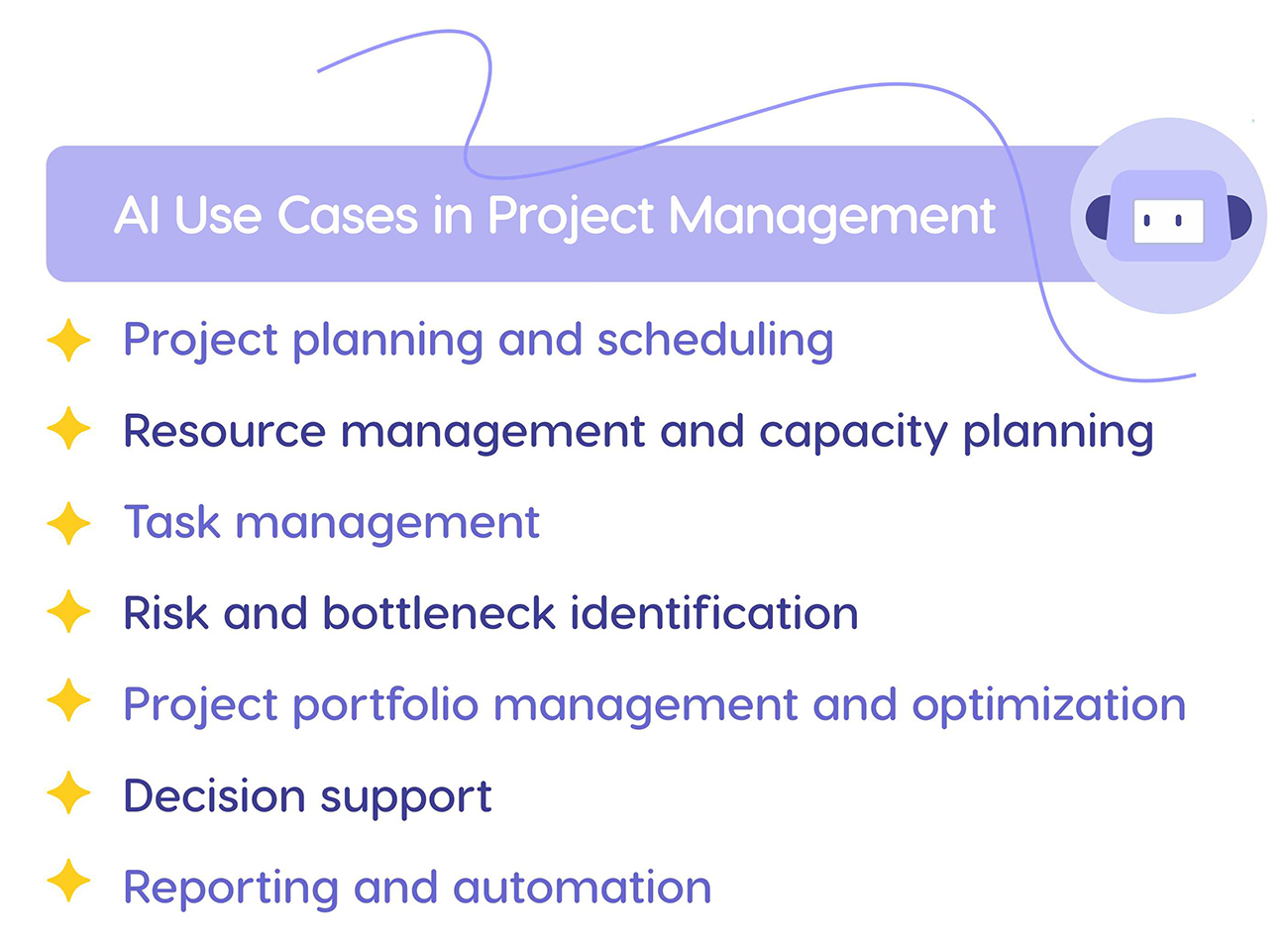
The use of AI in project management covers seven main areas, with resource and task management at the center: that is where inefficiencies turn into delays, budget overruns, and overload. In each area, AI takes an input and produces an output, and a person checks it before it changes a commitment. Not every product covers every area.
Project planning and scheduling
Input: scope, task dependencies, remaining effort, and who is available. Output: a draft plan, a work breakdown, or scenarios to compare. Check: a generated work breakdown is not a schedule. Dates hold only when dependencies, effort, and availability have been verified. Value: plans that are achievable from the start, instead of corrected after the first missed milestone.
Resource management and capacity planning
Input: demand from all projects, capacity per team and skill, calendars. Output: a forecast of where demand exceeds capacity, and suggestions for resource allocation. Check: a person confirms skills and availability before work is assigned. AI does not hire, move, or release people. Value: overload shows up weeks or months ahead. Read more about resource capacity planning and AI capacity planning.
Task management
Input: task lists, priorities, status updates. Output: suggested priorities, flags on tasks at risk, reminders, updated timelines. Check: a task is done when there is evidence it is done, not when a model assumes it. The rules for what AI may change on its own are set in advance. Value: less time chasing updates, and people pick up the task that matters most.
Risk and bottleneck identification
Input: workload and progress forecasts, plus the assumptions behind them. Output: early warnings of schedule risks and resource bottlenecks, and scenarios to resolve them. Check: a warning is a forecast, not a certainty, and it covers schedule and resource risk, not every enterprise risk. Value: time to react before a delay reaches the customer. Our guide to bottlenecks in project management explains the method.
Project portfolio management and optimization
AI in project portfolio management helps decide which projects to run, and in what order, with the people you have. Input: priorities or business value, effort, dependencies, and shared capacity. Output: sequences and scenarios that show each option's effect on dates and value. Check: leaders confirm the goals and assumptions, because a model's best answer depends on what it was asked to optimize. Value: fewer projects started than the shared teams can finish. See how Epicflow applies AI to portfolio decisions.
Decision support
Input: forecasts, scenarios, and the trade-offs between them. Output: options side by side, with the assumptions behind each. Check: the manager chooses and can trace each option back to its data. Value: decisions based on consequences, even under uncertainty. For example, you can compare project portfolio scenarios before moving a milestone or a team.
Reporting and automation
Input: approved status data and notes. Output: generative AI drafts status reports, meeting summaries, and progress updates. Check: the draft names its sources and says what data is missing, and a person reviews facts and dates. Rules-based reminders are useful too, but they are automation, not AI. Value: less time on manual reporting. The next section shows why that time rarely moves a delivery date.
Your Teams Are Using AI. Why Isn't the Portfolio Finishing Sooner?
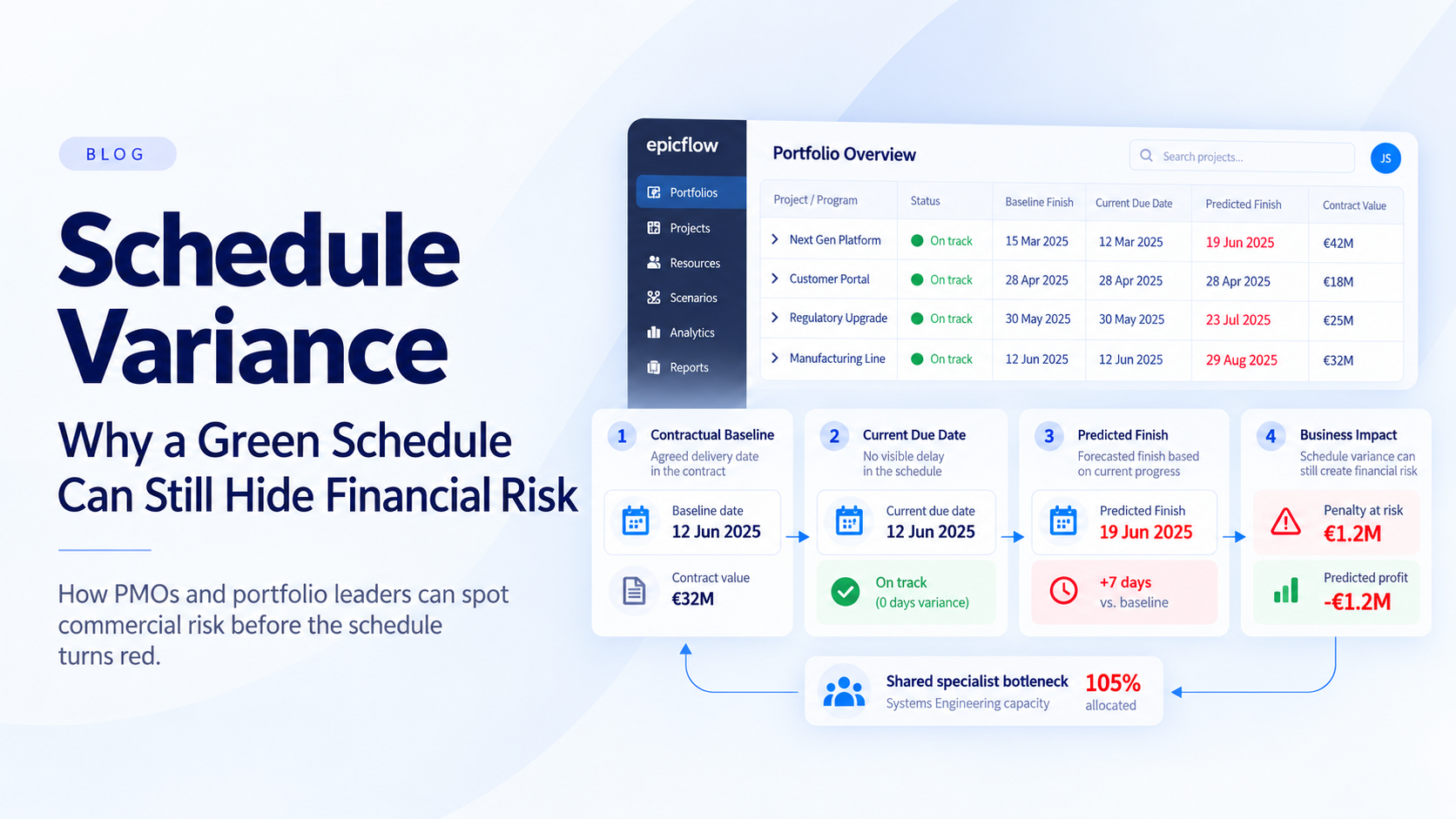
Look around a multi-project organization and you will find AI everywhere. Project managers draft reports in minutes. Engineers get code suggestions, meeting notes write themselves, and specifications are summarized before anyone opens them. Every team is faster. Yet the portfolio's delivery dates have barely moved. Most AI project management today speeds up tasks, not delivery.
The reason is how shared work flows. In a multi-project environment, one or two shared teams set the pace for every project that needs them: a test lab, a group of senior engineers, a review board. Work queues in front of them. An hour saved anywhere else gets work to that queue sooner, but it does not get it through any faster. Sometimes it only makes the queue longer.
AI only brings delivery forward when it saves hours where projects are waiting.
Example: hours saved vs. delivery capacity
Suppose three projects need 100 hours from a shared engineering team next week, and the team has 80 hours available. The gap is 20 hours. AI is used in two places: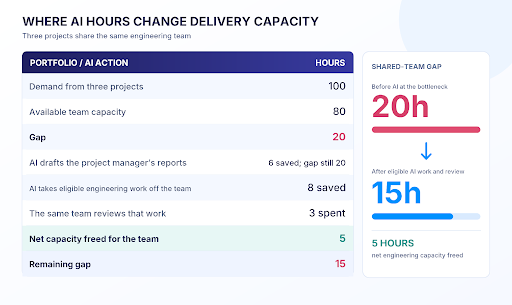
The six reporting hours are real savings, but they don't touch the engineering gap. The eight engineering hours do, minus the three the same team spends reviewing the AI's output. A 15-hour gap remains, so managers still need to compare other options: sequencing or staggering projects, moving scope, or adding capacity where it counts.
Where AI does pay off
The work worth giving to AI sits in the queue of a scarce team: preparing evidence and documents before a review, comparing requirements against a specification, sorting incoming risks or change requests, putting together review packs. The specialist keeps the judgment and spends less time on preparation.
Three questions sort the candidates. Is delivery waiting on this work? Does the wait cost real money? Can AI do it well enough for a person to sign off? Our bottlenecks guide shows how to use AI to relieve project bottlenecks with these tests. To decide which workflow to fund first, put a price on the wait: see how to use cost of delay to prioritize AI workflows. Then plan the AI like any other resource, with capacity, a cost, and dates. Our capacity planning guide shows how to include AI agents in capacity planning.
Judge the result by the dates it moved, not by the hours it saved.
Disruption, Not Automation: How AI Is Transforming Project Management in 2026
Automation has value: it takes routine work off people's plates. In complex portfolios, the bigger change is in the quality of decisions and in whether plans can actually be delivered.
In a 2023 Harvard Business Review article, "How AI Will Transform Project Management", Antonio Nieto-Rodriguez and Ricardo Viana Vargas named the areas where they expected AI to change the discipline:
- Better selection and prioritization;
- Support for the project management office;
- Improved, faster project definition, planning, and reporting;
- Virtual project assistants;
- Advanced testing systems and software;
- A new role for the project manager.
The authors expected these changes over the coming decade. Some are already in practice. Let's look at them through the example of Epicflow, which plans multiple projects around the people an organization actually has.
Examples of AI in Project Management: Epicflow Solution

In his book "The Self-Driven Project: Using Artificial Intelligence to Deliver Project Success", Paul Boudreau writes that "Epicflow uses AI to optimize resource utilization across multiple projects in a portfolio". In practice, the aim is not maximum utilization. It is more projects finished on time with the same people.
Epicflow fits organizations where several projects compete for the same specialists. Its use of AI falls into four layers:
- Planning and forecasting: a forecast of every project, built from the people you actually have.
- Portfolio decisions: scenarios and optimization that compare sequences of projects.
- Epica, an AI assistant that answers questions and flags problems.
- AI resources: AI agents planned in the resource pool like people.
The fourth layer is the newest. Where the work allows it, AI agents can join your resource pool and take first-pass work off your bottleneck, with a person signing off the result. Epicflow plans an AI resource like a person, with capacity, a rate, and dates. The agent can run on your own agent platform or on EpicStaff, which is included with Epicflow.
Better selection and prioritization
Selecting projects is where AI in project portfolio management earns its keep, because every choice changes what the shared teams can finish. Epicflow handles it with three capabilities, each for a different decision:
- Pipeline Leveling forecasts when every project in the portfolio is likely to finish, based on estimates and the capacity of each team. You can order projects by priority or by business value. Use it to see which commitments are at risk.
- Project Staggering postpones the start of some projects so the rest can finish on time. Use it when too much work has started at once.
- Epicflow Portfolio Optimizer answers a different question: which mix and order of projects delivers the most value with the capacity you have. Its AI searches millions of combinations. It is delivered as PMO as a Service: Epicflow's team builds the model with your data, and your leaders decide what to apply.
In each case the input is your project data and capacity, and the output is a forecast or a ranked option. The decision stays with the portfolio leader. Where commercial data is configured, Epicflow also puts a price on each week of delay, so the comparison shows what waiting costs.
Support for the project management office
According to the HBR authors, this area of using AI for project management includes:
- Better monitoring of project progress;
- The capability to anticipate potential problems and to address some simple ones automatically;
- Automated preparation and distribution of project reports;
- Automation, via AI virtual assistants, of support functions such as status updates, risk assessment, and stakeholder analysis.
For a PMO, Epicflow covers these areas in four ways:
- Visibility: progress and workload across all projects, recalculated as the data changes.
- Overload warnings: the workload forecast shows where a team will be overloaded, months ahead.
- Scenario planning: What-If Analysis tests changes, such as moving people or milestones, and shows the consequences for every project before anything changes in the live plan. It also supports effective risk management.
- Reporting: reports come from the live plan, so nobody compiles them by hand.
Warnings don't remove the need to act, but they can give managers time to react. Each one points to something a person can check: a task list, a load graph, or a scenario.
Improved, faster project definition, planning, and reporting
Before a project starts, Epicflow compares the demand it will create with the capacity of the teams it needs. That shows whether the project can be staffed as planned, or whether its start should move. Stakeholders get dates that account for the other projects competing for the same people.
Before committing to a delivery date, check three things in the data. Are remaining estimates current? Are dependencies between projects entered? Is availability, such as holidays and part-time work, up to date? Generative AI can draft a project charter or a report, but the dates in it need that check.
Virtual project assistants
Epicflow's AI assistant Epica works inside the data each user is allowed to see. Three examples of how teams use it:
- "What should I work on next?" Epica shows the user's task list, sorted by priority.
- Overload alerts. Epica tells a resource manager when a group is overloaded and points to the workload graph to check it. At the project manager's request, it also reminds people to log hours or update a task status.
- Questions about projects and resources. Users ask about workload, progress, or a project's status and get answers from the sources the organization has chosen. Answers respect each user's permissions.
Epica can also show which days off would not harm the project flow. The decision about leave, and any HR procedure, stays with people.
A new role for the project manager
AI in Epicflow does not do a project or resource manager's job. It takes administrative work off their plate and gives them a forecast to argue from. The role moves toward decisions: agreeing priorities with stakeholders, reviewing what AI produces, keeping data quality up, and leading the change in how the team works.
Nancy Underwood, PMO at VieCuri, describes the shift:

“One of the features I like most in Epicflow is the AI-driven What-If Analysis, which gives us the ability to see the future. I can see what will happen if we proceed the way things are happening now. Normally, people who lead projects look at what happened in the past and don’t look at what may block projects in the future. The What-If Analysis provides us with this opportunity so that I may act now and prevent bottlenecks before they appear.”
Results come from the method and the way teams work, not from AI alone. At KPN, the largest telecom operator in the Netherlands, on-time delivery rose from 18% to 80% in less than a year. The change came from how teams managed shared resources with Epicflow. Read KPN's project delivery results.
Risks and Limitations of AI in Project Management
AI in project management fails in predictable ways, and most risks have a practical control.
| Risk | What can go wrong | Practical control |
|---|---|---|
| Hallucinations and false confidence | Invented dates, facts, or constraints | Outputs that cite sources, flags for missing data, a factual review before anything is sent |
| Incomplete or stale data | Forecasts that look precise but are wrong | Named data owners, a fixed update rhythm, checks on effort, dependencies, and capacity |
| Data privacy and permissions | Confidential information sent to a service that should not have it | Approved tools only, minimal data, role-based access, a check of retention and training terms |
| Uncontrolled actions | A wrong change to a schedule, assignment, or budget | Limited rights, approval before material changes, an audit trail, a way to roll back |
| Bias and overreliance | Weak recommendations accepted, or good ones ignored | Comparison with a baseline, training, clear escalation, one accountable person |
Not every kind of AI fails the same way. A generative model can invent a fact. An optimization model can give an exact answer to the wrong question if its goals or constraints are set wrong. A human in the loop helps only if that person has the time and the information to check. Review also costs capacity, often from the same specialists the AI was meant to relieve.
Organizations already using AI report the same concerns. In the APM survey, 44% of them named data privacy and 42% integration among their challenges. PMI's standard for AI in project work, published in June 2026, also puts human oversight at the center.
How to Use AI in Project Management: Necessary Conditions
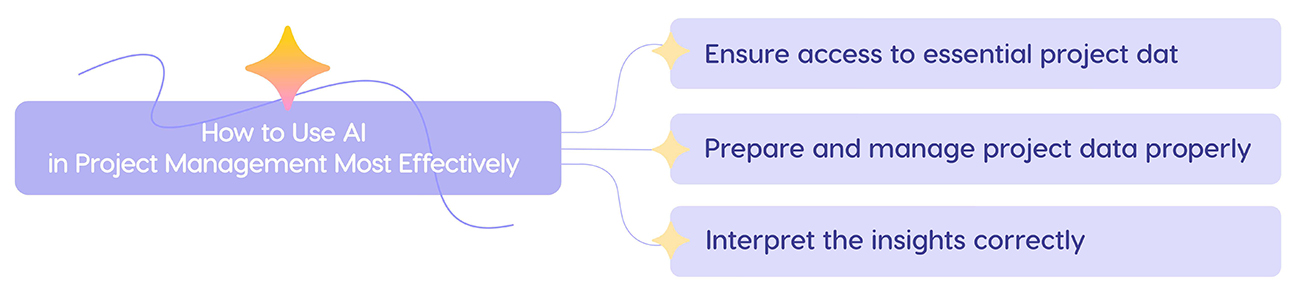
AI turns project data into information a manager can act on. Three conditions decide whether that information is any good, and a measurable pilot shows whether it pays off.
There should be access to essential project data
Each use case needs its own data. A status report needs approved notes and progress data. A capacity forecast needs demand from all projects, team capacity, skills, and calendars. AI can only work with the past, present, and future data it can see. In many organizations that data sits in separate places, and nobody can see future demand across projects. Start by listing the sources your use case needs and who owns each one.
Project data should be prepared and managed in a proper way
To prioritize tasks, flag risks, and support decisions, AI needs enough data to analyze. The biggest challenges here are as follows:
- Team members must enter the necessary information on time.
- They must update and edit the data when anything changes.
- The data must be valid, relevant, and correct.
Name an owner for each data source, agree on the format and how often it is updated, and check dependencies and availability. AI should not silently fill critical gaps with guesses and present them as facts. It can flag missing data and ask people to add it. The rule "garbage in, garbage out" still applies.
Correct interpretation of the information provided
Good decisions use information about the past (team performance, project outcomes), the present (the actual state of the projects), and the future (what will affect the final output). A system turns raw data into graphs, dashboards, and tables, but people have to make sense of them. Before acting on an AI output, ask what it assumes and which sources it used. Then ask how certain it is, who approves the change, and who escalates if something looks wrong.
Start with a measurable pilot
Use these six steps to introduce AI for project management without guessing:
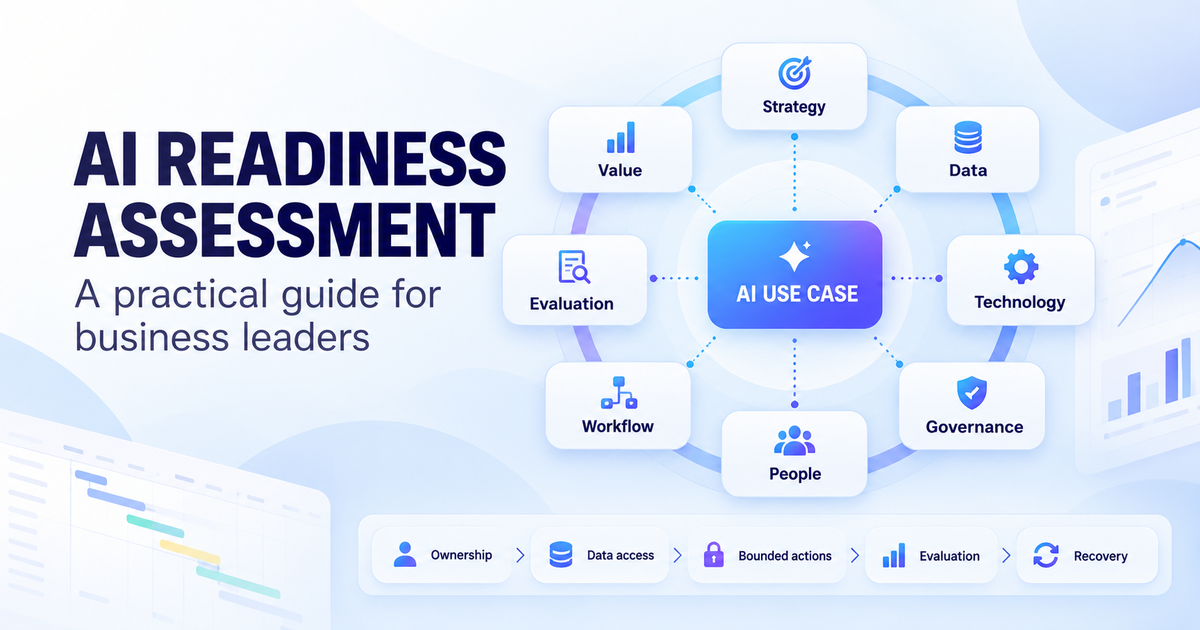
- Pick one process and one business problem, for example weekly status reporting or overload checks for a shared team. Prefer work that projects are waiting on.
- Record a baseline: time spent including review, error or rework rate, forecast accuracy, or overload. Don't measure the number of prompts.
- Define the allowed data, the users, and the person who owns the result.
- Run the pilot in review mode. AI proposes; it does not change commitments or critical data on its own.
- Compare accepted outputs, review effort, quality, and the operational result with the baseline. Count license, integration, and support costs.
- Scale only when the criteria agreed in advance are met, and review again in each new context.
An example of criteria: reporting effort is lower, the factual error rate is no higher than the baseline, and no critical change was applied without approval. This is an illustration, not a universal benchmark. To see where your organization stands first, assess your organization's AI readiness.
Key AI Trends in Project Management for 2026
AI and automation in project management have been among the top trends for several years. Three AI project management trends are shaping practice now.
The rise of AI agents
AI agents in project management go a step beyond assistants: they carry out a bounded sequence of actions, such as setting up a project from a template, collecting status, or preparing documents for review. The useful ones are bounded on purpose. They have set permissions, their actions are logged, and a person approves material changes. Agentic AI in project management is not a fully autonomous project manager. Where agents fit and how to govern them is covered in our guide to AI agents for project management.
Predictive project management
Prevention beats firefighting. Predictive models use project data to flag risks and bottlenecks and to forecast on-time delivery. They warn; they don't see the future. A forecast is only as good as the data and assumptions behind it, so its best use is an early warning that gives managers time to act.
Increased human-AI collaboration
Organizations are moving toward teams where AI handles analysis and drafting, while people own commitments, stakeholder leadership, and change. That takes new skills: reading model output critically, keeping data clean, and deciding what AI may do without approval. PMI's AI standard and APM's research both put human oversight at the center.
The Future of Project Management with AI: Conclusion
Three conclusions about the use of artificial intelligence in project management stand out:
- The value of AI in project management depends on the use case. Drafting, forecasting, and portfolio decisions are different jobs.
- Data quality, governance, and human judgment are not optional. Accountability stays with people.
- The value of AI project management shows in project results, not in the number of tasks automated. In a multi-project portfolio, that means aiming AI at the work projects are waiting on.
For organizations that put AI where it moves delivery dates, the future of project management with AI has already started.
See Epicflow in action. Send us your project list. We build a model of your portfolio and show where it is waiting.
Frequently Asked Questions
What is the role of AI in project management?
AI in project management analyzes project data, drafts information, forecasts risks, and supports decisions. Its role depends on the kind of AI and the data it can use: generative AI drafts and summarizes, predictive models forecast, and optimization compares scenarios. In every case AI informs the decision, and people stay accountable for priorities and commitments.
How to use AI for project management?
To use AI for project management, pick one use case with a clear problem, such as status reporting or overload checks. Record a baseline, approve the data and the tool, and run a pilot in review mode. Compare quality, review effort, and results with the baseline, and scale only when the criteria you agreed in advance are met.
Which AI tool is best for project management?
There is no single best option. The right choice depends on the job (drafting, forecasting, or portfolio decisions), the number of projects, how resources are shared, and the integrations you need. Check what data it uses, how it handles permissions, and whether its output can be traced. For a side-by-side view, see our comparison of ten popular options.
Will project management be replaced by AI?
The evidence so far points the other way. AI automates tasks such as data collection, reporting, and risk flagging, but responsibility for goals, priorities, stakeholder trade-offs, and commitments does not pass to a model. The project manager's role shifts toward decisions, data quality, and reviewing AI output.
What is the future of AI in enterprise project management?
The future of AI in enterprise project management is connected data, governed AI agents, and forecasts that support decisions across the whole portfolio. The direction is clear, but nobody can reliably predict dates or percentages. The enterprises that get value will aim AI at the work their projects are waiting on and keep people accountable for the result.
What are AI project management best practices?
AI project management best practices start with data that is clean and owned. Limit what AI can access and change, review outputs that affect commitments or costs, start with a measured pilot, and keep monitoring after you scale. Align each use with a business goal, and train teams to question AI output rather than simply accept it.
How is generative AI used in project management?
Generative AI in project management drafts status reports, summarizes meetings and documents, suggests work breakdowns, and answers questions from approved sources. It should not be treated as an authoritative source of dates, budgets, or availability. Those need validated project data, a proper planning method, and review by the people accountable.
What are the risks of using AI in project management?
The main risks are invented facts, stale or incomplete data, data privacy, uncontrolled changes to schedules or assignments, and overreliance. Controls include outputs that cite sources, named data owners, approved tools with role-based access, approval before material changes, and one accountable person for each use.
How can AI be used in a PMO?
A PMO can use AI to draft portfolio reports, flag schedule and resource risks, forecast capacity across projects, and compare portfolio scenarios. Each output still needs an owner: the PMO prepares the options, and leaders approve changes to priorities and commitments.
Does AI help projects finish faster?
Only when it saves time where projects are waiting. In a shared-resource portfolio, one or two teams set the pace. AI that saves hours elsewhere makes people faster but leaves delivery dates where they were. Aim AI at the work in front of the bottleneck, count the review time, and judge it by the dates it moved.